 CloudConsole
eu-central-2: Europe (Zurich)
eu-central-2 is the code for the Europe (Zurich) region in Switzerland. It is an opt-in region that must be enabled before use, and it exists mainly for Swiss organisations, such as banks, insurers, healthcare and public bodies, that need or prefer data hosted in Switzerland.
Why a Swiss region matters
Switzerland is not in the EU and has its own data-protection law (the revised Federal Act on Data Protection). Swiss financial institutions also work under supervisory expectations about outsourcing and data location, and Swiss customers frequently ask vendors directly where their data will sit. Before Zurich existed, these organisations used Frankfurt or Ireland and had to justify data leaving the country; eu-central-2 removes that question for the resources hosted in it.
Beyond regulation, Zurich gives Swiss users a slightly shorter path than Frankfurt, which matters for trading, payments and other latency-sensitive services.
Enabling eu-central-2
Zurich is disabled by default. Check its status and turn it on through the Account Management API (or the Account page in the console):
aws account get-region-opt-status --region-name eu-central-2

aws account enable-region --region-name eu-central-2

# list every opt-in region and its status
aws account list-regions \
  --query 'Regions[].[RegionName,RegionOptStatus]' --output table
The change takes a while to complete. In an organisation, the management account can enable it for members with --account-id. Also update any region allow-list SCP; otherwise the region is enabled but every request is still denied.
Using Zurich from tools
export AWS_REGION=eu-central-2
aws ec2 describe-availability-zones \
  --query 'AvailabilityZones[].ZoneId'
Endpoints take the form <service>.eu-central-2.amazonaws.com. Two things commonly break on the first day: an old SDK or IaC provider that doesn't recognise the code, and credentials from the global STS endpoint, whose tokens by default aren't accepted in opt-in regions. Use regional STS (most current SDKs do by default) or change the global endpoint token setting in IAM.
Service availability and recovery
As a newer region, Zurich has fewer services than Frankfurt. Check every managed service in your design on the AWS Regional Services List, including the supporting ones (KMS features, backup, monitoring integrations) that are easy to overlook.
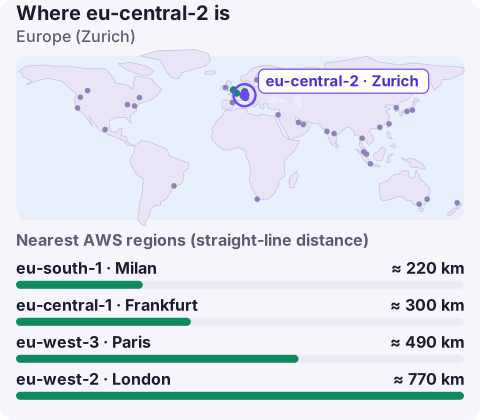
For disaster recovery, there is only one AWS region in Switzerland. If your requirement is "Swiss only", design for resilience across Availability Zones within Zurich and keep immutable backups in a separate account. If recovery data may leave the country, eu-central-1 in Frankfurt is the nearest large region, with eu-south-1 in Milan also close.
Before you migrate from Frankfurt
- Confirm each service you use exists in Zurich.
- Raise service quotas in the new region; they start at defaults.
- Re-create KMS keys there (keys are regional) and plan how encrypted snapshots and backups will be re-encrypted on copy.
- Turn on GuardDuty, Config and CloudTrail coverage for the region.
- Plan the cut-over: S3 bucket names are global, so new buckets need new names, and DNS TTLs should be lowered a day ahead.
Questions
Is eu-central-2 enabled by default?
No. Zurich is an opt-in region; enable it in the account settings or with aws account enable-region.
Where is eu-central-2?
In the Zurich area of Switzerland.
Is Switzerland in an EU region on AWS?
No. eu-central-2 is in Switzerland, which is outside the EU. The 'eu' prefix in the code is AWS's naming for European regions, not a statement about the European Union.
Opt-in regions are easy to forget when you're checking alarms from a phone. CloudConsole, a phone app for AWS, is built to show alarms and resources across all the regions you use.
About the app → · Download on the App Store