 CloudConsole
EC2 Spot instance pricing explained
Spot instances run on spare EC2 capacity at a price that AWS sets per instance type and Availability Zone and adjusts gradually with supply and demand; AWS advertises discounts of up to 90% off on-demand. You pay the Spot price in effect for the time the instance runs, billed per second, and AWS can reclaim the instance with a two-minute warning.
How the price is set
- Each instance type in each AZ has its own Spot price, published and changed gradually; there is no bidding.
- You can set a maximum price, but the default (the on-demand price) is usually best; a lower cap only increases interruptions.
- Spot prices are not in the AWS Price List API, so check them in the console's pricing history or with the CLI.
- Interruption frequency differs by instance type and Region; the Spot Instance Advisor publishes ranges.
aws ec2 describe-spot-price-history --instance-types m7i.large m7a.large m6i.large \
  --product-descriptions "Linux/UNIX" --start-time 2026-11-10T00:00:00 \
  --query 'SpotPriceHistory[].{az:AvailabilityZone,type:InstanceType,price:SpotPrice,at:Timestamp}' --output table
Illustrative savings
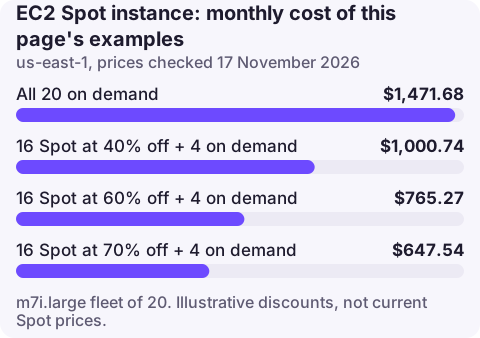
The on-demand m7i.large price in us-east-1 at the time of writing is $0.1008 per hour, $73.58 a month. Spot prices move, so the table shows what a fleet of 20 instances would cost at three illustrative discount levels, with 4 kept on demand as a stable base. These are not current Spot prices.
| Assumed Spot discount | 16 Spot instances | Fleet total with 4 on demand |
|---|---|---|
| 40% | $706.41 | $1,000.74 |
| 60% | $470.94 | $765.27 |
| 70% | $353.20 | $647.54 |
All 20 on demand would be 20 × $73.584 = $1,471.68. The arithmetic for the 60% row: 16 × $73.584 × 0.4 = $470.94, plus 4 × $73.584 = $294.34.
Where Spot fits
- Stateless web and API tiers behind a load balancer, with several instance types allowed.
- CI runners, batch, data processing and rendering that can retry.
- Kubernetes node groups with Karpenter or Cluster Autoscaler handling replacement; see EKS pricing.
- Not for single databases, stateful singletons or anything that cannot lose a node with two minutes' notice.
Costs and behaviour to know
- EBS volumes, public IPv4 addresses and data transfer are charged at normal rates; Spot discounts only the instance.
- Savings Plans and Reserved Instances do not apply to Spot usage.
- Diversifying across instance types and AZs with a price-capacity-optimised allocation strategy reduces interruptions far more than chasing the lowest price.
- Fargate Spot gives the same trade-off for containers; see Fargate pricing.
Handling interruptions
Watch for the interruption notice in instance metadata or through EventBridge, drain the instance from its load balancer or Kubernetes node pool, and let the Auto Scaling group or Karpenter replace it.
Seeing Spot on the bill
Spot usage shows in Cost Explorer under EC2-Instances with usage types such as SpotUsage:m7i.large (with an AZ suffix in some views). The Purchase option dimension separates Spot from On Demand, and the EC2 console's Spot Requests page has a savings summary for recent Spot usage.
Questions
How much cheaper is Spot than on-demand?
It varies by instance type, AZ and time. AWS advertises up to 90% off; check the current price with describe-spot-price-history or the console before planning on a number.
Do I bid for Spot instances?
No. Spot prices are set by AWS and change gradually. You can set a maximum price, but leaving it at the on-demand default is usually best.
Can Savings Plans be used with Spot?
No. Savings Plans and Reserved Instances apply to on-demand usage only; Spot already carries its own discount.
A wave of Spot interruptions can look like an outage. CloudConsole is being built to show alarms and recent changes on a phone, which helps tell them apart.
About the app → · Download on the App Store