 CloudConsole
Reserved Instances pricing explained
A Reserved Instance is a billing discount for a specific instance type (and, for EC2, platform and Region) in return for a one- or three-year term. For an m7i.large running Linux in us-east-1 at the time of writing, a one-year standard RI with no upfront payment costs $0.06668 per hour against $0.1008 on demand, and a three-year all-upfront RI costs $1,046 for the whole term.
Prices for an m7i.large (Linux, us-east-1)
| Option | Upfront | Hourly |
|---|---|---|
| On-demand | — | $0.1008 |
| 1-year standard, no upfront | $0 | $0.06668 |
| 1-year standard, partial upfront | $278 | $0.03175 |
| 1-year standard, all upfront | $545 | $0 |
| 1-year convertible, no upfront | $0 | $0.07406 |
| 3-year standard, all upfront | $1,046 | $0 |
From the AWS Price List API (Reserved terms) at the time of writing. Standard RIs can be modified (AZ, size within the family) and sold on the RI Marketplace; convertible RIs can be exchanged for other families or platforms but cost more.
Worked examples: one instance for a year
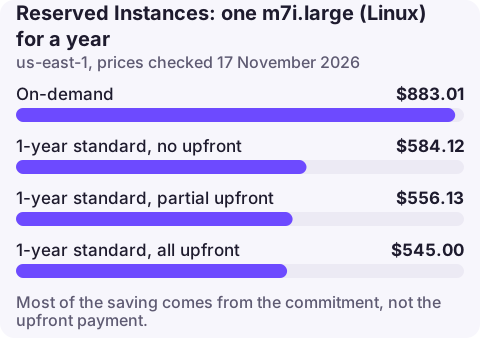
- On demand: 8,760 × $0.1008 = $883.01
- No upfront: 8,760 × $0.06668 = $584.12
- Partial upfront: $278 + 8,760 × $0.03175 = $556.13
- All upfront: $545.00
All upfront saves $338.01 on the year against on demand, but most of that saving comes from the commitment itself, not the upfront payment: no upfront already saves $298.89.
Three years. On demand for three years is 3 × $883.01 = $2,649.02; a three-year all-upfront RI is $1,046, a saving of $1,603.02, provided the instance runs the whole time.
Reserved Instances or Savings Plans?
For EC2, the one-year no-upfront EC2 Instance Savings Plan rate for an m7i.large ($0.06668) matches the standard RI, with more flexibility across sizes and operating systems, so most teams now buy Savings Plans for EC2; see Savings Plans pricing. Reservations still matter for services Savings Plans do not cover: RDS reserved instances, ElastiCache and OpenSearch reserved nodes, and Redshift reserved nodes, each with its own price list.
Rules that catch people out
- An RI is a discount, not an instance: if nothing matching runs in an hour, the reserved hour is wasted.
- Regional versus zonal: regional RIs float across AZs and sizes in a family (Linux), zonal RIs reserve capacity in one AZ.
- Platform matters: a Linux RI does not cover Windows or RHEL usage.
- RDS RIs are per engine and deployment: a Single-AZ reservation does not cover a Multi-AZ instance fully.
- Expiry: when the term ends, usage silently returns to on-demand prices.
Seeing reservations on the bill
Cost Explorer's RI utilisation and coverage reports show wasted reservations and uncovered usage. Upfront payments appear on the bill in the month of purchase; use amortised cost in Cost Explorer to spread them over the term. To list active EC2 reservations:
aws ec2 describe-reserved-instances --filters Name=state,Values=active \
  --query 'ReservedInstances[].{type:InstanceType,count:InstanceCount,end:End,offering:OfferingClass}' --output table
Questions
How much do Reserved Instances save?
For an m7i.large in us-east-1 at the time of writing, about 34% for a one-year no-upfront standard RI and about 61% for three years all upfront, if the instance runs continuously.
Which AWS services offer reserved pricing?
EC2, RDS, ElastiCache, OpenSearch Service, Redshift and some others such as DynamoDB reserved capacity. EC2 and Fargate are more often covered with Savings Plans.
Should I pay all upfront for a Reserved Instance?
Only if you have spare cash and certainty. Most of the discount comes with no upfront payment; all upfront adds a few more per cent.
Expiring reservations rarely trigger an alert. CloudConsole is being built to show costs on a phone, which makes a monthly glance easy.
About the app → · Download on the App Store