 CloudConsole
CloudWatch alarm for Amazon Cognito SignInThrottles
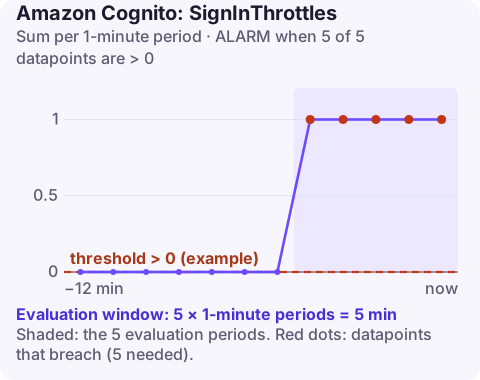
SignInThrottles counts user authentication requests that a Cognito user pool rejected because the request rate went over quota. AWS recommends an alarm on its Sum for each UserPool and UserPoolClient, firing when it exceeds your threshold for 5 of 5 one-minute periods; zero suits a steady workload.
Why sign-in throttling happens
Authentication calls such as InitiateAuth and the challenge responses that follow it count against the pool's authentication quota. When the combined rate goes over it, Cognito returns TooManyRequestsException and counts a sign-in throttle. Users see "something went wrong" at the login screen.
In practice, the quota is usually exceeded by one of these rather than by organic growth:
- Credential stuffing: bots trying leaked username and password lists. Throttles rise alongside failed sign-ins.
- Retry storms: after a brief outage, every client retries at once, often without backoff.
- Back-end services signing in as users on every request instead of caching tokens.
- Morning peaks on workforce apps where everyone logs in between 8:55 and 9:05.
Telling these apart decides the response: abuse needs blocking, retry storms need client fixes, and only genuine demand justifies a quota increase.
Recommended alarm settings
| Setting | Value |
|---|---|
| Namespace | AWS/Cognito |
| Metric | SignInThrottles |
| Dimensions | UserPool, UserPoolClient |
| Statistic | Sum |
| Period | 60 seconds |
| Datapoints to alarm | 5 |
| Evaluation periods | 5 |
| Comparison operator | GreaterThanThreshold |
| Threshold | Depends on your situation: 0 for steady load; set from history for bursty load |
Settings as published in the CloudWatch recommended alarms list.
Choosing a threshold
Start at 0. Then look at the last month of SignInThrottles beside SignInSuccesses:
- No throttles outside incidents: keep 0.
- Short daily bursts that clients absorb with retries: set the threshold just above the usual burst value, so only bigger or longer events alarm.
- Constant low-level throttling: do not tune it out. It means legitimate users are failing every day; fix the cause or raise the quota.
Treat missing data as notBreaching. Each app client reports separately, so alarm on the clients your users actually sign in through.
Create it
aws cloudwatch put-metric-alarm \
  --alarm-name userpool-web-signin-throttles \
  --namespace AWS/Cognito \
  --metric-name SignInThrottles \
  --dimensions Name=UserPool,Value=eu-west-2_AbCdEf123 Name=UserPoolClient,Value=1h2j3k4l5m6n7o8p9q0r1s2t3u \
  --statistic Sum \
  --period 60 \
  --evaluation-periods 5 \
  --datapoints-to-alarm 5 \
  --threshold 0 \
  --comparison-operator GreaterThanThreshold \
  --treat-missing-data notBreaching \
  --alarm-actions arn:aws:sns:eu-west-2:123456789012:ops-alerts \
  --region eu-west-2
When it fires
- Look at the shape. A vertical wall straight after an outage is a retry storm; it clears as clients back off. A steady plateau at an odd hour is more likely automated.
- Check for abuse. If the pool's threat protection features are enabled, review the risk events; otherwise look at sign-in sources in your application logs or WAF logs. Rate-based WAF rules on the login endpoint cut credential stuffing quickly.
- Find heavy internal callers. A service that calls
InitiateAuthper request should cache tokens until shortly before they expire. - Check the quota in Quotas in Amazon Cognito and request an increase if real demand has outgrown it.
Questions
What does SignInThrottles measure in Cognito?
The number of user authentication requests rejected for exceeding the user pool's request-rate quota in each period.
Do throttled sign-ins count as failed logins?
They are counted separately as throttles. The user never got as far as having their password checked.
Should the threshold be zero?
For a steady workload, yes. Raise it only if short, retried bursts are normal and harmless for your users.
Login failures generate support tickets fast, so knowing whether it is a bot attack or a retry storm matters. CloudConsole, a phone app for AWS, is built to show this alarm with sign-in success and throttle trends on a phone.
Did it start after a deploy? What changed? on the app’s alarm screen lists the deploys and configuration changes from the hour before the alarm fired.
About the app → · Download on the App Store