 CloudConsole
CloudWatch alarm for Amazon Cognito TokenRefreshThrottles
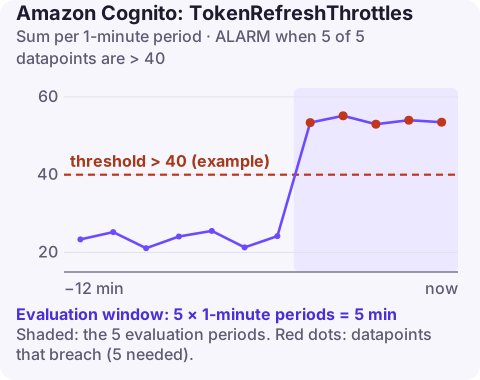
TokenRefreshThrottles counts requests to exchange a refresh token for new tokens that a Cognito user pool rejected for exceeding its rate quota. AWS suggests an alarm on the Sum per UserPool and UserPoolClient above a threshold you set from history, for 5 of 5 one-minute periods, because short, retried throttles are expected.
What drives token refresh volume
Every signed-in client periodically trades its refresh token for a fresh ID and access token. Volume is set by two things you control: how many sessions are active and how long access tokens last. Halve the access token validity and you roughly double the refresh rate for the same users.
Throttling usually starts after one of these:
- Access token validity shortened in the app client settings, for security reasons, without checking the rate impact (the minimum is five minutes).
- A client bug that refreshes on every API call or on every app resume, rather than when the token is close to expiry.
- Synchronised refreshes: a fleet of devices or services that all signed in at the same moment and refresh at the same moment.
- Genuine growth in concurrent sessions.
Recommended alarm settings
| Setting | Value |
|---|---|
| Namespace | AWS/Cognito |
| Metric | TokenRefreshThrottles |
| Dimensions | UserPool, UserPoolClient |
| Statistic | Sum |
| Period | 60 seconds |
| Datapoints to alarm | 5 |
| Evaluation periods | 5 |
| Comparison operator | GreaterThanThreshold |
| Threshold | Depends on your situation: above your normal, acceptable throttling level |
From AWS's recommended alarms page. Unlike sign-up and sign-in, AWS does not suggest zero here; a few throttled refreshes that are retried a moment later are invisible to users.
Setting the threshold
- Graph
TokenRefreshThrottlesandTokenRefreshSuccesses(Sum, one minute) for four weeks. - Find the typical peak of throttles on normal days, for example 15 a minute at the morning peak.
- Set the threshold comfortably above it, say 40, so the alarm only fires when throttling clearly exceeds the normal pattern.
- Revisit after changing token lifetimes or releasing a new client version.
Leave missing data as notBreaching.
Create it
# 40 is an example: set it above your normal peak of throttled refreshes
aws cloudwatch put-metric-alarm \
  --alarm-name userpool-mobile-refresh-throttles \
  --namespace AWS/Cognito \
  --metric-name TokenRefreshThrottles \
  --dimensions Name=UserPool,Value=eu-west-2_AbCdEf123 Name=UserPoolClient,Value=1h2j3k4l5m6n7o8p9q0r1s2t3u \
  --statistic Sum \
  --period 60 \
  --evaluation-periods 5 \
  --datapoints-to-alarm 5 \
  --threshold 40 \
  --comparison-operator GreaterThanThreshold \
  --treat-missing-data notBreaching \
  --alarm-actions arn:aws:sns:eu-west-2:123456789012:ops-alerts \
  --region eu-west-2
When it fires
- Check for a client release. A sudden step change in refresh volume that lines up with an app version rollout points to a refresh-on-every-call bug.
- Check app client settings for a recent change to access token validity:
aws cognito-idp describe-user-pool-client --user-pool-id eu-west-2_AbCdEf123 \ --client-id 1h2j3k4l5m6n7o8p9q0r1s2t3u \ --query "UserPoolClient.[AccessTokenValidity,IdTokenValidity,TokenValidityUnits]" - Make clients refresh lazily, a short time before expiry and with jitter, and back off on
TooManyRequestsException. - If real session growth is the cause, request a quota increase for the relevant category; see Quotas in Amazon Cognito.
Questions
Why are my Cognito token refreshes throttled?
Usually because clients refresh far more often than needed, access tokens were made very short-lived, or many sessions refresh at the same moment.
Does shortening access token validity increase Cognito traffic?
Yes. Every active session refreshes once per token lifetime, so a shorter lifetime means proportionally more refresh requests.
Should TokenRefreshThrottles alarm at zero?
Usually not. Occasional throttled refreshes are retried without users noticing, so set the threshold above your normal level.
Refresh throttling usually follows a client release and grows as users update. CloudConsole, a phone app for AWS, is built to show this alarm with its trend so you can see whether it is getting better or worse.
Did it start after a deploy? What changed? on the app’s alarm screen lists the deploys and configuration changes from the hour before the alarm fired.
About the app → · Download on the App Store