 CloudConsole
CloudWatch alarm for Amazon Cognito SignUpThrottles
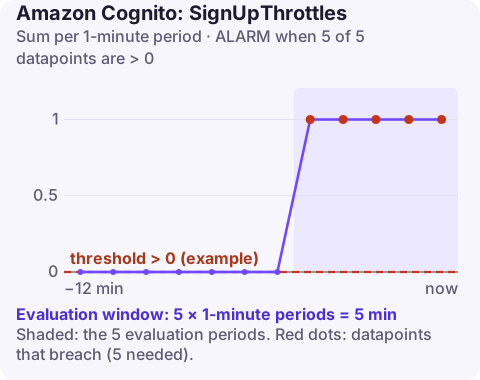
SignUpThrottles counts sign-up requests that a Cognito user pool rejected for exceeding its request-rate quota. AWS recommends alarming on its Sum per UserPool and UserPoolClient when it is above your threshold for 5 consecutive one-minute periods; for steady workloads the threshold should be 0.
What the metric counts
Each user pool has request-rate quotas, grouped by category of operation. User creation calls, which include SignUp, share one of those budgets. When the rate is exceeded, Cognito rejects the call with a TooManyRequestsException and adds one to SignUpThrottles. The companion metric SignUpSuccesses counts the ones that got through.
Sign-up is the operation where throttling hurts most: a throttled user who sees an error may simply leave. It also tends to happen at predictable moments, such as a marketing email, a launch or a TV slot, and at unpredictable ones, such as a bot farm creating accounts.
Recommended alarm settings
| Setting | Value |
|---|---|
| Namespace | AWS/Cognito |
| Metric | SignUpThrottles |
| Dimensions | UserPool, UserPoolClient |
| Statistic | Sum |
| Period | 60 seconds |
| Datapoints to alarm | 5 |
| Evaluation periods | 5 |
| Comparison operator | GreaterThanThreshold |
| Threshold | Depends on your situation: 0 for steady traffic; tune for bursty traffic |
Settings from the CloudWatch recommended alarms page. With a threshold of 0 and five-of-five evaluation, the alarm fires only when sign-ups are throttled every minute for five minutes, which is sustained, not incidental.
Choosing a threshold for bursty sign-ups
- Chart
SignUpThrottlesandSignUpSuccesses(Sum, one minute) over the last campaign or launch. - If throttles only appear during known bursts and your client retries them successfully, set the threshold just above the burst-time level so routine campaigns stay quiet.
- If throttles appear outside bursts, keep 0: you are under-provisioned for normal traffic.
- A sudden throttle spike with no campaign behind it is worth investigating as abuse, so do not tune it away.
Treat missing data as notBreaching.
Create it
aws cloudwatch put-metric-alarm \
  --alarm-name userpool-signup-throttles \
  --namespace AWS/Cognito \
  --metric-name SignUpThrottles \
  --dimensions Name=UserPool,Value=eu-west-2_AbCdEf123 Name=UserPoolClient,Value=1h2j3k4l5m6n7o8p9q0r1s2t3u \
  --statistic Sum \
  --period 60 \
  --evaluation-periods 5 \
  --datapoints-to-alarm 5 \
  --threshold 0 \
  --comparison-operator GreaterThanThreshold \
  --treat-missing-data notBreaching \
  --alarm-actions arn:aws:sns:eu-west-2:123456789012:ops-alerts \
  --region eu-west-2
UserPoolClient is the app client ID. Each app client of a pool reports separately, so a pool used by a web and a mobile client needs an alarm per client.
When it fires
- Is the traffic real? Look at sign-up sources: many sign-ups from a small set of IPs, disposable email domains or a single user agent suggest bots. Put AWS WAF in front of the sign-up path or require a challenge.
- Are clients retrying sensibly? Retries without backoff turn a short burst into a long one. Make sure the SDK or your code uses exponential backoff with jitter.
- Is the quota simply too low? Compare the peak rate with the quota for the user-creation category in Quotas in Amazon Cognito, and request an increase through Service Quotas if legitimate demand exceeds it.
- For planned events, request the increase before the event, not during it.
Questions
What error does a throttled Cognito sign-up return?
TooManyRequestsException. The SDKs retry it, but a sustained burst still reaches users as a failed sign-up.
Should my app retry a throttled sign-up?
Yes, with exponential backoff and jitter, and without making the user re-enter the form. Immediate tight retries make throttling worse for everyone.
How do I raise the Cognito sign-up limit?
Request an increase for the relevant user pool quota category through Service Quotas.
Sign-up throttling during a launch costs users you may never get back. CloudConsole, a phone app for AWS, is built to show this alarm and the success-versus-throttle graph on a phone while the campaign is running.
Did it start after a deploy? What changed? on the app’s alarm screen lists the deploys and configuration changes from the hour before the alarm fired.
About the app → · Download on the App Store