 CloudConsole
AWS Free Tier explained
New AWS customers get $100 in Free Tier credits at sign-up and can earn up to $100 more by completing activities, and choose between a Free plan (no charges, up to 6 months or until the credits run out) and a Paid plan (pay-as-you-go beyond the credits). Separately, over 30 services have always-free monthly allowances, such as 1 million Lambda requests and 25 GB of DynamoDB storage, for new and existing customers.
How the Free Tier works now
The Free Tier is now built around credits rather than a list of 12-month allowances for new accounts:
- $100 in credits when you create an account.
- Up to $100 more for completing activities listed in the Explore AWS widget on Console Home, within the first 6 months.
- Always-free offers on over 30 services, available to all customers, new and existing.
- Short-term trials of selected services, available on the Paid plan.
Usage beyond an always-free limit, or on a service without a free offer, is paid from the credits first. Credits are only for new customers: anyone who has, or has had, an AWS account is not eligible. If your account predates the credit model, the Free Tier page in the Billing and Cost Management console shows which offers apply to it.
Free plan or Paid plan
| Free plan | Paid plan | |
|---|---|---|
| Credits | $100 at sign-up, up to $100 more | $100 at sign-up, up to $100 more |
| Charges | None | Pay-as-you-go beyond the credits |
| Services | A subset; no Savings Plans, Reserved Instances or services that would use up the credits at once | All services and features |
| Ends | After 6 months or when credits run out, whichever is first | Does not end |
| Short-term trials | No | Yes |
When a Free plan ends, AWS closes or suspends the account and keeps its data for 90 days; upgrading to the Paid plan within that window restores access. You can upgrade at any time but cannot move back to the Free plan. Joining AWS Organizations or setting up Control Tower upgrades the account automatically. AWS's FAQ states credit expiry both as 6 months from account creation and, for credits carried into a Paid plan, 12 months; the Credits page in your account shows the actual expiry date.
Always-free allowances worth knowing
These monthly allowances apply to every account, every month, and appear in the AWS Price List as free tiers:
| Service | Free each month |
|---|---|
| Lambda | 1 million requests and 400,000 GB-seconds |
| DynamoDB | 25 GB of storage, 25 WCU and 25 RCU of provisioned capacity |
| SQS / SNS | 1 million requests each |
| CloudFront | 1 TB of data transfer out and 10 million requests |
| Data transfer out to the internet | 100 GB, across all services |
| KMS | 20,000 requests |
| EventBridge Scheduler | 14 million invocations |
Beyond these limits standard prices apply; see Lambda pricing and DynamoDB pricing for worked examples. EC2, RDS and similar instance-based services are not always free: on a new account they are paid from the credits.
Check whether a function stays inside the free allowance with the Lambda cost calculator.
How fast credits go
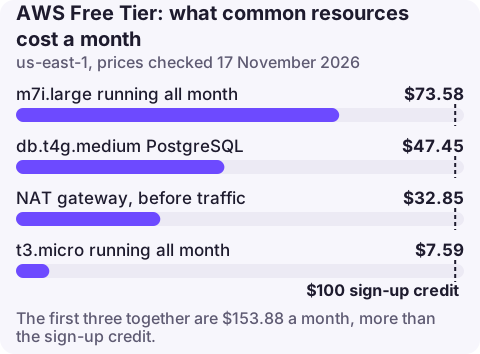
Credits are spent at normal prices, so it helps to know what common resources cost in us-east-1 at the time of writing. An m7i.large left running all month is about $73.58, a NAT gateway $32.85 before traffic, and a db.t4g.medium PostgreSQL instance $47.45. Those three alone use $153.88 a month, more than the sign-up credit in under a month. A t3.micro is about $7.59 a month, and Lambda, DynamoDB on demand and S3 at small scale often stay inside always-free limits.
Avoiding surprise charges
- Stay on the Free plan while experimenting if you cannot risk any charge; it cannot bill you.
- On the Paid plan, set a monthly spend limit (the FAQ says from $20) or an AWS Budget with email alerts; see how to set up a billing alarm.
- Check the Free Tier page in the Billing console, which shows usage against each free limit for the month.
- Delete NAT gateways, load balancers, Elastic IPs and databases after a tutorial; they bill by the hour even when idle.
- Watch Regions: resources left in a Region you rarely open keep consuming credits.
Questions
How much is the AWS Free Tier worth?
New customers get $100 in credits at sign-up and can earn up to $100 more, plus always-free monthly allowances on over 30 services.
What happens after the AWS Free Tier ends?
A Free plan account is closed when the plan ends after 6 months or when credits run out; data is kept for 90 days, during which upgrading to the Paid plan restores access. Paid plan accounts continue with pay-as-you-go pricing.
Is EC2 free on the AWS Free Tier?
EC2 usage on a new account is paid from the Free Tier credits rather than being free in itself. Always-free allowances cover services such as Lambda, DynamoDB, SQS and SNS.
Can I get the AWS Free Tier on a second account?
No. Free Tier credits and the Free plan are only for new customers who have not had an AWS account before.
Knowing when credits run low matters most in the last weeks of a Free plan. CloudConsole is being built to show costs and alarms on a phone.
About the app → · Download on the App Store