 CloudConsole
How to set up an AWS billing alert
The simplest billing alert is an AWS Budget: in Billing and Cost Management, create a monthly cost budget with an amount and email alerts at, say, 80% of actual spend and 100% of forecast spend. The older alternative is a CloudWatch alarm on the EstimatedCharges metric, which only exists in us-east-1 and only after you enable billing alerts in billing preferences.
Budgets or CloudWatch?
| AWS Budgets | CloudWatch billing alarm | |
|---|---|---|
| Alerts on forecast spend | Yes | No, only charges so far |
| Filter by service, tag, account | Yes | Per service via the ServiceName dimension, no tags |
| Where it lives | Billing console, global | us-east-1 only |
| Notification | Email or SNS directly | SNS topic |
Use Budgets unless you already run everything through CloudWatch alarms. On top of either, AWS Cost Anomaly Detection can flag unusual daily spend without a fixed threshold, and the free tier usage alerts in billing preferences warn as you near free tier limits.
Create a budget in the console
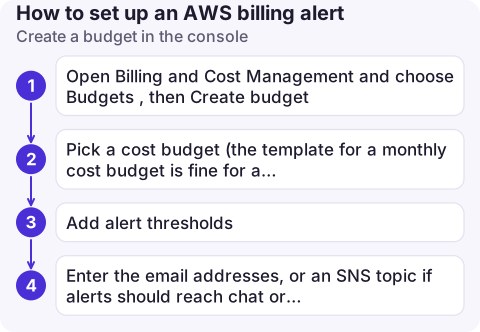
- Open Billing and Cost Management and choose Budgets, then Create budget.
- Pick a cost budget (the template for a monthly cost budget is fine for a first alert) and enter the amount.
- Add alert thresholds. A good starting set: actual cost at 80%, actual at 100%, forecast at 100%.
- Enter the email addresses, or an SNS topic if alerts should reach chat or paging tools.
Create it with the CLI
cat > budget.json <<'EOF'
{"BudgetName": "monthly-total", "BudgetType": "COST", "TimeUnit": "MONTHLY",
 "BudgetLimit": {"Amount": "200", "Unit": "USD"}}
EOF
cat > notify.json <<'EOF'
[{"Notification": {"NotificationType": "ACTUAL", "ComparisonOperator": "GREATER_THAN",
                   "Threshold": 80, "ThresholdType": "PERCENTAGE"},
  "Subscribers": [{"SubscriptionType": "EMAIL", "Address": "[email protected]"}]},
 {"Notification": {"NotificationType": "FORECASTED", "ComparisonOperator": "GREATER_THAN",
                   "Threshold": 100, "ThresholdType": "PERCENTAGE"},
  "Subscribers": [{"SubscriptionType": "EMAIL", "Address": "[email protected]"}]}]
EOF
aws budgets create-budget --account-id 123456789012 \
  --budget file://budget.json \
  --notifications-with-subscribers file://notify.json
The CloudWatch route, after enabling billing alerts in billing preferences:
aws cloudwatch put-metric-alarm --region us-east-1 \
  --alarm-name billing-over-200-usd \
  --namespace AWS/Billing --metric-name EstimatedCharges \
  --dimensions Name=Currency,Value=USD \
  --statistic Maximum --period 21600 --evaluation-periods 1 \
  --threshold 200 --comparison-operator GreaterThanThreshold \
  --alarm-actions arn:aws:sns:us-east-1:123456789012:billing-alerts
EstimatedCharges is month-to-date and resets at the start of each month, so the threshold is a monthly figure.
Why billing alerts don't fire
- Email subscription never confirmed. SNS email subscriptions stay pending until someone clicks the confirmation link.
- Alarm created outside us-east-1. There is no billing data in other Regions; the alarm sits in INSUFFICIENT_DATA.
- Billing alerts not enabled. Without the billing preference, the EstimatedCharges metric is never published.
- Expecting real-time. Billing data refreshes a few times a day. A runaway resource can cost a lot before the first alert, so treat alerts as a safety net, not a brake.
- Member accounts. In an organisation, the management account sees consolidated data; budgets in a member account cover that account.
Good practice
- Have at least one forecast-based alert: it warns you early in the month instead of after the money is spent.
- Send alerts to a shared address or channel, not one person's inbox.
- On a free tier account, set a small budget (a few dollars) so the first paid usage is noticed. Budgets warn; they do not stop resources, though budget actions can apply an IAM or SCP policy if you configure them.
Questions
How do I get an alert before I exceed the AWS free tier?
Turn on free tier usage alerts in billing preferences and create a small monthly cost budget, for example 1 or 5 USD, with an actual-spend alert.
Why is my CloudWatch billing alarm stuck in INSUFFICIENT_DATA?
Either billing alerts are not enabled in billing preferences, or the alarm is in a Region other than us-east-1, where the AWS/Billing metrics are published.
Can an AWS budget stop my resources automatically?
Not by itself. Budget actions can apply an IAM policy or SCP, or stop specific EC2 or RDS instances you choose, when a threshold is crossed; otherwise budgets only notify.

A budget email is easy to miss in a busy inbox. CloudConsole, a phone app for AWS, is built to put cost alerts and the spend behind them on your phone.
About the app → · Download on the App Store