 CloudConsole
AWS Budgets vs CloudWatch billing alarms
Use AWS Budgets for most cost alerts: monitoring is free, it can alert on forecasted as well as actual spend, and it filters by service, account, tag or usage type. A CloudWatch billing alarm watches the EstimatedCharges metric in us-east-1 and fires only when actual charges cross a threshold; it is simple and plugs into existing alarm routing. Many teams run a budget with a forecast alert plus one billing alarm as a backstop.
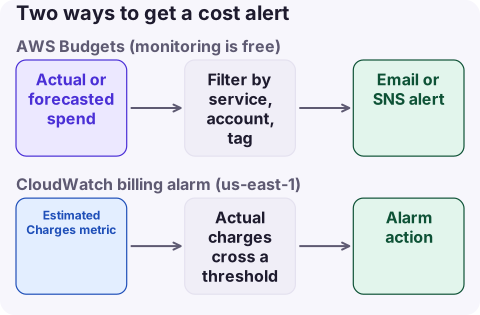
Side by side
| AWS Budgets | CloudWatch billing alarm | |
|---|---|---|
| Forecast alerts | Yes, before the money is spent | No; actual estimated charges only |
| Scope | Filters by service, linked account, tag, usage type, Region and more | Total, or per service or linked account via metric dimensions |
| Other budget types | Usage, RI and Savings Plans utilisation and coverage | None |
| Data freshness | Updated up to three times a day | Metric published several times a day |
| Actions | Can apply IAM or SCP policies or stop instances | Any alarm action (SNS, and from there chat, paging) |
| Cost | Monitoring and notifications free; first two action-enabled budgets free, then $0.10 a day each; reports $0.01 each | A standard alarm, within the 10 free alarm metrics |
| Where | Billing and Cost Management console | CloudWatch in us-east-1 only, after enabling billing alerts |
Prices from the AWS Budgets and CloudWatch pricing pages at the time of writing.
Create a budget with a forecast alert
aws budgets create-budget --account-id 123456789012 \
  --budget '{"BudgetName":"monthly-total","BudgetLimit":{"Amount":"500","Unit":"USD"},"TimeUnit":"MONTHLY","BudgetType":"COST"}' \
  --notifications-with-subscribers '[
    {"Notification":{"NotificationType":"FORECASTED","ComparisonOperator":"GREATER_THAN","Threshold":100,"ThresholdType":"PERCENTAGE"},
     "Subscribers":[{"SubscriptionType":"EMAIL","Address":"[email protected]"}]},
    {"Notification":{"NotificationType":"ACTUAL","ComparisonOperator":"GREATER_THAN","Threshold":80,"ThresholdType":"PERCENTAGE"},
     "Subscribers":[{"SubscriptionType":"EMAIL","Address":"[email protected]"}]}]'
The forecast alert fires when AWS projects you will exceed the full budget; the actual alert fires at 80% spent. Swap email for an SNS topic to route into chat.
Create a billing alarm
First enable Receive CloudWatch billing alerts in Billing preferences (management account for an organisation). Then, in us-east-1:
aws cloudwatch put-metric-alarm --region us-east-1 \
  --alarm-name billing-over-500-usd \
  --namespace AWS/Billing --metric-name EstimatedCharges \
  --dimensions Name=Currency,Value=USD \
  --statistic Maximum --period 21600 --evaluation-periods 1 \
  --threshold 500 --comparison-operator GreaterThanOrEqualToThreshold \
  --alarm-actions arn:aws:sns:us-east-1:123456789012:billing-alerts
EstimatedCharges accumulates through the month and resets at the start of the next, so a fixed threshold catches month-to-date overspend, not a sudden daily jump. If charges are already over the threshold when you create it, the alarm goes straight to ALARM. Full steps are on setting up a billing alarm.
Which to use
- One account, simple guardrail: a monthly cost budget with a forecast alert.
- Teams or projects: budgets filtered by cost allocation tag or linked account, each with its own subscribers.
- Alerts must go through your existing alarm pipeline: a billing alarm on
EstimatedCharges. - Catching unusual daily spikes: neither is ideal; add Cost Anomaly Detection.
What not to do: rely on a budget action to "cap" spend. Budgets data lags by hours, and actions stop only what they are configured to stop; AWS has no hard spending cap.
Questions
Do AWS Budgets cost money?
Monitoring budgets and receiving notifications is free. Action-enabled budgets beyond the first two cost $0.10 a day each, and budget reports cost $0.01 each.
Why can I only create billing alarms in us-east-1?
Billing metric data is stored in US East (N. Virginia) and represents worldwide charges, so the alarm must be created there.
Can AWS Budgets stop spending automatically?
Budget actions can apply IAM or SCP policies or stop specific EC2 and RDS instances, but data lags by hours and there is no hard cap on charges.
Budget and billing alerts land in an inbox that is easy to ignore at a weekend. CloudConsole, a phone app for AWS, is built to show costs by service alongside alarms on your phone, so an alert comes with the breakdown that explains it.
About the app → · Download on the App Store