 CloudConsole
AWS CloudTrail pricing explained
The first copy of management events in each Region is free. Additional copies cost $2.00 per 100,000 management events, data events (S3 object and Lambda invoke activity) cost $0.10 per 100,000, and CloudTrail Insights costs $0.35 per 100,000 events analysed, in us-east-1 at the time of writing. S3 storage for the log files is billed separately.
Pricing dimensions
| Dimension | Unit | us-east-1 price |
|---|---|---|
| First copy of management events per Region | event | Free |
| Additional copies of management events | 100,000 events | $2.00 |
| Data events | 100,000 events | $0.10 |
| Network activity events | 100,000 events | $0.10 |
| Insights events analysed | 100,000 events | $0.35 |
| CloudTrail Lake ingestion, first 5 TB | GB | $2.50 |
| CloudTrail Lake queries | GB scanned | $0.005 |
From the AWS Price List API at the time of writing. Lake ingestion gets cheaper at higher volumes and has one-year-retention pricing options.
Worked examples
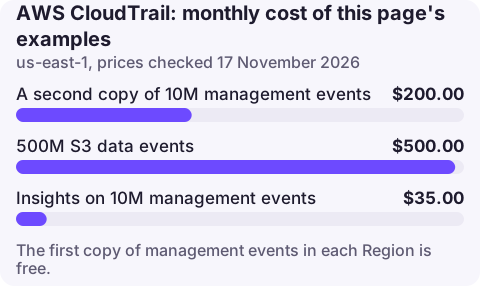
1. A second trail. An account generating 10 million management events a month, with an organisation trail and a separate account trail both logging them: the second copy costs 100 × $2.00 = $200.00 a month.
2. S3 data events on a busy bucket. 500 million object operations: 5,000 × $0.10 = $500.00 a month. Use advanced event selectors to log only writes, or only the buckets that need it.
3. Insights. Analysing 10 million management events for unusual API rates: 100 × $0.35 = $35.00.
Logging data events selectively
Data events are where CloudTrail bills grow, and advanced event selectors are the control. In the S3 example above, if only one operation in ten is a write, logging just PutObject and DeleteObject records 50 million events: 500 × $0.10 = $50.00 a month instead of $500.00. Selectors can also match specific bucket ARNs or key prefixes, and Lambda data events can be limited to the functions you need to audit. Keep read events for buckets that hold sensitive data, where knowing who downloaded what is the point of the trail.
What is free
- Event history: 90 days of management events in the console and
lookup-eventsAPI, with no trail needed. - One trail per Region delivering management events to S3 (you pay only for the S3 storage).
- Read-only and write management events are both included in that first copy.
Easy-to-miss charges
- Duplicate trails from teams or third-party tools each creating their own.
- Data events for all S3 buckets including the bucket that stores the trail itself, which logs its own writes.
- CloudWatch Logs delivery of a trail, billed at Logs ingestion rates.
- KMS-encrypted trails calling KMS for every log file.
- Lake event data stores ingesting all management events in addition to the trail.
Seeing CloudTrail cost
Group Cost Explorer by Usage type under CloudTrail: USE1-PaidEventsRecorded is additional management
event copies and USE1-DataEventsRecorded data events. To list trails and whether they are organisation
trails:
aws cloudtrail describe-trails --query 'trailList[].{name:Name,org:IsOrganizationTrail,multi:IsMultiRegionTrail}' --output tableCutting it: cutting CloudTrail cost.
Questions
Does CloudTrail cost money?
The first copy of management events in each Region is free. Additional trails, data events, Insights and CloudTrail Lake are charged.
How much do CloudTrail data events cost?
$0.10 per 100,000 data events in us-east-1 at the time of writing.
Why did my CloudTrail cost increase?
Usually a new trail duplicating management events or data events enabled on busy S3 buckets or Lambda functions. Check Usage type in Cost Explorer.
CloudTrail is where you look after an alarm to see who changed what. CloudConsole is being built to show recent changes next to alarms on a phone.
About the app → · Download on the App Store