 CloudConsole
AWS KMS key rotation settings
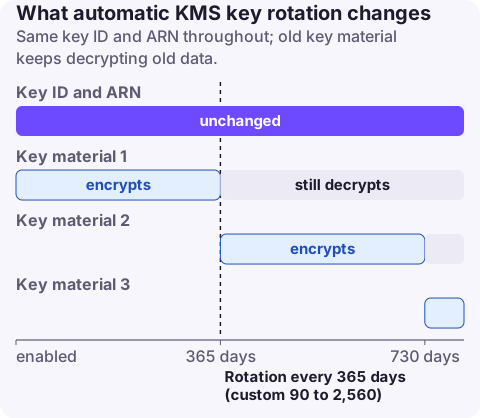
Automatic rotation is off by default for customer managed KMS keys; once enabled, KMS generates new key material every 365 days, or on a custom period of 90 to 2,560 days. AWS managed keys rotate every year automatically. You can also rotate on demand at any time without changing the schedule. Rotation keeps the same key ID and ARN, and old material stays available to decrypt existing data, so nothing needs re-encrypting or redeploying. It applies only to symmetric keys with KMS-generated material; asymmetric, HMAC and custom key store keys need manual rotation.
Rotation options
| Option | Applies to | Schedule | Notes |
|---|---|---|---|
| Automatic rotation | Customer managed symmetric keys with AWS_KMS origin | Every 365 days by default, or 90 to 2,560 days | Off until you enable it |
AWS managed keys (aws/s3, aws/ebs, ...) | AWS managed keys | Every year | Always on, can't be changed |
| On-demand rotation | Symmetric keys with KMS or imported (EXTERNAL) material | When you call it | Doesn't change the automatic schedule; quota of 25 on-demand rotations per key |
| Manual rotation | Asymmetric, HMAC, custom key store keys | Your process | Create a new key, move the alias |
What rotation changes: only the current key material used for new encryption. The key ID, ARN, aliases, key policy and grants stay the same. KMS keeps every previous version of the material and picks the right one to decrypt, so applications and services need no changes.
What rotation doesn't do: it doesn't re-encrypt existing data, doesn't rotate data keys that were generated earlier (envelope encryption), and doesn't help if a data key has leaked.
Cost
Each of the first two rotations adds a monthly charge for the extra key material on top of the key's base charge; the increase is capped at the second rotation, so later rotations add nothing. Rotated key versions don't count against the key quota. In Cost Explorer, key charges appear under usage type <Region>-KMS-Keys.
Recommended settings
| Situation | Setting |
|---|---|
| Most customer managed keys | Enable automatic rotation, default 365 days |
| Compliance asks for more frequent rotation | Custom period, e.g. 90 or 180 days |
| Suspected exposure of key material use | On-demand rotation now, plus investigate CloudTrail |
| Keys with imported material | On-demand rotation with new imported material |
| Signing or HMAC keys | Manual rotation: new key, update alias, keep the old key for verification |
Enable and check it
# Turn on yearly rotation, or set a custom period
aws kms enable-key-rotation --key-id 1234abcd-12ab-34cd-56ef-1234567890ab
aws kms enable-key-rotation --key-id 1234abcd-12ab-34cd-56ef-1234567890ab --rotation-period-in-days 180

# Status, period and next rotation date
aws kms get-key-rotation-status --key-id 1234abcd-12ab-34cd-56ef-1234567890ab

# Rotate now and list past rotations
aws kms rotate-key-on-demand --key-id 1234abcd-12ab-34cd-56ef-1234567890ab
aws kms list-key-rotations --key-id 1234abcd-12ab-34cd-56ef-1234567890ab
CloudFormation: EnableKeyRotation: true and optional RotationPeriodInDays (default 365) on AWS::KMS::Key. Terraform: enable_key_rotation = true and rotation_period_in_days (90 to 2,560) on aws_kms_key. The kms:RotationPeriodInDays condition key can enforce a period in policies.
Audit
- AWS Config and Security Hub include controls that flag customer managed keys without rotation enabled.
- CloudTrail records
RotateKeyevents when automatic rotation happens andRotateKeyOnDemandfor manual calls. - List keys without rotation:
for k in $(aws kms list-keys --query 'Keys[].KeyId' --output text); do
  aws kms get-key-rotation-status --key-id "$k" --query "[KeyId,KeyRotationEnabled]" --output text 2>/dev/null
done
AWS managed and asymmetric keys report rotation differently or return errors here; filter on KeyManager=CUSTOMER with describe-key for a precise list.
Questions
How often does AWS KMS rotate keys?
Every 365 days by default once automatic rotation is enabled on a customer managed key, or on a custom period from 90 to 2,560 days. AWS managed keys rotate yearly.
Does KMS key rotation re-encrypt my data?
No. Existing data stays encrypted under the old key material, which KMS keeps for decryption. Only new encryption uses the new material.
Does KMS key rotation cost extra?
Yes, a little: the first and second rotations each add to the key's monthly charge, and later rotations add nothing more. See the KMS pricing page for amounts.
Key rotation is a compliance setting more than an incident cause, but key policy changes and disabled keys can break everything. CloudConsole, a phone app for AWS, is being built to show security findings and alarms on your phone.
About the app → · Download on the App Store