 CloudConsole
S3 Block Public Access settings explained
S3 Block Public Access has four settings: BlockPublicAcls and IgnorePublicAcls deal with ACLs, BlockPublicPolicy and RestrictPublicBuckets with bucket and access point policies. They can be set on an organization, an account, a bucket or an access point, and S3 applies the most restrictive combination. New buckets already have all four turned on. The safe default is all four on at account (or organization) level, with public content served through CloudFront rather than public buckets.
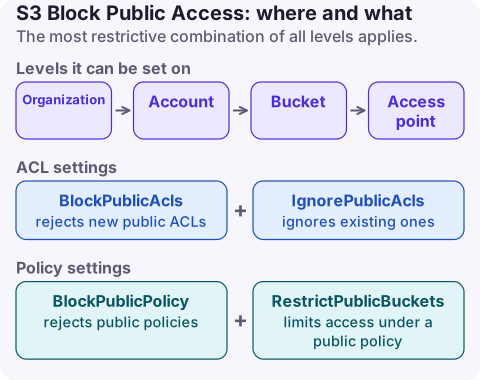
The four settings
| Setting | When TRUE | Affects existing config? |
|---|---|---|
BlockPublicAcls | Rejects PutBucketAcl, PutObjectAcl and PutObject calls that set a public ACL (and public-ACL bucket creation at account level) | No, existing ACLs stay |
IgnorePublicAcls | S3 ignores every public ACL on the bucket and its objects | Yes, public ACLs stop granting access |
BlockPublicPolicy | Rejects PutBucketPolicy and access point policies that grant public access | No, existing policies stay |
RestrictPublicBuckets | Limits access under a public policy to AWS service principals and principals in the bucket owner's account | Yes, public-policy access stops for everyone else |
So the two Block settings stop new public grants and the Ignore/Restrict settings neutralise existing ones. You need all four to be sure nothing is public.
Levels and precedence
| Level | Scope | Notes |
|---|---|---|
| Organization (AWS Organizations policy) | Selected member accounts | All four together (all or none); overrides account settings |
| Account | All buckets and access points in the account, all Regions | Set in the S3 console's Block Public Access settings for this account, or s3control |
| Bucket | One bucket and its access points | New buckets have all four on by default |
| Access point | Requests through that access point | Can be stricter than the bucket |
S3 evaluates every applicable level and enforces the most restrictive result. A bucket with BPA off is still protected if the account or organization setting is on.
Recommended setup
- Account level: all four on in every account. Apply through an organization policy if you use AWS Organizations, so new accounts are covered.
- Static websites and public downloads: keep the bucket private and serve it with CloudFront and Origin Access Control; see CloudFront S3 access denied for the policy that needs.
- A bucket that genuinely must be public: isolate it in a dedicated account with account-level BPA relaxed only there, and document why.
- Use IAM Access Analyzer for S3 and find public buckets to audit regularly.
Change it
# Account level (all buckets in the account)
aws s3control put-public-access-block --account-id 123456789012 \
  --public-access-block-configuration BlockPublicAcls=true,IgnorePublicAcls=true,BlockPublicPolicy=true,RestrictPublicBuckets=true

# One bucket
aws s3api put-public-access-block --bucket my-bucket \
  --public-access-block-configuration BlockPublicAcls=true,IgnorePublicAcls=true,BlockPublicPolicy=true,RestrictPublicBuckets=true

# Check what applies
aws s3control get-public-access-block --account-id 123456789012
aws s3api get-public-access-block --bucket my-bucket
CloudFormation: PublicAccessBlockConfiguration on AWS::S3::Bucket with BlockPublicAcls, BlockPublicPolicy, IgnorePublicAcls, RestrictPublicBuckets. Terraform: aws_s3_bucket_public_access_block for a bucket and aws_s3_account_public_access_block for the account, with block_public_acls, block_public_policy, ignore_public_acls and restrict_public_buckets.
Rolling it out without breaking things
Turning on the Ignore and Restrict settings removes access that works today. Before enabling them on an existing account:
- List buckets with public policies or ACLs (Access Analyzer, or
get-bucket-policy-statusper bucket). - Move each legitimate public use to CloudFront or presigned URLs.
- Enable the two Block settings first (no impact on existing access), then Ignore and Restrict.
Symptoms after enabling: anonymous requests to formerly public objects return 403 AccessDenied, and PutBucketPolicy with a public statement fails with AccessDenied, which can break IaC that tries to make a bucket public; see S3 access denied.
Questions
Is S3 Block Public Access enabled by default?
Yes for new buckets: all four settings are on unless you turn them off when creating the bucket. Account-level settings depend on your account and organization configuration.
What is the difference between BlockPublicAcls and IgnorePublicAcls?
BlockPublicAcls rejects requests that would add a public ACL. IgnorePublicAcls makes S3 disregard public ACLs that already exist, so they grant no access.
Should S3 Block Public Access be enabled at account level?
Yes in almost every case. Serve public content through CloudFront with Origin Access Control instead of a public bucket.
A bucket made public by mistake needs attention within minutes, not hours. CloudConsole, a phone app for AWS, is being built to show security alarms and findings on your phone.
About the app → · Download on the App Store