 CloudConsole
IAM limits: policy size, roles and attached policies
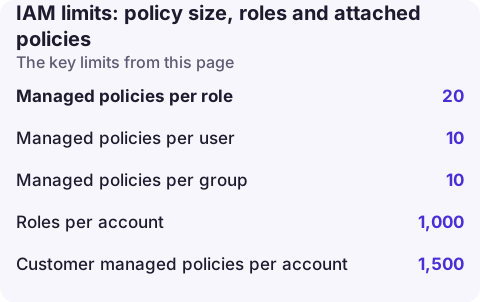
A customer managed IAM policy can be at most 6,144 characters (whitespace not counted), and all inline policies on a role together at most 10,240 characters (5,120 for a group, 2,048 for a user). By default a role can have 20 managed policies attached, raisable to 25; an account can have 1,000 roles (up to 10,000) and 1,500 customer managed policies (up to 10,000). Role trust policies default to 2,048 characters, raisable to 8,192. Policy size limits themselves can't be raised.
Quotas you can raise
Requests up to the maximum are approved automatically within minutes. IAM is a global service, so request increases in the US East (N. Virginia) Region in Service Quotas.
| Quota | Default | Maximum |
|---|---|---|
| Managed policies per role | 20 | 25 |
| Managed policies per user | 10 | 20 |
| Managed policies per group | 10 | 10 |
| Roles per account | 1,000 | 10,000 |
| Customer managed policies per account | 1,500 | 10,000 |
| Role trust policy length | 2,048 characters | 8,192 characters |
| Instance profiles per account | 1,000 | 10,000 |
| Groups per account | 300 | 500 |
| OpenID Connect providers per account | 100 | 700 |
| Server certificates per account | 20 | 20 |
Limits you cannot raise
| Limit | Value |
|---|---|
| Customer managed policy size | 6,144 characters |
| Inline policies on a role (combined) | 10,240 characters |
| Inline policies on a group (combined) | 5,120 characters |
| Inline policies on a user (combined) | 2,048 characters |
| Role name | 64 characters (path plus name must also be 64 or fewer for console role switching) |
| Session policy (JSON plus managed ARNs) | 2,048 characters; up to 10 managed policy ARNs |
| Session tags | 50 per session |
| Role maximum session duration | 1 to 12 hours |
IAM doesn't count whitespace towards the size limits, so pretty-printing doesn't hurt you. Everything else does: long ARNs, repeated action lists and condition blocks.
The errors you'll see
LimitExceeded: Cannot exceed quota for PolicySize: 6144
LimitExceeded: Cannot exceed quota for PoliciesPerRole: 20
LimitExceeded: Cannot exceed quota for ACLSizePerRole: 2048
The last one refers to the trust policy. In CloudFormation these appear as a failed AWS::IAM::ManagedPolicy or AWS::IAM::Role resource and the stack rolls back.
Check where you stand
# Account-wide counts and quotas in one call
aws iam get-account-summary --query 'SummaryMap.{roles:Roles,rolesQuota:RolesQuota,policies:Policies,policiesQuota:PoliciesQuota,attachedPerRole:AttachedPoliciesPerRoleQuota,policySize:PolicySizeQuota}'

# Policies attached to one role
aws iam list-attached-role-policies --role-name app-task-role --query 'length(AttachedPolicies)'
get-account-summary is the quickest way to see both usage and the current quota values, including any increase you've been granted.
Getting under the size limits
- Use wildcards carefully for action families you genuinely need (
s3:Get*rather than ten Get actions), but don't widen resources to*to save space. - Group resources with ARN patterns (
arn:aws:s3:::app-*) or with tag-based conditions instead of listing each ARN. - Split by responsibility: several smaller managed policies attached to the role, each under 6,144 characters, within the 20-per-role quota.
- Move rarely changing statements to AWS managed policies where one fits.
- Consolidate inline policies into managed ones; the 10,240-character inline budget is per role in total.
- For trust policies listing many accounts or roles, use
aws:PrincipalOrgIDoraws:PrincipalOrgPathsconditions instead of naming each principal.
Questions
What is the maximum size of an IAM policy?
6,144 characters for a customer managed policy, not counting whitespace. Inline policies are limited in total per identity: 10,240 characters for a role, 5,120 for a group and 2,048 for a user.
How many managed policies can be attached to an IAM role?
20 by default, and you can raise it to 25 through Service Quotas.
How many IAM roles can an account have?
1,000 by default, adjustable up to 10,000.
IAM limits usually surface as a failed deploy rather than an outage. CloudConsole, a phone app for AWS, is being built to show deployment and CloudFormation failures on your phone so you can see which stack hit the limit.
About the app → · Download on the App Store