 CloudConsole
aws iam create-role
aws iam create-role --role-name my-role --assume-role-policy-document file://trust.json creates an IAM role that the principals in the trust policy can assume. The role has no permissions until you attach policies, and EC2 instances additionally need an instance profile wrapping the role.
What the command does
A role has two halves. The trust policy, passed here as --assume-role-policy-document, says who may assume it: an AWS service such as Lambda, another account, a federated identity provider. The permissions policies, attached afterwards, say what the role can do. Creating a role without the second half is valid and common; it just cannot do anything yet.
Syntax
aws iam create-role --role-name <name> \
  --assume-role-policy-document file://trust.json \
  [--description "..."] [--path /service/] \
  [--max-session-duration 3600-43200] \
  [--permissions-boundary <policy-arn>] \
  [--tags Key=k,Value=v]
Worked examples
A Lambda execution role. trust-lambda.json:
{
  "Version": "2012-10-17",
  "Statement": [{
    "Effect": "Allow",
    "Principal": {"Service": "lambda.amazonaws.com"},
    "Action": "sts:AssumeRole"
  }]
}
aws iam create-role --role-name orders-fn-exec \
--assume-role-policy-document file://trust-lambda.json \
--query Role.Arn --output text
aws iam attach-role-policy --role-name orders-fn-exec \
--policy-arn arn:aws:iam::aws:policy/service-role/AWSLambdaBasicExecutionRoleA role for EC2 (principal ec2.amazonaws.com), plus the instance profile the console would normally create for you:
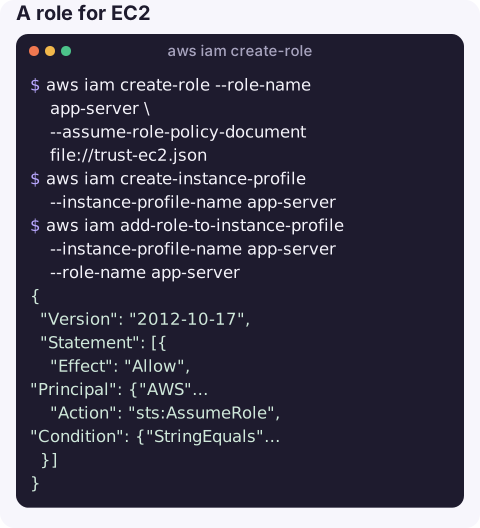
aws iam create-role --role-name app-server \
  --assume-role-policy-document file://trust-ec2.json
aws iam create-instance-profile --instance-profile-name app-server
aws iam add-role-to-instance-profile --instance-profile-name app-server --role-name app-server
A cross-account role that a specific role in another account may assume, with an external ID and a 4-hour session limit:
{
  "Version": "2012-10-17",
  "Statement": [{
    "Effect": "Allow",
    "Principal": {"AWS": "arn:aws:iam::210987654321:role/ops-automation"},
    "Action": "sts:AssumeRole",
    "Condition": {"StringEquals": {"sts:ExternalId": "ops-7f3a"}}
  }]
}
aws iam create-role --role-name ops-readonly \
--assume-role-policy-document file://trust-ops.json \
--max-session-duration 14400 \
--description "Read-only access for the ops account"
aws iam attach-role-policy --role-name ops-readonly \
--policy-arn arn:aws:iam::aws:policy/ReadOnlyAccessCheck it from the other side with sts assume-role once IAM has propagated the change.
Key options
| Option | Notes |
|---|---|
--assume-role-policy-document | Trust policy JSON, inline or file://. Required. |
--max-session-duration | Upper limit for sessions, 3,600 to 43,200 seconds. Callers still request a duration; role chaining is capped at one hour regardless. |
--permissions-boundary | Managed policy ARN that caps what the role can ever do, whatever is attached. |
--path | Organises roles, e.g. /service/. Becomes part of the ARN. |
--tags | Tags on the role; useful for ABAC conditions and cost ownership. |
Gotchas
- "Invalid principal in policy". The trust policy names an account, role or user that does not exist, or a typo in the service principal. IAM validates principals when you save.
- Propagation delay. A brand-new role can fail to be assumed for a few seconds. Scripts that create and immediately use a role should retry.
- EntityAlreadyExists means the name is taken in this account; role names are unique regardless of path.
- The trust policy is not the permissions. If assuming works but actions fail, look at attached policies with list-attached-role-policies. If assuming fails, see not authorized to perform sts:AssumeRole.
- Change the trust policy later with
aws iam update-assume-role-policy, not create-role.
Questions
Can I create an IAM Identity Center user or permission set with this command?
No. create-role makes a role inside one account. Identity Center users and permission sets are managed with the identitystore and sso-admin commands, and Identity Center then creates the roles for you.
How do I attach a policy to a new role?
aws iam attach-role-policy --role-name <name> --policy-arn <arn> for a managed policy, or aws iam put-role-policy with a policy document for an inline one.
What is the maximum session duration for an IAM role?
12 hours (43,200 seconds), set with --max-session-duration. The default is one hour.
New roles are often created in a hurry to unblock a deploy and then forgotten. CloudConsole is built to show AWS resources and alarms on a phone with production guardrails.
About the app → · Download on the App Store