 CloudConsole
Amazon SQS limits and quotas
An SQS message can be up to 1 MiB (1,048,576 bytes); larger payloads go to S3 via the Extended Client Library. Messages are kept for 4 days by default and up to 14 days, the visibility timeout ranges from 0 seconds to 12 hours (default 30 seconds), and a standard queue allows roughly 120,000 in-flight messages (FIFO: 120,000). Batches hold up to 10 messages and long polling waits at most 20 seconds.
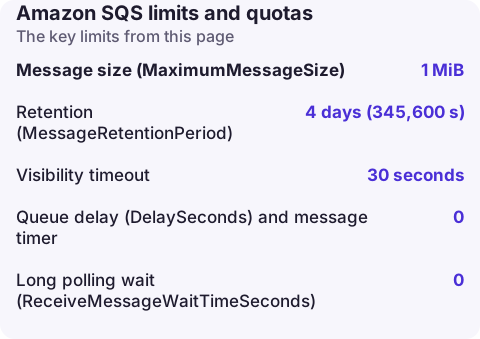
SQS limits at a glance
| Setting or quota | Minimum | Default | Maximum |
|---|---|---|---|
| Message size (MaximumMessageSize) | 1 KiB | 1 MiB | 1 MiB (2 GB via S3 extended client) |
| Retention (MessageRetentionPeriod) | 60 seconds | 4 days (345,600 s) | 14 days (1,209,600 s) |
| Visibility timeout | 0 seconds | 30 seconds | 12 hours (43,200 s) |
| Queue delay (DelaySeconds) and message timer | 0 | 0 | 15 minutes |
| Long polling wait (ReceiveMessageWaitTimeSeconds) | 0 | 0 | 20 seconds |
| Messages per send, receive or delete batch | 1 | - | 10 |
| Message attributes | - | - | 10 per message |
| Queue name | 1 character | - | 80 characters |
| Messages stored in a queue | - | - | Unlimited |
None of these can be raised through Service Quotas; they are part of the API.
In-flight messages and throughput
In-flight means received by a consumer and not yet deleted. A standard queue allows approximately 120,000 in flight, depending on traffic and backlog. With short polling you get an OverLimit error when you reach it; with long polling SQS simply returns no new messages, which looks like an idle queue even though ApproximateNumberOfMessagesVisible is high. FIFO queues also support up to 120,000 in-flight messages and do not return an error; processing just slows. Both can be raised only through AWS Support.
Throughput: standard queues accept a nearly unlimited number of API calls per second. FIFO queues are limited per partition to 300 transactions per second per action (send, receive, delete) without high throughput mode, or 3,000 messages per second when every call is a batch of 10. High throughput FIFO raises this much further, and the limit varies by Region (the highest Regions document up to 70,000 transactions per second without batching).
What hitting each limit looks like
- Message too large:
InvalidParameterValue, with a reason saying the message must be shorter than the queue's limit, when the body plus attributes exceedsMaximumMessageSize. The queue setting can be lower than 1 MiB, so check it before assuming the hard limit. - Retention: messages silently disappear when they reach the retention period, whether or not they were processed. Watch ApproximateAgeOfOldestMessage against the retention value.
- Visibility timeout too short: messages are processed twice; see visibility timeout.
- Dead-letter queue retention: for standard queues the original enqueue time is kept, so a DLQ with the same retention as its source deletes moved messages early. Give the DLQ a longer retention; see redrive settings.
Check and change a queue's limits
aws sqs get-queue-attributes --queue-url https://sqs.eu-west-2.amazonaws.com/123456789012/orders \
  --attribute-names MaximumMessageSize MessageRetentionPeriod VisibilityTimeout ApproximateNumberOfMessagesNotVisible

# Keep messages 14 days and allow the full 1 MiB
aws sqs set-queue-attributes --queue-url https://sqs.eu-west-2.amazonaws.com/123456789012/orders \
  --attributes MessageRetentionPeriod=1209600,MaximumMessageSize=1048576
ApproximateNumberOfMessagesNotVisible is the in-flight count; compare it with the 120,000 ceiling when consumers seem to stall. Most attribute changes take up to 60 seconds to apply; a retention change can take up to 15 minutes and also affects messages already in the queue.
Designing around the limits
- Keep messages small: send IDs and S3 keys, not documents. The Extended Client Library (Java and Python) does this automatically up to 2 GB.
- Delete messages as soon as they are processed, and use batch deletes to stay well under the in-flight cap.
- For Lambda consumers, remember the 6 MB invocation payload: a batch of ten 1 MiB messages fits, but a batch window that collects more will be split.
- Use several queues, or several message group IDs on FIFO, when one queue cannot keep up.
Questions
What is the maximum message size in SQS?
1 MiB (1,048,576 bytes), including attributes. Use the SQS Extended Client Library to store bodies up to 2 GB in S3.
How long can a message stay in SQS?
Up to 14 days. The default retention is 4 days and the minimum is 60 seconds.
Is there a limit to the number of messages in an SQS queue?
No limit on stored messages, but in-flight messages (received and not deleted) are capped at about 120,000 for standard queues.
Queue limits show up as a growing backlog or messages vanishing at the retention boundary. CloudConsole, a phone app for AWS, is being built to show queue-age alarms on your phone so you can react before messages expire.
About the app → · Download on the App Store