 CloudConsole
SQS redrive policy, maxReceiveCount and dead-letter queue settings
A redrive policy on a source queue names a dead-letter queue (deadLetterTargetArn) and a maxReceiveCount: once a message has been received more times than that without being deleted, SQS moves it to the DLQ. The API documents a default of 10. Use at least 5 for Lambda consumers (AWS's recommendation) so throttling and transient errors get retried, give the DLQ a longer retention period than the source queue, and alarm on any message arriving in the DLQ.
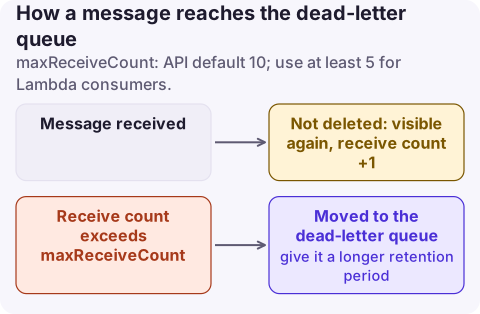
The settings
| Setting | Where | Meaning |
|---|---|---|
deadLetterTargetArn | Source queue RedrivePolicy | ARN of the DLQ (same account and Region; FIFO source needs a FIFO DLQ) |
maxReceiveCount | Source queue RedrivePolicy | Receives allowed before the message moves; default 10 |
RedriveAllowPolicy | DLQ | Which source queues may use it: allowAll (default), byQueue (up to 10 ARNs) or denyAll |
MessageRetentionPeriod | DLQ | Should be longer than the source queue's |
VisibilityTimeout | Source queue | Each expiry without a delete costs one receive |
Choosing maxReceiveCount
| Consumer | Suggested value | Reasoning |
|---|---|---|
| Lambda event source mapping | 5 or more | Throttled or failed batches return to the queue; a batch counts as received even if Lambda never ran your code for it |
| Worker with its own in-process retries | 3 to 5 | Retries already happen before the message returns |
| Downstream that has outages of minutes | 10 to 20, with a longer visibility timeout | Spread retries over the expected outage |
| Poison-message-heavy feeds | 2 to 3 | Get bad messages out of the way quickly |
Avoid 1: a single crash, deploy or throttle sends the message to the DLQ. For standard queues with a maxReceiveCount above 3, SQS moves a message that has been received 3 or more times to the back of the queue, so ApproximateAgeOfOldestMessage can look healthier than reality.
Total time before a message is dead-lettered is roughly maxReceiveCount x visibility timeout (plus any delay), which must fit inside the source queue's retention or messages expire before they ever reach the DLQ.
Retention: the trap
For standard queues, a message keeps its original enqueue timestamp when moved. If both queues keep messages for 4 days and a message spent 3 days failing, it is deleted from the DLQ after 1 day. Set DLQ retention to the 14-day maximum. FIFO queues reset the timestamp on the move.
Configure it
# Create the DLQ with 14-day retention
aws sqs create-queue --queue-name orders-dlq --attributes MessageRetentionPeriod=1209600

# Attach it to the source queue
aws sqs set-queue-attributes --queue-url https://sqs.eu-west-2.amazonaws.com/123456789012/orders \
  --attributes '{"RedrivePolicy":"{\"deadLetterTargetArn\":\"arn:aws:sqs:eu-west-2:123456789012:orders-dlq\",\"maxReceiveCount\":\"5\"}"}'

# Move messages back after a fix
aws sqs start-message-move-task --source-arn arn:aws:sqs:eu-west-2:123456789012:orders-dlq \
  --destination-arn arn:aws:sqs:eu-west-2:123456789012:orders
CloudFormation: RedrivePolicy (with deadLetterTargetArn and maxReceiveCount) and RedriveAllowPolicy on AWS::SQS::Queue. Terraform: redrive_policy on aws_sqs_queue or the separate aws_sqs_queue_redrive_policy resource; redrive_allow_policy for the DLQ side.
Redrive is covered step by step in redrive a dead-letter queue.
Alarms and symptoms
- Alarm on
ApproximateNumberOfMessagesVisible > 0on the DLQ (the metric for a quiet queue may be sparse; treat missing data as not breaching). See messages visible. - Messages in the DLQ that processed fine later: visibility timeout too short or maxReceiveCount too low.
- Messages vanish without reaching the DLQ: source retention shorter than maxReceiveCount x visibility timeout.
- Lambda partial batch failures: enable
ReportBatchItemFailuresso only failed messages return to the queue and count towards maxReceiveCount. - SNS, EventBridge or Lambda async DLQs are configured on those services, not with an SQS redrive policy.
Questions
What is the default maxReceiveCount in SQS?
The SetQueueAttributes API reference documents a default of 10. The console asks you to choose a value when you enable a dead-letter queue.
What should maxReceiveCount be for Lambda?
At least 5, as AWS recommends, so Lambda can retry throttled or failed batches before messages are sent to the dead-letter queue.
Why do messages disappear from my SQS dead-letter queue?
For standard queues the retention clock keeps running from when the message was first sent. Give the DLQ a longer retention period than the source queue.
A dead-letter queue that fills up silently is a data-loss incident in slow motion. CloudConsole, a phone app for AWS, is being built to put DLQ alarms on your phone so the first failed message gets attention.
About the app → · Download on the App Store