 CloudConsole
aws sqs send-message
aws sqs send-message --queue-url <url> --message-body '{"orderId":42}' puts one message on an SQS queue and returns its MessageId. FIFO queues also need --message-group-id, and a --message-deduplication-id unless content-based deduplication is enabled on the queue.
What the command does
It calls the SendMessage API for a single message. The body is text (JSON, XML or plain), up to the queue's MaximumMessageSize, which can be set as high as 1 MiB at the time of writing. Optional message attributes travel alongside the body and let consumers or SNS-style filters inspect metadata without parsing the payload.
The queue is addressed by URL, not name. If you only know the name, look it up first:
aws sqs get-queue-url --queue-name orders --query QueueUrl --output textSyntax
aws sqs send-message --queue-url <queue-url> \
  --message-body <text> \
  [--delay-seconds 0-900] \
  [--message-attributes '{"name":{"DataType":"String","StringValue":"v"}}'] \
  [--message-group-id <group>] [--message-deduplication-id <id>]   # FIFO
Worked examples
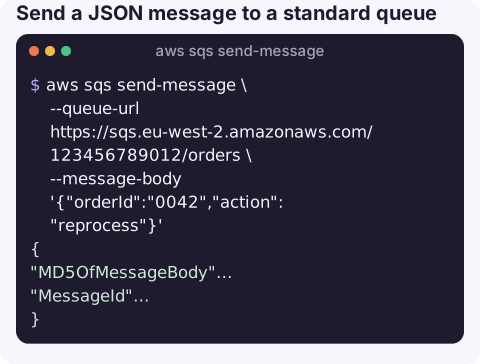
Send a JSON message to a standard queue:
aws sqs send-message \
  --queue-url https://sqs.eu-west-2.amazonaws.com/123456789012/orders \
  --message-body '{"orderId":"0042","action":"reprocess"}'
Response:
{
  "MD5OfMessageBody": "6f1ed002ab5595859014ebf0951522d9",
  "MessageId": "5fea7756-0ea4-451a-a703-a558b933e274"
}
Body from a file, which sidesteps shell quoting entirely:
aws sqs send-message --queue-url https://sqs.eu-west-2.amazonaws.com/123456789012/orders \
  --message-body file://payload.json
With message attributes and a 60-second delay:
aws sqs send-message --queue-url https://sqs.eu-west-2.amazonaws.com/123456789012/orders \
  --message-body '{"orderId":"0042"}' \
  --delay-seconds 60 \
  --message-attributes '{"eventType":{"DataType":"String","StringValue":"OrderCreated"},"version":{"DataType":"Number","StringValue":"2"}}'
FIFO queue: messages with the same group ID are delivered in order, one group at a time:
aws sqs send-message \
  --queue-url https://sqs.eu-west-2.amazonaws.com/123456789012/orders.fifo \
  --message-body '{"orderId":"0042","step":"paid"}' \
  --message-group-id customer-4711 \
  --message-deduplication-id 0042-paid
Key options
| Option | Notes |
|---|---|
--message-body | Required. Only certain Unicode characters are allowed; anything else returns InvalidMessageContents. |
--delay-seconds | 0–900 seconds. Per-message delay is not supported on FIFO queues; set DelaySeconds on the queue instead. |
--message-attributes | Up to 10 attributes. DataType is String, Number or Binary; values are passed as strings. |
--message-group-id | Required on FIFO queues. Ordering is guaranteed within a group, not across groups. |
--message-deduplication-id | FIFO only. Messages with the same ID inside the 5-minute deduplication window are accepted but not delivered twice. |
Gotchas
- Quoting on Windows. PowerShell and cmd treat quotes differently from bash. Use
file://for the body and attributes if a JSON body arrives mangled. - Wrong Region or account gives AWS.SimpleQueueService.NonExistentQueue. The Region is part of the URL, but the CLI still needs credentials for the account that owns the queue or a queue policy that allows you.
- Encrypted queues need KMS permissions. With SSE-KMS, the sender needs
kms:GenerateDataKeyandkms:Decrypton the key, otherwise the send is denied. - Testing in production is real. A test message on a live queue will be processed by real consumers. Use a separate queue, or an attribute your consumer ignores.
- Batches. For up to 10 messages per call, use
aws sqs send-message-batchand check itsFailedlist.
Questions
How do I find the queue URL for send-message?
Run aws sqs get-queue-url --queue-name my-queue, or aws sqs list-queues --queue-name-prefix my to see matching URLs in the current Region.
Why does send-message fail on my FIFO queue?
FIFO queues require --message-group-id, and either --message-deduplication-id or ContentBasedDeduplication enabled on the queue. The queue name must also end in .fifo.
What is the maximum SQS message size?
Up to the queue's MaximumMessageSize, which defaults to and can be set as high as 1 MiB at the time of writing. For larger payloads, store the data in S3 and send a pointer.
Replaying a single message by hand is a common fix when a consumer drops one. CloudConsole is built to show queues and their alarms on a phone, with guardrails around anything that touches production.
About the app → · Download on the App Store