 CloudConsole
ap-southeast-6: Asia Pacific (New Zealand)
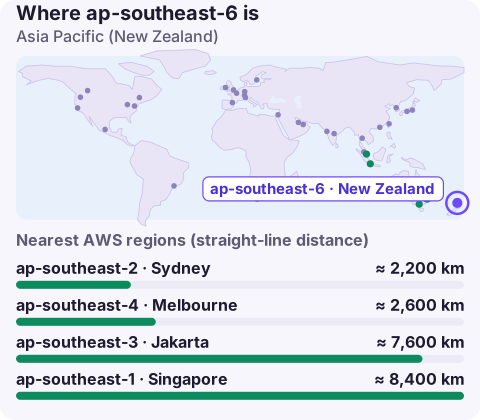
ap-southeast-6 is the code for the Asia Pacific (New Zealand) region, AWS's first region in New Zealand, based in the Auckland area. It is an opt-in region, so it has to be enabled per account, and it gives New Zealand organisations in-country hosting instead of relying on Sydney across the Tasman.
What changes for New Zealand workloads
Until this region existed, most New Zealand companies ran in ap-southeast-2 (Sydney). That worked, but it meant every request crossed the Tasman Sea and every byte of data was stored in Australia. A local region changes both:
- Data in New Zealand. Government agencies, health organisations, iwi organisations and businesses whose customers ask for local hosting can now keep data onshore. New Zealand's Privacy Act sets rules on disclosure overseas; check how they apply to you.
- Latency. Users in Auckland, Wellington and Christchurch avoid the trans-Tasman hop, which helps interactive and real-time services.
- Resilience thinking. New Zealand's dependence on a small number of international cables is a known risk; hosting onshore keeps local services running if international links degrade.
Enabling ap-southeast-6
aws account get-region-opt-status --region-name ap-southeast-6
aws account enable-region --region-name ap-southeast-6

# confirm the region now responds
aws ec2 describe-availability-zones --region ap-southeast-6 \
  --query 'AvailabilityZones[].ZoneName' --output text
Update the CLI, SDKs and any Terraform or CDK versions first; releases from before the launch don't know the region. Then add it to SCP allow-lists and landing-zone governed regions, and turn on per-region security services (GuardDuty, Security Hub, Config).
Targeting it
Use --region ap-southeast-6, AWS_REGION=ap-southeast-6 or region = ap-southeast-6 in a profile. Endpoints follow <service>.ap-southeast-6.amazonaws.com. If you get an invalid security token error here while the same credentials work in Sydney, the token came from the global STS endpoint; use regional STS or change the token setting in IAM account settings.
Migrating from Sydney
Moving an existing New Zealand workload across the Tasman is a standard cross-region migration, but a few points deserve care:
- Check every managed service on the AWS Regional Services List. A new region starts with a core set; anything missing either stays in Sydney or needs a substitute.
- Create new KMS keys locally; re-encrypt snapshots and backups during copy.
- S3 bucket names are global, so plan new names and update application configuration.
- Lower DNS TTLs ahead of cut-over, and keep Sydney read-only for a while as a fallback.
- Request production quotas in advance; a new region starts at defaults.
Recovery options
With one AWS region in New Zealand, an onshore-only recovery plan relies on multiple Availability Zones in the Auckland region and backups held in a separate account. If your rules allow recovery in Australia, Sydney is the natural partner and ap-southeast-4 (Melbourne) is another option. Decide which data may cross the Tasman before you configure replication, because reversing that later means auditing every copy.
Questions
Where is ap-southeast-6?
In New Zealand, in the Auckland area. AWS names it Asia Pacific (New Zealand).
Is ap-southeast-6 opt-in?
Yes. Enable it per account before use.
Should New Zealand companies move from Sydney?
If you need data in New Zealand or lower latency for NZ users, yes for those components. Check service availability first; Sydney still has the broader catalogue.
If you've just moved from Sydney to the New Zealand region, the first few weeks are when surprises appear. CloudConsole, a phone app for AWS, is built to show alarms and resources across both regions on your phone.
About the app → · Download on the App Store