 CloudConsole
eu-west-2: Europe (London)
eu-west-2 is the code for the Europe (London) region, located in and around London in the United Kingdom. It is enabled by default and is the region to use when data has to stay in the UK or your users are mainly British; note that since Brexit it is not inside the EU, so it doesn't satisfy an EU-only residency requirement.
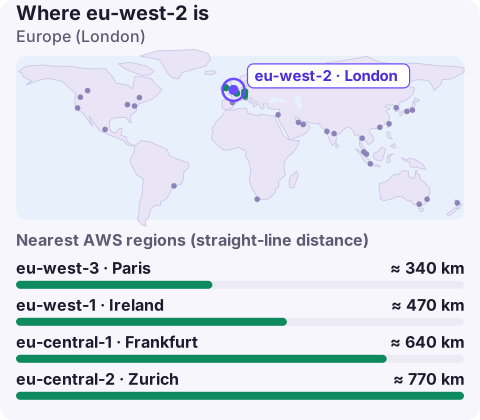
Where eu-west-2 is and who uses it
The region is in the London area. Its main users are:
- UK public sector and suppliers, where contracts and guidance often expect UK hosting.
- Financial services regulated in the UK, who prefer data and processing to stay in the country.
- Consumer products with UK audiences, where the latency gain over Ireland is small but real for interactive traffic.
For data protection, the UK has its own regime (UK GDPR and the Data Protection Act 2018). If a contract says "EU", London doesn't count; if it says "UK", Ireland doesn't.
Availability Zones in eu-west-2
Rather than relying on a number from a blog post, ask the API which zones your account can use. Zone names (eu-west-2a, eu-west-2b…) map to physical zones per account, while zone IDs (euw2-az1…) are the same for everyone:
aws ec2 describe-availability-zones --region eu-west-2 \
  --query 'AvailabilityZones[].[ZoneName,ZoneId,State]' \
  --output table
Use zone IDs when two accounts need subnets in the same physical zone (for example a shared VPC endpoint service or cross-account low-latency traffic). Not every instance type is offered in every zone; aws ec2 describe-instance-type-offerings --location-type availability-zone shows which zones have a given type, which saves a failed Auto Scaling launch.
Targeting London from the CLI, SDKs and IaC
export AWS_REGION=eu-west-2
aws configure set region eu-west-2 --profile uk-prod
Service endpoints follow <service>.eu-west-2.amazonaws.com, such as ec2.eu-west-2.amazonaws.com. In Terraform the region belongs in the provider block, in CDK in the stack's env; both ignore the shell's region if one is set explicitly, so check there first when resources appear in Ireland instead.
Neighbouring regions and DR
| Region | Relationship to London |
|---|---|
| eu-west-1 (Ireland) | Closest, larger service catalogue, but in the EU not the UK |
| eu-west-3 (Paris) | Short hop across the Channel |
| eu-central-1 (Frankfurt) | Large, central European hub |
There is no second AWS region in the UK, so if recovery data must stay in the UK, rely on multiple Availability Zones in London plus backups in a separate account. If your rules allow EU storage, Ireland is the usual recovery region.
Before you choose London
Check the AWS Regional Services List for every managed service in your design. London is well served, but a service that launched recently may reach Ireland or Frankfurt first, and the workaround is usually awkward once you're committed. Also compare prices for your main line items against Ireland; for some services London costs more. If the only reason for London is a customer questionnaire, confirm whether they really need UK hosting or would accept the EU; the answer changes your region, your recovery options and your bill.
Questions
Where is eu-west-2?
In London, United Kingdom. Its full name in the console is Europe (London).
How many availability zones does eu-west-2 have?
Check the current list with aws ec2 describe-availability-zones --region eu-west-2, which shows the zones your account can use and their zone IDs.
Is eu-west-2 in the EU?
No. The UK left the EU, so data in eu-west-2 is in the UK. Use Ireland, Frankfurt or another EU region for an EU-only requirement.
For UK teams, eu-west-2 is where the 3am alarm usually comes from. CloudConsole, a phone app for AWS, is built to show those alarms, logs and resources on your phone.
About the app → · Download on the App Store