 CloudConsole
me-south-1: Middle East (Bahrain)
me-south-1 is the code for the Middle East (Bahrain) region, AWS's first region in the Middle East. It is an opt-in region, so it has to be enabled before use, and it serves Bahrain and the wider Gulf, including customers in Saudi Arabia, Kuwait and Qatar who want a nearby region.
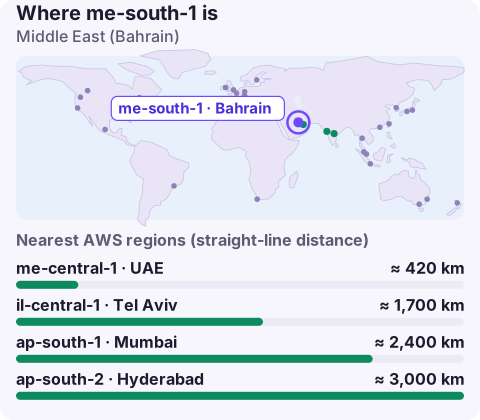
What the Bahrain region is used for
Bahrain was AWS's first Gulf region, so many regional companies built their first in-region AWS footprint here. Common reasons to use it today:
- Gulf users: Bahrain sits next to Saudi Arabia's Eastern Province and is close to Kuwait and Qatar, giving short paths for much of the Gulf Cooperation Council.
- Bahraini data requirements: organisations regulated in Bahrain can keep data in the country.
- An established footprint: teams already running here have years of operational experience and tooling built around it.
Check whether a country-specific rule for your customers points to a different location before treating Bahrain as a Gulf-wide answer; some regulators require data to stay in their own country.
me-south-1 vs me-central-1
| me-south-1 | me-central-1 | |
|---|---|---|
| Country | Bahrain | United Arab Emirates |
| Opt-in | Yes | Yes |
| Best for | Bahrain residency; users around the northern Gulf | UAE residency; users in Dubai and Abu Dhabi |
With both available, a Gulf business without a single-country rule can run in one and recover into the other. Confirm both regions support every service in the recovery plan before relying on it.
Moving between the two is a standard cross-region exercise: new KMS keys in the target, snapshot and AMI copies re-encrypted on the way, S3 replication into new buckets, and a database replica promoted at cut-over. Plan it as a project rather than a weekend change, since both regions start with default quotas.
Enabling and targeting me-south-1
# check, then enable
aws account get-region-opt-status --region-name me-south-1
aws account enable-region --region-name me-south-1

# use it
aws ecs list-clusters --region me-south-1
Endpoints follow <service>.me-south-1.amazonaws.com. A common source of confusion is the code itself: Bahrain is south and the UAE is central, which doesn't match most people's mental map. Name profiles after the country (for example [profile bahrain-prod]) so nobody has to remember which is which.
Operational notes
- Opt-in credentials: tokens from the global STS endpoint don't work in opt-in regions unless you change the IAM account setting. Regional STS endpoints avoid the issue.
- Per-region security services: enable GuardDuty, Security Hub and AWS Config here explicitly; turning them on in another region doesn't cover Bahrain.
- Service coverage: the catalogue is smaller than in the largest regions. Check the AWS Regional Services List before choosing managed services.
- Quotas: request increases for EC2, Lambda concurrency and others here specifically.
Other nearby regions
Beyond me-central-1, the nearest options are il-central-1 in Tel Aviv and ap-south-1 in Mumbai. For workloads without residency rules that need the widest service range, eu-central-1 in Frankfurt is often used for analytics and back-office systems.
Questions
Where is me-south-1?
In Bahrain. It was AWS's first region in the Middle East.
Is me-south-1 opt-in?
Yes. Enable it per account before use.
Can I use me-south-1 for Saudi Arabian customers?
For latency, often yes. For data residency, check the specific Saudi rule that applies; some require data to stay in the Kingdom, which a region in Bahrain doesn't satisfy.
Running in two Gulf regions doubles the places an alarm can come from. CloudConsole, a phone app for AWS, is built to show both regions' alarms and resources on one phone screen.
About the app → · Download on the App Store