 CloudConsole
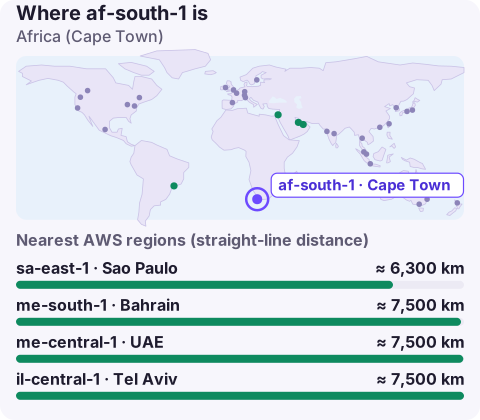
af-south-1: Africa (Cape Town)
af-south-1 is the code for the Africa (Cape Town) region in South Africa, AWS's only region on the African continent at the time of writing. It is an opt-in region that must be enabled per account, and it is the natural home for South African workloads and for data that needs to stay in South Africa.
Who should use Cape Town
- South African users. Requests from Johannesburg, Cape Town and Durban stay in the country instead of travelling to Europe, which cuts a long round trip from every API call.
- South African data. POPIA (the Protection of Personal Information Act) governs personal data, and banks, insurers and public bodies frequently prefer or require local hosting.
- Southern African markets. Neighbouring countries are often better served from Cape Town than from Europe, depending on how their networks route.
For users in West or North Africa, Europe can still be closer in network terms because of submarine cable routes; measure before you move them.
Turning af-south-1 on
aws account get-region-opt-status --region-name af-south-1

aws account enable-region --region-name af-south-1

# list the regions your account has opted in to
aws ec2 describe-regions \
  --filters Name=opt-in-status,Values=opted-in \
  --query 'Regions[].RegionName' --output text
Enabling takes a little while. If you use AWS Organizations, enable it from the management account per member with --account-id, and update region allow-lists in your SCPs at the same time.
Using it from the CLI and SDKs
Set --region af-south-1, AWS_REGION=af-south-1, or region = af-south-1 in the profile. Endpoints follow <service>.af-south-1.amazonaws.com, e.g. ec2.af-south-1.amazonaws.com.
The first error most people hit after enabling is The security token included in the request is invalid. That usually means the session token came from the global STS endpoint, which by default only issues tokens valid in regions that were enabled from the start. Configure tools to use regional STS, or change the global endpoint token setting in IAM account settings so its tokens work in all regions.
Cost and services
Prices in Cape Town are generally higher than in us-east-1 or eu-west-1, and the catalogue is smaller. Check the AWS Regional Services List for every managed service you plan to use. A common split is to keep user-facing services and personal data in af-south-1 and run batch analytics on anonymised data, CI/CD or archives in a cheaper European region, if your rules allow it.
Disaster recovery and neighbours
There's no second AWS region in Africa to pair with, so in-country resilience comes from multiple Availability Zones in Cape Town plus backups in a separate account. If data may leave South Africa, European regions such as eu-west-1 (Ireland), eu-west-2 (London) or eu-south-1 (Milan) are common recovery choices; me-central-1 and ap-south-1 are alternatives with different routes. Factor in replication data-transfer costs out of Cape Town, and test the restore path, not just the copy: a backup in Ireland is only useful if your team can bring the application up there with the right keys, images and DNS changes.
Questions
Where is af-south-1?
In Cape Town, South Africa.
Is af-south-1 enabled by default?
No. It's an opt-in region; enable it in the account settings or with aws account enable-region.
Why do I get 'security token is invalid' in af-south-1?
Your session token probably came from the global STS endpoint, which by default isn't valid in opt-in regions. Use a regional STS endpoint or change the IAM setting.
If your users are in South Africa and some of your team is elsewhere, Cape Town alarms will arrive outside someone's working day. CloudConsole, a phone app for AWS, is built to show those alarms and resources on your phone.
About the app → · Download on the App Store