 CloudConsole
me-central-1: Middle East (UAE)
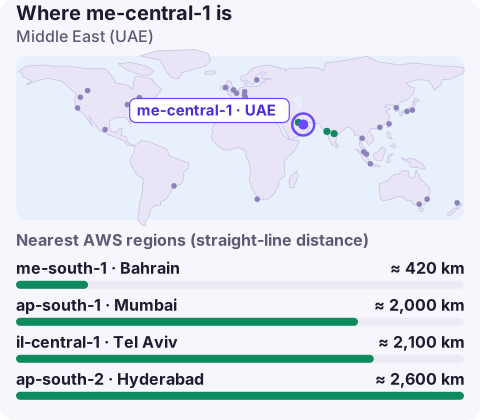
me-central-1 is the code for the Middle East (UAE) region in the United Arab Emirates. It is an opt-in region that must be enabled per account, and it is used by organisations serving the UAE and wider Gulf, particularly those whose customers or regulators expect data to stay in the Emirates.
Why choose the UAE region
Before me-central-1, Gulf workloads ran mainly in Bahrain, Frankfurt or Mumbai. Having a region in the UAE helps when:
- Data must stay in the UAE. Government entities, free-zone financial institutions and healthcare providers can face rules or contractual terms that require in-country hosting. Read the specific rule that applies to you; requirements differ by emirate and sector.
- Users are in the Emirates. Dubai and Abu Dhabi users get short network paths for real-time apps, fintech and streaming.
- You want two Gulf regions. With me-south-1 in Bahrain nearby, workloads without strict single-country rules can use the pair for recovery within the Gulf.
Opting in
The region is off until someone with account-management permissions turns it on:
aws account enable-region --region-name me-central-1
aws account get-region-opt-status --region-name me-central-1
The IAM permissions involved are account:EnableRegion and account:GetRegionOptStatus; grant them narrowly, since enabling or disabling regions affects everyone in the account. Disabling a region later doesn't delete your resources there, but makes them unreachable until it is re-enabled, which is a nasty surprise if someone does it as a "clean-up".
Targeting me-central-1
export AWS_REGION=me-central-1
aws ec2 describe-availability-zones \
  --query 'AvailabilityZones[].[ZoneName,ZoneId]' --output text
Endpoints follow <service>.me-central-1.amazonaws.com. Remember that me-central-1 (UAE) and me-south-1 (Bahrain) are different countries; if residency is the reason you chose the UAE, a one-word slip in a deployment pipeline is a compliance incident, not just a misconfiguration. If credentials from the global STS endpoint are rejected here, use regional STS.
Services and capacity
me-central-1 has a smaller catalogue than the largest regions. For each managed service, and for specialised EC2 families such as GPU instances, confirm availability on the AWS Regional Services List or with describe-instance-type-offerings before you design around it. Quotas in a newly enabled region start at defaults, so request production values early; increases can take time to approve.
Neighbouring regions
| Region | Notes |
|---|---|
| me-south-1 (Bahrain) | The other Gulf region; opt-in |
| il-central-1 (Tel Aviv) | Eastern Mediterranean; opt-in |
| ap-south-1 (Mumbai) | Large region across the Arabian Sea; enabled by default |
| eu-central-1 (Frankfurt) | Broad catalogue for non-resident workloads |
Measure latency from your actual user base before choosing; network routes in the region don't always follow the map.
If the goal is faster page loads rather than residency, CloudFront edge locations in the Gulf can cache static content close to users while the origin stays where it is. Keep the origin in me-central-1 when the data itself has to stay in the Emirates, or when dynamic requests dominate.
Questions
Where is me-central-1?
In the United Arab Emirates. AWS calls it Middle East (UAE).
What is the difference between me-central-1 and me-south-1?
me-central-1 is in the UAE and me-south-1 is in Bahrain. Both are opt-in Gulf regions; choose based on where your data must live and where your users are.
Do I need to enable me-central-1?
Yes. It's an opt-in region, so enable it in the account settings or with aws account enable-region first.
If your users are in the Gulf and your team isn't, alarms fire at odd hours. CloudConsole, a phone app for AWS, is built to show alarms and resources across regions on your phone.
About the app → · Download on the App Store