 CloudConsole
CloudFormation vs Terraform
Choose CloudFormation if you are AWS-only and want AWS to hold state, roll back failed deployments automatically and deploy across accounts with StackSets, at no extra charge for AWS resources. Choose Terraform if you manage more than AWS (other clouds, SaaS such as GitHub, Datadog or Cloudflare), want one workflow and module ecosystem for all of it, and are prepared to run and secure remote state.
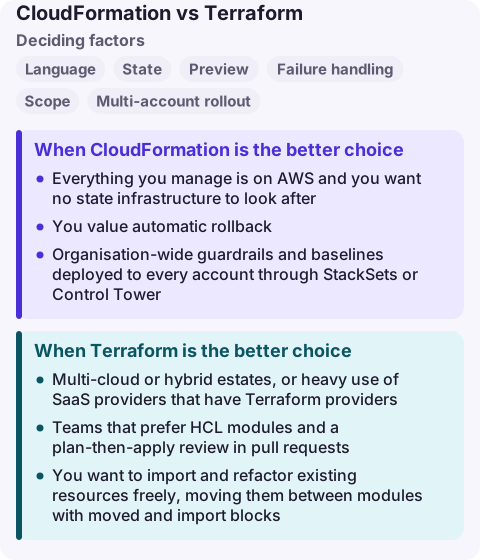
CloudFormation vs Terraform compared
| Factor | AWS CloudFormation | HashiCorp Terraform |
|---|---|---|
| Language | JSON or YAML templates | HCL (Terraform language) |
| State | Managed by AWS in the stack | State file you store and lock (for example in S3), may contain secrets |
| Preview | Change sets | terraform plan |
| Failure handling | Automatic rollback to last working state | Stops; partially applied changes remain until you fix and re-apply |
| Scope | AWS (plus registry and custom resources) | AWS and hundreds of other providers |
| Multi-account rollout | StackSets across accounts and Regions | Workspaces, pipelines or wrappers you build |
| Drift | Drift detection on stacks | plan shows drift against state |
| Cost | No charge for AWS::*, Alexa::* and Custom::* resources; third-party handlers billed | CLI free to use; HCP Terraform or Enterprise priced separately |
| Licence | AWS service | Business Source License since August 2023 |
When CloudFormation is the better choice
- Everything you manage is on AWS and you want no state infrastructure to look after.
- You value automatic rollback: a failed update returns the stack to its previous state rather than leaving it half applied.
- Organisation-wide guardrails and baselines deployed to every account through StackSets or Control Tower.
- You use AWS SAM or the AWS CDK, which both deploy through CloudFormation.
Watch the quotas: a template can declare 500 resources, 200 parameters and 200 outputs. Large systems split into nested or separate stacks connected with exports or SSM parameters.
When Terraform is the better choice
- Multi-cloud or hybrid estates, or heavy use of SaaS providers that have Terraform providers.
- Teams that prefer HCL modules and a plan-then-apply review in pull requests.
- You want to import and refactor existing resources freely, moving them between modules with
movedandimportblocks.
Treat state as sensitive: AWS prescriptive guidance recommends storing it remotely, encrypted and versioned, with least-privilege access, because it can hold database passwords and other secrets.
Migrating or mixing
You can run both, but give each resource exactly one owner. A common split is CloudFormation or Control Tower for account baselines and Terraform for application infrastructure, or the reverse. To move resources from CloudFormation to Terraform, set DeletionPolicy: Retain, remove them from the stack, then terraform import them. To move the other way, CloudFormation resource import brings existing resources into a stack, and the IaC generator can produce a template from resources in your account.
Common wrong reasons
- "Terraform supports new AWS features faster." It depends on the feature and provider release. AWS notes Terraform may lag; CloudFormation can also lag for some services. Check the specific resources you need.
- "CloudFormation is too verbose." Raw YAML is; the CDK generates it for you if you prefer code.
- "Terraform is open source." Its licence changed to the Business Source License in 2023; check whether that matters for how you use it.
Questions
Is Terraform better than CloudFormation for AWS?
Neither is better in general. CloudFormation suits AWS-only teams that want managed state and automatic rollback; Terraform suits teams managing several providers with one tool.
Does CloudFormation cost anything?
There is no charge for AWS::*, Alexa::* and Custom::* resources; you pay for the resources created. Third-party resource types from the registry incur handler operation charges.
Can Terraform and CloudFormation manage the same account?
Yes, as long as each resource is managed by only one of them. Shared values can be passed through SSM parameters or stack outputs read by Terraform data sources.
A failed deploy at night looks different in each tool: a stack stuck in UPDATE_ROLLBACK_FAILED versus a Terraform apply that stopped halfway. CloudConsole is being built to show stack events, alarms and recent changes on a phone with production guardrails.
About the app → · Download on the App Store