 CloudConsole
Lightsail vs EC2
Choose Lightsail for a small website, blog, WordPress site or side project where a predictable monthly bundle (server, disk and a data transfer allowance) matters more than control. Choose EC2 for production systems that need auto scaling, private networking in your own VPC, specific instance types, IAM instance roles or commitment discounts.
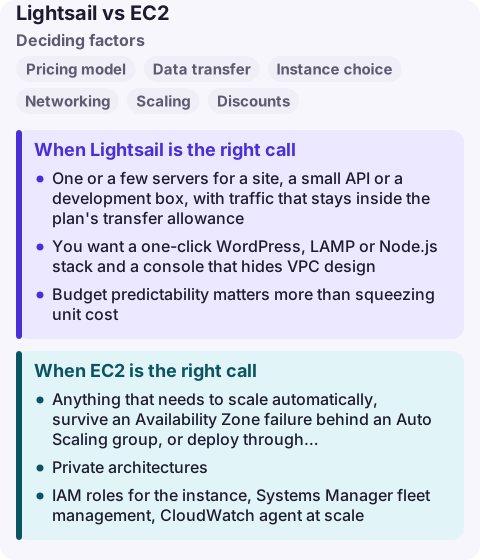
Lightsail vs EC2 compared
| Factor | Lightsail | EC2 |
|---|---|---|
| Pricing model | Fixed plan (bundle) charged hourly up to a monthly cap | Per-second instance price plus separate EBS, data transfer and public IPv4 charges |
| Data transfer | Allowance included in each plan; only excess outbound is charged | Charged per GB out to the internet (after the AWS free allowance) |
| Instance choice | Burstable plans in fixed sizes | Hundreds of types: compute, memory, storage, GPU, Graviton |
| Networking | Lightsail-managed network; VPC peering to the default VPC only | Your own VPCs, subnets, security groups, endpoints |
| Scaling | Manual; load balancer across instances you create | Auto Scaling groups, launch templates |
| Discounts | None beyond the bundle | Savings Plans, Reserved Instances, Spot |
| Extras bundled | Static IPs, DNS zones, snapshots, simple firewall | Everything available, everything configured separately |
When Lightsail is the right call
- One or a few servers for a site, a small API or a development box, with traffic that stays inside the plan's transfer allowance.
- You want a one-click WordPress, LAMP or Node.js stack and a console that hides VPC design.
- Budget predictability matters more than squeezing unit cost. The bill rarely surprises you.
Lightsail instances are burstable: they have a baseline CPU level and can burst above it. A site that runs the CPU hot all day will be throttled back to the baseline.
When EC2 is the right call
- Anything that needs to scale automatically, survive an Availability Zone failure behind an Auto Scaling group, or deploy through CI with launch templates.
- Private architectures: databases in private subnets, VPC endpoints, Transit Gateway, PrivateLink.
- IAM roles for the instance, Systems Manager fleet management, CloudWatch agent at scale.
- Sustained heavy CPU, large memory, GPUs or Graviton families beyond the burstable plans.
- Large steady fleets where Savings Plans or Spot cut the price well below a fixed bundle.
Moving from Lightsail to EC2
Lightsail has a free Upgrade to EC2 feature: take a manual snapshot of the instance, export it, and launch an EC2 instance from the resulting AMI. Disk snapshots can be restored as EBS volumes. Load balancers, managed databases and container services are not exported, so recreate those on the EC2 side (ELB, RDS, ECS).
You can also run both: enable VPC peering from Lightsail to your default VPC so a Lightsail web server talks privately to an RDS database or other resources there.
Common wrong reasons
- "Lightsail is a toy." It runs on AWS infrastructure and suits real small workloads; its limits are flexibility and scale, not reliability.
- "EC2 is always cheaper per CPU." Once you add EBS, public IPv4 and data transfer, a small EC2 setup can cost more than the equivalent bundle.
- "We will outgrow it, so start on EC2." The upgrade path exists; starting small and moving later is reasonable for a genuinely small project.
Questions
Is Lightsail cheaper than EC2?
For small, steady workloads that stay within the plan's data transfer allowance, often yes, because storage, a static IP and transfer are bundled. For large or variable fleets, EC2 with Savings Plans or Spot is usually cheaper.
Can Lightsail connect to my VPC?
Only through VPC peering with the default VPC in the same Region, which you enable on the Lightsail account page.
Can I move a Lightsail instance to EC2?
Yes. Export a manual instance snapshot with Upgrade to EC2, then launch an EC2 instance from it. Managed databases and load balancers are not exported.
A small site on one server has no failover, so an alert usually means the box itself is in trouble: CPU pinned at baseline, disk full or the instance unreachable. CloudConsole is being built to show EC2 alarms and resources on a phone with production guardrails.
About the app → · Download on the App Store