 CloudConsole
CloudWatch alarm: Kinesis GetRecords.Success
Alarm on AWS/Kinesis GetRecords.Success per StreamName with the Average over 60 seconds, firing when it is below your threshold for 5 of 5 minutes. The Average is the fraction of GetRecords calls that succeeded, so a threshold such as 0.95 means "alert if more than 5% of reads fail for five minutes".
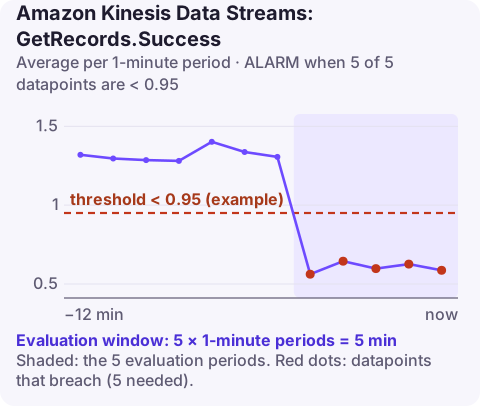
What the metric measures
Every GetRecords call on the stream records a 1 if it succeeded and a 0 if it failed. Averaging those values gives a success ratio between 0 and 1. This is a stream-level view of how healthy your consumers' reads are.
A failed call returns no data. By far the most common failure is ProvisionedThroughputExceededException: each shard allows five GetRecords calls per second and 2 MB/s of reads, shared among every consumer that does not use enhanced fan-out. Add a second or third application reading the same stream and the limits are hit quickly. Other failures include expired shard iterators and permission errors after an IAM change.
Recommended alarm settings
| Setting | Recommended value |
|---|---|
| Namespace | AWS/Kinesis |
| Metric | GetRecords.Success |
| Dimensions | StreamName |
| Statistic | Average |
| Threshold | Depends on your situation (a success ratio between 0 and 1; see below) |
| Period | 60 seconds |
| Datapoints to alarm | 5 |
| Evaluation periods | 5 |
| Comparison operator | LessThanThreshold |
Choosing the threshold
Because SDKs and the KCL retry failed reads, a few failures are routine. The threshold should catch a failure rate your consumers cannot absorb by retrying.
- Chart the metric with the Average statistic at one-minute resolution over two weeks.
- Note the lowest values seen during normal operation, including deploys and traffic peaks.
- Set the threshold a little below that floor. If normal minutes never drop below 0.99, a threshold of 0.95 is quiet and still sensitive.
- If you run several consumers on shared throughput, expect a lower normal floor, and fix that rather than lowering the threshold.
Set missing data to breaching if a consumer should always be reading; with no calls there is no datapoint, and an idle stream otherwise looks healthy.
Create the alarm
aws cloudwatch put-metric-alarm \
  --alarm-name kinesis-orders-getrecords-success \
  --alarm-description "Less than 95% of GetRecords calls on orders succeeding" \
  --namespace AWS/Kinesis \
  --metric-name GetRecords.Success \
  --dimensions Name=StreamName,Value=orders \
  --statistic Average \
  --period 60 \
  --evaluation-periods 5 \
  --datapoints-to-alarm 5 \
  --threshold 0.95 \
  --comparison-operator LessThanThreshold \
  --alarm-actions arn:aws:sns:eu-west-2:123456789012:oncall-alerts
0.95 is an example; derive yours with the method above.
When it fires
- Check read throttling on the same stream: if ReadProvisionedThroughputExceeded rose at the same time, the cause is capacity.
- Count consumers. Each extra shared-throughput consumer takes a share of the per-shard limits. Move heavy readers to enhanced fan-out, which gives each registered consumer its own throughput.
- Look at consumer logs for the exception names. Expired iterators point to consumers pausing too long between calls; access denied points to a role or key policy change.
- Reduce call rate if consumers poll in a tight loop with tiny batches; ask for more records per call and back off on empty results.
Questions
Why is GetRecords.Success below 1 when consumers seem fine?
Throttled calls are retried automatically, so the application may not notice. A small number of failures is normal; a sustained drop is the signal.
How many consumers can share a Kinesis stream?
Any number can read, but shared-throughput consumers split each shard's read limits. For more than a couple of consumers, enhanced fan-out avoids contention.
A drop in read success is easy to dismiss when it is only throttling, until the consumer starts falling behind. CloudConsole is a phone app for AWS, built to show related stream alarms together on your phone.
Did it start after a deploy? What changed? on the app’s alarm screen lists the deploys and configuration changes from the hour before the alarm fired.
About the app → · Download on the App Store