 CloudConsole
CloudWatch alarm: S3 Object Lambda LambdaResponse4xx
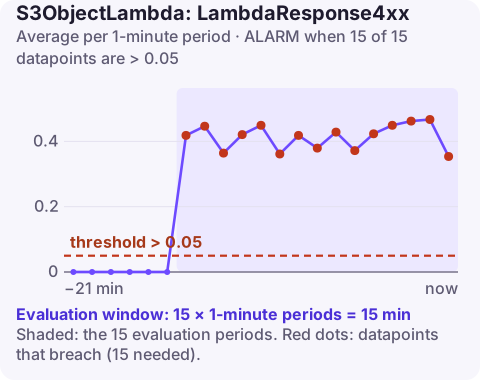
Alarm on AWS/S3ObjectLambda LambdaResponse4xx for the AccessPointName and DataSourceARN, Average over 60 seconds, above 0.05 for 15 of 15 minutes. It counts client errors S3 returned to your transformation function when it called WriteGetObjectResponse, which points at a bug or permission problem in the function rather than in the caller.
What this metric isolates
The other Object Lambda error metrics describe what the end client received. LambdaResponse4xx looks one step inside: it measures 4xx responses S3 gave to the function's WriteGetObjectResponse call. When that call fails, the transformed object never reaches the client, who then sees an error too.
Typical reasons for a 4xx on that call:
- The function's execution role lacks permission to call
WriteGetObjectResponse(thes3-object-lambda:WriteGetObjectResponseaction). - The function passes the wrong
RequestRouteorRequestTokenfrom the event, for example from a different invocation or a hard-coded value. - Invalid response parameters: headers or metadata S3 rejects.
- The function responds too late, after the request has already been abandoned.
Because these are code or configuration problems, they tend to appear right after a deploy and affect every request, rather than trickling in.
The route and token come from the invocation event. A minimal correct pattern in Python looks like this:
def handler(event, context):
    ctx = event["getObjectContext"]
    original = requests.get(ctx["inputS3Url"]).content
    s3.write_get_object_response(
        RequestRoute=ctx["outputRoute"],
        RequestToken=ctx["outputToken"],
        Body=transform(original),
    )
Reusing values across invocations, or reading them from the wrong key, is a common way to end up with every call rejected.
Recommended alarm settings
| Setting | Recommended value |
|---|---|
| Namespace | AWS/S3ObjectLambda |
| Metric | LambdaResponse4xx |
| Dimensions | AccessPointName, DataSourceARN |
| Statistic | Average |
| Threshold | 0.05 |
| Period | 60 seconds |
| Datapoints to alarm | 15 |
| Evaluation periods | 15 |
| Comparison operator | GreaterThanThreshold |
Tuning
A healthy function should produce essentially no LambdaResponse4xx. The 5% threshold and 15-minute window are conservative; if the access point serves real users, consider lowering both so a broken deploy pages you within minutes. Keep missing data as not breaching for access points with idle periods.
Test changes with a single request through the access point before deploying broadly: a malformed WriteGetObjectResponse call fails on the first request, so it is cheap to catch in a staging environment.
Create the alarm
aws cloudwatch put-metric-alarm \
  --alarm-name s3ol-redacted-docs-lambda-response-4xx \
  --alarm-description "Transformation function getting 4xx from WriteGetObjectResponse" \
  --namespace AWS/S3ObjectLambda \
  --metric-name LambdaResponse4xx \
  --dimensions Name=AccessPointName,Value=redacted-docs Name=DataSourceARN,Value=arn:aws:s3:eu-west-2:123456789012:accesspoint/docs-ap \
  --statistic Average \
  --period 60 \
  --evaluation-periods 15 \
  --datapoints-to-alarm 15 \
  --threshold 0.05 \
  --comparison-operator GreaterThanThreshold \
  --treat-missing-data notBreaching \
  --alarm-actions arn:aws:sns:eu-west-2:123456789012:oncall-alerts
When it fires
- Read the function's logs. The SDK error from
WriteGetObjectResponsenames the problem (access denied, invalid token, invalid argument). - Check the role for the
WriteGetObjectResponsepermission, especially if the role or its policies changed recently. - Check the code path that reads
getObjectContextfrom the event, and confirm both route and token are passed through unchanged. - Roll back the function version if the alarm started with a deploy.
Questions
How do I create a CloudWatch alarm for an S3 bucket?
Enable request metrics on the bucket with a metrics configuration (a filter), then alarm on metrics such as 4xxErrors or 5xxErrors using the BucketName and FilterId dimensions. Daily storage metrics like BucketSizeBytes need no setup but are only updated once a day.
What is the difference between 4xxErrors and LambdaResponse4xx?
4xxErrors counts client errors returned to the end caller. LambdaResponse4xx counts client errors S3 returned to your function when it tried to send the transformed response.
Errors on the function's response call usually start with a deploy and affect every request, so speed matters. CloudConsole, a phone app for AWS, is built to show the alarm on your phone as soon as it changes state.
Did it start after a deploy? What changed? on the app’s alarm screen lists the deploys and configuration changes from the hour before the alarm fired.
About the app → · Download on the App Store