 CloudConsole
aws ecr describe-images
aws ecr describe-images --repository-name my-repo lists the images in an ECR repository with their digest, tags, size, push time and scan summary. Use --image-ids imageTag=v1.2.3 to look up one tag, and --query with sort_by on imagePushedAt to find the newest image.
What the command does
Each entry in imageDetails describes one image manifest:
{
  "registryId": "123456789012",
  "repositoryName": "orders-api",
  "imageDigest": "sha256:4f1c…",
  "imageTags": ["v1.42.0", "prod"],
  "imageSizeInBytes": 84213377,
  "imagePushedAt": "2026-11-15T17:02:44+00:00",
  "imageManifestMediaType": "application/vnd.oci.image.manifest.v1+json",
  "lastRecordedPullTime": "2026-11-16T08:55:10+00:00"
}
The CLI pages through large repositories automatically.
Syntax
aws ecr describe-images --repository-name <repo> \
  [--image-ids imageTag=<tag> | imageDigest=<sha256:...>] \
  [--filter tagStatus=TAGGED|UNTAGGED|ANY] \
  [--registry-id <account-id>]
Worked examples
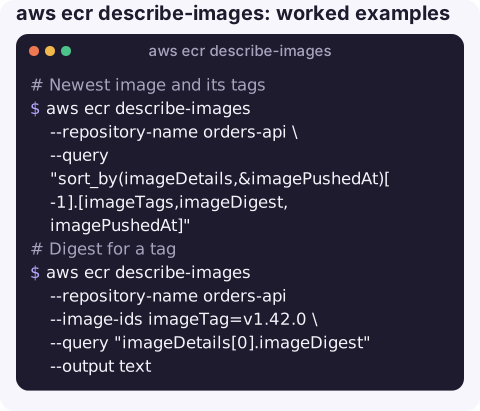
Newest image and its tags:
aws ecr describe-images --repository-name orders-api \
  --query "sort_by(imageDetails,&imagePushedAt)[-1].[imageTags,imageDigest,imagePushedAt]"
Digest for a tag, to pin a deployment to an exact image:
aws ecr describe-images --repository-name orders-api --image-ids imageTag=v1.42.0 \
  --query "imageDetails[0].imageDigest" --output text
Last 10 pushes as a table, with size in bytes:
aws ecr describe-images --repository-name orders-api \
  --query "reverse(sort_by(imageDetails,&imagePushedAt))[:10].[imagePushedAt,join(',', imageTags || ['<untagged>']),imageSizeInBytes]" \
  --output table
Untagged images, usually left behind when a tag is moved:
aws ecr describe-images --repository-name orders-api --filter tagStatus=UNTAGGED \
  --query "imageDetails[].imageDigest" --output text
Scan findings summary for an image (basic or enhanced scanning must be on):
aws ecr describe-images --repository-name orders-api --image-ids imageTag=v1.42.0 \
  --query "imageDetails[0].[imageScanStatus.status,imageScanFindingsSummary.findingSeverityCounts]"
Using it in a deployment
Two checks are worth scripting before a release. First, confirm the tag your pipeline is about to deploy actually exists, so a typo fails the pipeline instead of producing a task that cannot pull its image. Second, resolve the tag to a digest and deploy the digest, so the running service cannot drift if someone pushes the same tag again:
digest=$(aws ecr describe-images --repository-name orders-api \
  --image-ids imageTag=v1.42.0 --query "imageDetails[0].imageDigest" --output text) || exit 1
echo "deploying 123456789012.dkr.ecr.eu-west-2.amazonaws.com/orders-api@$digest"
For clean-up, lastRecordedPullTime tells you whether an old image is still being pulled by anything; images that have not been pulled for months are good candidates for a lifecycle rule.
Key options
| Option | Notes |
|---|---|
--image-ids | One or more imageTag= or imageDigest= selectors. Missing ones return ImageNotFoundException. |
--filter tagStatus= | TAGGED, UNTAGGED or ANY. |
--registry-id | Account ID of a registry you have cross-account access to. |
--max-items | Cap output; sorting with --query only sees the items fetched. |
Gotchas
- Size is compressed.
imageSizeInBytesis the compressed size in the registry; the image is larger once pulled and extracted. - Multi-architecture images appear as an image index plus per-platform manifests; the index carries the tags.
- Tags are mutable unless the repository has tag immutability enabled. Deploy by digest when you need certainty about what runs.
- Sorting needs the whole list. If you combine
--max-itemswithsort_by, you sort only the first page. - Pull failures are a different problem. If ECS cannot pull an image that exists here, see CannotPullContainerError.
Questions
How do I get the latest image tag from ECR?
Use --query "sort_by(imageDetails,&imagePushedAt)[-1].imageTags" on describe-images. Tags like latest only mean what your pipeline makes them mean.
How do I delete untagged ECR images?
List their digests with --filter tagStatus=UNTAGGED, then call aws ecr batch-delete-image with imageDigest entries, or set a lifecycle policy to expire them automatically.
What is the difference between list-images and describe-images?
list-images returns only digests and tags and is lighter. describe-images adds size, push time, pull time and scan information.
Knowing exactly which image is running is the first step in most container incidents. CloudConsole is built to show container services, alarms and logs on a phone.
About the app → · Download on the App Store