 CloudConsole
aws ecs describe-tasks
aws ecs describe-tasks --cluster my-cluster --tasks <task-id> returns a task's status, stoppedReason, stopCode, each container's exit code and reason, health status and network attachments. It is the command that tells you why a task stopped, and it works for stopped tasks for a limited time after they stop.
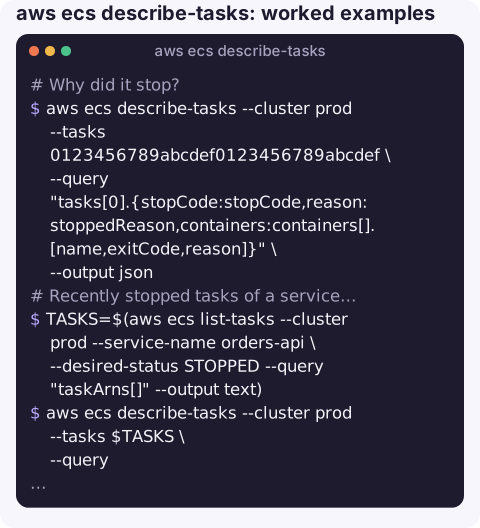
What the command does
Up to 100 task IDs or ARNs can be described per call. Each entry in tasks[] includes lastStatus and desiredStatus, taskDefinitionArn, group (for example service:orders-api), startedAt, stoppedAt, stopCode, stoppedReason, healthStatus, attachments (the ENI for awsvpc tasks) and containers[], each with lastStatus, exitCode, reason, healthStatus and the image digest that actually ran.
Syntax
aws ecs describe-tasks --cluster my-cluster --tasks <task-id-or-arn> [...] [--include TAGS]Worked examples
Why did it stop?
aws ecs describe-tasks --cluster prod --tasks 0123456789abcdef0123456789abcdef \
  --query "tasks[0].{stopCode:stopCode,reason:stoppedReason,containers:containers[].[name,exitCode,reason]}" \
  --output json
Recently stopped tasks of a service, with reasons:
TASKS=$(aws ecs list-tasks --cluster prod --service-name orders-api \
  --desired-status STOPPED --query "taskArns[]" --output text)
aws ecs describe-tasks --cluster prod --tasks $TASKS \
  --query "tasks[].[stoppedAt,stopCode,stoppedReason,containers[0].exitCode]" --output text
Private IP of a Fargate task:
aws ecs describe-tasks --cluster prod --tasks 0123456789abcdef0123456789abcdef \
  --query "tasks[0].attachments[0].details[?name=='privateIPv4Address'].value | [0]" --output text
Which image digest is actually running:
aws ecs describe-tasks --cluster prod --tasks 0123456789abcdef0123456789abcdef \
  --query "tasks[0].containers[].[name,image,imageDigest]" --output table
Is ECS Exec ready on this task?
aws ecs describe-tasks --cluster prod --tasks 0123456789abcdef0123456789abcdef \
  --query "tasks[0].[enableExecuteCommand,containers[0].managedAgents[0].lastStatus]" --output text
Decoding stop reasons
| You see | Meaning |
|---|---|
| Exit code 137 | Killed with SIGKILL: out of memory, or did not exit within the stop timeout. See exit code 137. |
| Exit code 139 | Segmentation fault in the process. |
| Exit code 143 | Stopped by SIGTERM, typically a normal stop or scale-in. |
Essential container in task exited | The main container stopped; check its exit code and logs. |
Task failed ELB health checks | The load balancer marked it unhealthy and ECS replaced it. |
CannotPullContainerError / ResourceInitializationError | Image pull or secrets retrieval failed, often networking or execution-role permissions. |
stopCode SpotInterruption | Fargate Spot capacity was reclaimed. |
Gotchas
- Stopped tasks disappear. ECS keeps stopped tasks visible for only about an hour. For longer history, capture task state change events with EventBridge.
- Short IDs need the right cluster. A task ID without the matching
--clusterreturns aMISSINGfailure, not an error. - Exit code missing? If the container never started (pull or secrets failure), there is no exit code; the reason is in
stoppedReasonorcontainers[].reason. - Logs hold the detail. Exit codes tell you how a process died, not why; read the container's log stream next.
- Health status needs a health check.
healthStatusonly reflects container health checks defined in the task definition. With none defined it staysUNKNOWN, which is normal and not a fault.
Questions
How do I find why an ECS task stopped?
Run describe-tasks on the task and read stopCode, stoppedReason and containers[].exitCode and reason. List recent stopped tasks with list-tasks --desired-status STOPPED.
What does ECS exit code 137 mean?
The container was killed with SIGKILL, usually for exceeding its memory limit or not shutting down within the stop timeout after SIGTERM.
What does "task stopped by user" mean?
stopCode UserInitiated: someone or something called StopTask, such as a deployment script, a person in the console, or automation.
A stopped task leaves its reason behind for only a short time, which matters when you are paged. CloudConsole, a phone app for AWS, is built to show stopped tasks, their reasons and their logs on a phone.
About the app → · Download on the App Store