 CloudConsole
ECS task stopped: Essential container exited with exit code 137
Exit code 137 means the container was killed with SIGKILL (128 + 9). In ECS there are two causes: the container hit its memory limit and was OOM-killed, or ECS asked it to stop with SIGTERM, it didn't exit within the stop timeout (30 seconds by default), and ECS killed it. The container's reason field in describe-tasks tells you which; fix memory sizing for the first, and SIGTERM handling for the second.
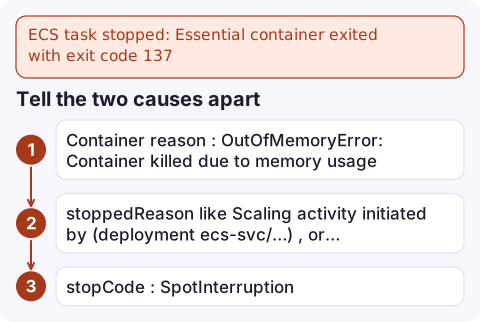
Tell the two causes apart
aws ecs describe-tasks --cluster prod --tasks arn:aws:ecs:eu-west-2:123456789012:task/prod/0f9e… \
--query 'tasks[].{stopped: stoppedReason, code: stopCode, containers: containers[].[name,exitCode,reason]}'| What you see | Cause |
|---|---|
Container reason: OutOfMemoryError: Container killed due to memory usage | Memory limit reached; see ECS OutOfMemoryError |
stoppedReason like Scaling activity initiated by (deployment ecs-svc/…), or Task failed ELB health checks, stopCode ServiceSchedulerInitiated, and no OOM reason | ECS stopped the task on purpose and the process ignored SIGTERM until it was killed |
stopCode: SpotInterruption | Fargate Spot or EC2 Spot capacity was reclaimed |
Stopped tasks stay visible in describe-tasks and the console only for a limited time (around an hour), so capture the details early, or record ECS task state change events with EventBridge.
Why a container ignores SIGTERM
When ECS stops a task it sends SIGTERM to each container's main process, waits for the container's stopTimeout, then sends SIGKILL. A 137 after a deploy or scale-in means the app was still running when the timeout ended. Usual reasons:
- Shell-form entrypoint.
CMD node server.js(shell form) runs your app under/bin/sh -c, which doesn't forward SIGTERM. Use exec form:CMD ["node", "server.js"]. - Wrapper scripts that start the app without
exec. End the script withexec "$@"so the app replaces the shell as PID 1. - The app has no SIGTERM handler and, as PID 1, the default action doesn't apply. Add a handler that stops accepting work and exits.
- Shutdown takes longer than the timeout: draining long requests, flushing buffers or finishing a job.
Fix it
- Use exec form, and add an init process that forwards signals and reaps zombies. In the container definition:
"linuxParameters": { "initProcessEnabled": true }, "stopTimeout": 60stopTimeoutcan be raised up to 120 seconds on Fargate. Keep it longer than your real shutdown time but shorter than the load balancer's deregistration delay plus a margin. - Handle SIGTERM in the app. In Node.js:
process.on('SIGTERM', () => { server.close(() => process.exit(0)); setTimeout(() => process.exit(1), 25000).unref(); }); - Register a new task definition revision and deploy it, then watch the next deployment's stopped tasks. A clean shutdown exits with 0 (or 143 if the app exits because of the signal itself).
Mistakes to avoid
- Raising memory when the stopped reason is a deployment. That doesn't help; the kill came from the stop timeout, not the memory limit.
- Treating every 137 as harmless. During deployments it may mean requests were cut off mid-flight, which users see as 502s from the load balancer.
- Setting a very long stop timeout to hide slow shutdown. Deployments and scale-in then take much longer, and Spot interruptions only give about two minutes anyway.
Questions
What does exit code 137 mean in ECS?
The container was killed with SIGKILL. Either it exceeded its memory limit, or it didn't stop within the stop timeout after ECS sent SIGTERM.
How do I know if ECS exit code 137 was out of memory?
Run aws ecs describe-tasks and check the container's reason. OutOfMemoryError: Container killed due to memory usage confirms an OOM kill; otherwise check the task's stoppedReason.
What is the default ECS stop timeout?
30 seconds. You can set stopTimeout per container, up to 120 seconds on Fargate.

Exit 137 often appears in the middle of a deployment that users feel as a burst of errors. CloudConsole, a phone app for AWS, is built to show service events, stopped tasks and the related alarms on your phone, so you can tell a memory problem from a shutdown problem quickly.
Did it start after a deploy? What changed? on the app’s alarm screen lists the deploys and configuration changes from the hour before the alarm fired.
About the app → · Download on the App Store