 CloudConsole
Essential container in task exited
This stoppedReason only says that one container marked essential stopped, so ECS stopped the whole task. The real reason is on the container: run aws ecs describe-tasks and read each container's exitCode and reason, then follow the exit code (1 for an application error, 137 for a kill or out-of-memory, 139 for a crash, 143 for SIGTERM). Also check whether the container that exited should have been essential at all.
Get the container-level details
The task-level message is generic; the detail lives on each container:
aws ecs describe-tasks --cluster prod --tasks <task-arn> \
  --query 'tasks[0].containers[].{name: name, essential: essential, exit: exitCode, reason: reason, status: lastStatus}' \
  --output table
If you don't have the task ARN, list recently stopped tasks for the service:
aws ecs list-tasks --cluster prod --service-name api --desired-status STOPPEDStopped tasks are only kept for a short time (about an hour). For a history, create an EventBridge rule on ECS "Task State Change" events with lastStatus STOPPED and send them to a log group.
What the exit code tells you
| Exit code | Meaning | Where to go next |
|---|---|---|
| 0 | The process finished successfully, but an essential container isn't supposed to finish | Is it a one-off job or init container? Mark it non-essential |
| 1 (or another small number) | Application error | Exit code 1 |
| 137 | SIGKILL: out of memory, or ignored SIGTERM | Exit code 137 |
| 139 | Segmentation fault | Exit code 139 |
| 143 | Ended on SIGTERM | Exit code 143 |
none, with a reason | Container never started | See CannotPullContainerError or ResourceInitializationError |
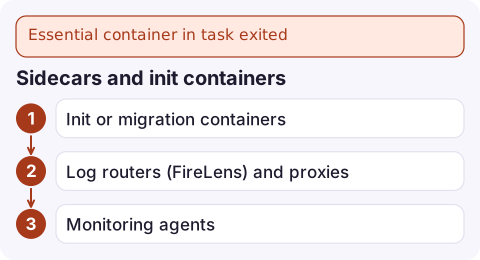
Sidecars and init containers
Every container is essential by default. That's right for the main app, but it causes needless restarts when a helper exits:
- Init or migration containers that run once and exit 0 should be
"essential": false, with the app depending on them:
With{ "name": "migrate", "essential": false, … }, { "name": "app", "essential": true, "dependsOn": [{ "containerName": "migrate", "condition": "SUCCESS" }], … }SUCCESS, the app only starts if the migration exits 0. - Log routers (FireLens) and proxies are usually essential on purpose: if they die, logs or traffic would be lost silently. If one keeps exiting, fix it rather than making it non-essential.
- Monitoring agents are often fine as non-essential so a broken agent doesn't take the application down.
Look at the service, not just one task
aws ecs describe-services --cluster prod --services api \
  --query 'services[0].{running: runningCount, desired: desiredCount, events: events[:5].message}'
A running count below desired with repeated "has started 1 tasks" events means a restart loop. If it began with a deployment and the deployment circuit breaker is enabled, ECS may roll back by itself; otherwise roll back to the previous task definition revision with update-service while you investigate.
When several tasks have stopped, compare them. The same container failing with the same exit code every time points to the image or configuration of that revision. Different containers or codes across tasks point to something environmental instead, such as a dependency that is down, memory pressure on shared EC2 hosts or Spot interruptions.
Questions
What does Essential container in task exited mean?
A container with essential set to true stopped, so ECS stopped every container in the task. The container's own exit code and reason explain why it stopped.
Should every container in an ECS task be essential?
No. Make the main application essential. Init containers, one-off jobs and optional agents are usually better as non-essential, with dependsOn conditions where order matters.
How long can I see stopped ECS tasks?
Only for a short period after they stop, typically about an hour. Capture task state change events with EventBridge if you need a longer history.

A task restart loop is easy to miss until the running count drops below desired and users notice. CloudConsole, a phone app for AWS, is built to show ECS service events, running counts and alarms on your phone.
Did it start after a deploy? What changed? on the app’s alarm screen lists the deploys and configuration changes from the hour before the alarm fired.
About the app → · Download on the App Store