 CloudConsole
ALB idle timeout and HTTP client keepalive duration
The connection idle timeout (idle_timeout.timeout_seconds) closes a client or target connection after it has carried no data for that long: 60 seconds by default, 1 to 4,000 allowed. The HTTP client keepalive duration (client_keep_alive.seconds) is the maximum life of a client connection, 3,600 seconds by default, 60 to 604,800 allowed. Set your targets' own keep-alive timeout longer than the ALB idle timeout, and raise the idle timeout only for requests that legitimately stay silent for more than 60 seconds.
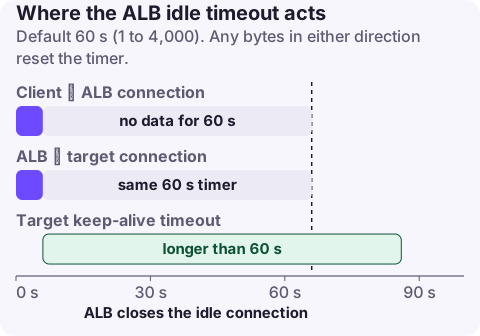
How the two settings work
Idle timeout applies to both sides of the load balancer: the connection from the client and the connection from the ALB to the target. If no bytes are sent or received for the idle period, the ALB closes the connection. A request whose backend takes 90 seconds to send its first byte will fail with 504 under the default 60 seconds. HTTP/2 PING frames don't reset the timer.
HTTP client keepalive duration is a ceiling on how long one client connection can be reused. When it expires the ALB accepts one more request and closes the connection gracefully (Connection: close for HTTP/1.x, a GOAWAY frame for HTTP/2). It starts when the connection opens and doesn't reset with traffic. Lower values make clients reconnect sooner, which helps traffic move away after a zonal shift or an IP address change.
Recommended values
| Situation | Idle timeout | Client keepalive |
|---|---|---|
| Typical API or web app | 60 s (default) | 3,600 s (default) |
| Endpoints that stream or long-poll with gaps over 60 s | Longest silent gap plus margin (for example 120 to 300 s) | Default |
| Large uploads through the ALB | Long enough for the slowest client chunk gap | Default |
| WebSockets / server-sent events | Above your heartbeat interval; send heartbeats every 30 to 50 s instead of raising it a lot | Default |
| Using zonal shift or frequent IP changes | Default | Lower, such as 300 to 900 s |
Whatever you choose, the target's keep-alive timeout must be longer than the ALB idle timeout. If the application closes an idle connection first, the ALB may send a request on a socket that is already closing and return 502 Bad Gateway to the client. Typical fixes:
- Node.js:
server.keepAliveTimeout = 65000andserver.headersTimeout = 66000for a 60-second ALB. - Gunicorn:
--keep-alive 65; nginx:keepalive_timeout 65s;; Apache:KeepAliveTimeout 65.
Change it
Console: EC2, Load Balancers, select the ALB, Attributes, Edit, then Connection idle timeout and HTTP client keepalive duration under traffic configuration.
CLI:
aws elbv2 modify-load-balancer-attributes \
  --load-balancer-arn arn:aws:elasticloadbalancing:eu-west-2:123456789012:loadbalancer/app/web/50dc6c495c0c9188 \
  --attributes Key=idle_timeout.timeout_seconds,Value=120 Key=client_keep_alive.seconds,Value=3600

aws elbv2 describe-load-balancer-attributes \
  --load-balancer-arn arn:aws:elasticloadbalancing:eu-west-2:123456789012:loadbalancer/app/web/50dc6c495c0c9188 \
  --query "Attributes[?starts_with(Key,'idle_timeout') || starts_with(Key,'client_keep_alive')]"
CloudFormation: on AWS::ElasticLoadBalancingV2::LoadBalancer, add entries to LoadBalancerAttributes:
LoadBalancerAttributes:
  - Key: idle_timeout.timeout_seconds
    Value: "120"
  - Key: client_keep_alive.seconds
    Value: "3600"
Terraform: idle_timeout and client_keep_alive arguments on aws_lb.
Symptoms of getting it wrong
| Symptom | Likely cause |
|---|---|
| 504 after exactly the idle timeout on slow endpoints | Backend silent longer than the idle timeout |
| Random low-rate 502s, more after quiet periods | Target keep-alive shorter than the ALB idle timeout |
ELB 5xx with -1 target processing time in access logs | Target closed or reset the connection |
| Many idle connections on targets after raising the timeout | Idle timeout set far higher than needed |
| Clients keep hitting an impaired zone after a shift | Long client keepalive |
Questions
What is the default idle timeout for an Application Load Balancer?
60 seconds. You can set it from 1 to 4,000 seconds with the idle_timeout.timeout_seconds attribute.
What is the difference between ALB idle timeout and keep-alive?
Idle timeout closes a connection after a period with no data. The HTTP client keepalive duration caps the total lifetime of a client connection regardless of activity; it defaults to 3,600 seconds.
How do I set the ALB idle timeout in Terraform?
Use the idle_timeout argument on the aws_lb resource; client_keep_alive sets the keepalive duration.
Intermittent 502s from a keep-alive mismatch are hard to reproduce on demand. CloudConsole, a phone app for AWS, is being built to show load balancer 5xx alarms on your phone so you can line them up with deploys and traffic.
About the app → · Download on the App Store