 CloudConsole
ALB 502 Bad Gateway
An ALB returns 502 when the target closed the connection or sent a response the load balancer could not use. The classic cause is an application keep-alive timeout shorter than the ALB's idle timeout (60 seconds by default), so the target closes a connection the ALB is about to reuse. Other causes are crashing targets, malformed responses and Lambda targets that error or return an invalid result.
Is the 502 from the ALB or your app?
Two CloudWatch metrics answer this immediately:
HTTPCode_ELB_502_Count: the load balancer generated the 502 because of a problem talking to the target.HTTPCode_Target_5XX_Count: your application returned a 5xx itself; the ALB just passed it on.
aws cloudwatch get-metric-statistics --namespace AWS/ApplicationELB \
  --metric-name HTTPCode_ELB_502_Count \
  --dimensions Name=LoadBalancer,Value=app/my-alb/50dc6c495c0c9188 \
  --start-time 2026-11-16T08:00:00Z --end-time 2026-11-16T10:00:00Z \
  --period 300 --statistics Sum
The ALB's own 502 page is a short HTML document with 502 Bad Gateway and the Server: awselb/2.0 header. If your app's error page comes back instead, debug the app.
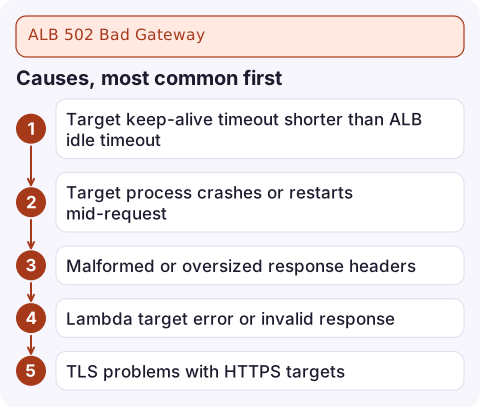
Causes, most common first
| Cause | Signal |
|---|---|
| Target keep-alive timeout shorter than ALB idle timeout | Sporadic 502s at low to moderate load, often on the first request after a quiet spell; no app errors logged |
| Target process crashes or restarts mid-request | 502s cluster around deploys, OOM kills or container restarts |
| Malformed or oversized response headers | Every request to one route fails; app logs show a 200 |
| Lambda target error or invalid response | Access log error_reason such as LambdaUnhandled, LambdaInvalidResponse or LambdaResponseTooLarge |
| TLS problems with HTTPS targets | Every request fails right after enabling HTTPS on the target group |
Fix the keep-alive mismatch
The ALB keeps connections to targets open and reuses them. If your server closes an idle connection after 5 seconds (the Node.js default) while the ALB believes it is good for 60, a request sent on it hits a closed socket and becomes a 502. Make the target's keep-alive timeout longer than the ALB idle timeout. Check the ALB setting:
aws elbv2 describe-load-balancer-attributes \
  --load-balancer-arn arn:aws:elasticloadbalancing:eu-west-2:123456789012:loadbalancer/app/my-alb/50dc6c495c0c9188 \
  --query "Attributes[?Key=='idle_timeout.timeout_seconds']"
Then raise the server side, for example in Node.js:
server.keepAliveTimeout = 65000;
server.headersTimeout = 66000;
Equivalent settings exist in nginx (keepalive_timeout), gunicorn (--keep-alive) and Apache (KeepAliveTimeout).
Use the access logs
With access logging enabled, each 502 line shows elb_status_code 502, and usually target_status_code as - when the target never sent a usable response. A target_processing_time of -1 means the connection failed or closed before a response. If you query the logs with Athena, count by target to see whether one instance is responsible:
SELECT target_ip, count(*) AS errors
FROM alb_logs
WHERE elb_status_code = 502
  AND time > '2026-11-16T08:00:00'
GROUP BY target_ip
ORDER BY errors DESC;
The table and column names depend on how you created the Athena table.
Other fixes
- Graceful shutdown: on SIGTERM, stop accepting new connections and finish in-flight requests, and keep the target group's deregistration delay longer than your longest request.
- Lambda targets: return
statusCode,headersand a stringbody, catch exceptions, and keep responses under the size limit. - Headers: avoid huge cookies or many repeated headers in responses.
- Not the ALB at all? A 502 page from CloudFront mentioning a Lambda validation error comes from Lambda@Edge, and API Gateway has its own malformed proxy response 502.
Questions
Why do I get intermittent 502 errors from my ALB?
Most often the target's HTTP keep-alive timeout is shorter than the ALB idle timeout, so the target closes connections the ALB tries to reuse. Set the server's keep-alive timeout above the ALB's.
How do I tell if a 502 came from the ALB or my application?
Compare HTTPCode_ELB_502_Count (generated by the load balancer) with HTTPCode_Target_5XX_Count (returned by your targets). Access logs show both elb_status_code and target_status_code.
Can unhealthy targets cause 502?
Indirectly. Requests in flight to a target that crashes or is killed fail with 502. Purely unhealthy targets usually lead to 503 when none are left to route to.

Intermittent 502s are easy to dismiss until they show up in a customer complaint. CloudConsole, a phone app for AWS, is built to show load balancer error alarms and target health on your phone, so a slow trickle of 502s gets noticed.
Did it start after a deploy? What changed? on the app’s alarm screen lists the deploys and configuration changes from the hour before the alarm fired.
About the app → · Download on the App Store