 CloudConsole
ALB target group health check settings
An Application Load Balancer checks each target every 30 seconds by default (5 to 300 allowed), waits 5 seconds for a reply (2 to 120), needs 5 consecutive successes to mark a target healthy and 2 failures to mark it unhealthy (each 2 to 10), and treats HTTP 200 as success on path /. For most services a cheap dedicated path such as /healthz, a 10 to 15 second interval, a 5 second timeout, 2 to 3 healthy and 2 to 3 unhealthy checks give faster, steadier results than the defaults.
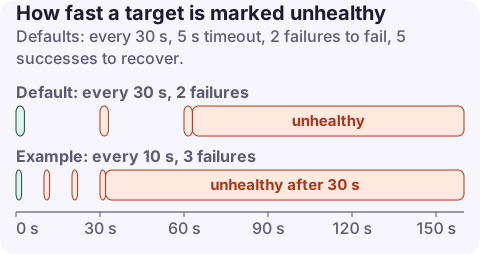
The settings and their defaults
| Setting (API name) | Default (instance/IP targets) | Range |
|---|---|---|
| Protocol (HealthCheckProtocol) | HTTP | HTTP or HTTPS |
| Port (HealthCheckPort) | traffic-port | Any port |
| Path (HealthCheckPath) | / | Any path (gRPC: /AWS.ALB/healthcheck) |
| Interval (HealthCheckIntervalSeconds) | 30 s (35 s for Lambda) | 5 to 300 |
| Timeout (HealthCheckTimeoutSeconds) | 5 s (30 s for Lambda) | 2 to 120 |
| Healthy threshold (HealthyThresholdCount) | 5 | 2 to 10 |
| Unhealthy threshold (UnhealthyThresholdCount) | 2 | 2 to 10 |
| Success codes (Matcher) | 200 | 200 to 499, lists or ranges ("200-299") |
A new target must pass one check to start receiving traffic. With the defaults, a target that had failed needs 5 x 30 = 150 seconds of good checks to come back, and a dead target is removed after about 2 x 30 = 60 seconds. If every target in all enabled zones is unhealthy, the ALB fails open and sends traffic to all of them anyway.
Watch out for Terraform: the aws_lb_target_group documentation lists its own defaults of 3 for both thresholds and a 6-second timeout for HTTP, so a target group created with Terraform may not match the AWS defaults above. Set every value explicitly.
Recommended values
| Situation | Interval | Timeout | Healthy | Unhealthy | Path / matcher |
|---|---|---|---|---|---|
| Typical web or API service | 10 to 15 s | 5 s | 2 to 3 | 2 to 3 | /healthz, 200 |
| Slow-starting app (JVM, large caches) | 15 s | 5 s | 2 | 3 | Same, plus an ECS grace period or ASG health check grace period |
| Endpoint that redirects (/ returns 301 or 302) | - | - | - | - | Use a non-redirecting path, or matcher 200-399 |
| App behind auth (401 on /) | - | - | - | - | Unauthenticated health path; avoid accepting 401 |
| Lambda target | 35 s+ | 30 s | 2 to 3 | 2 to 3 | Interval must exceed the function timeout |
Keep the health endpoint cheap and local: return 200 when the process can serve requests. Don't call the database or downstream APIs from it, or a slow dependency marks every target unhealthy at once and the whole service goes down.
Change it
CLI:
aws elbv2 modify-target-group \
  --target-group-arn arn:aws:elasticloadbalancing:eu-west-2:123456789012:targetgroup/web/73e2d6bc24d8a067 \
  --health-check-path /healthz --health-check-interval-seconds 15 --health-check-timeout-seconds 5 \
  --healthy-threshold-count 2 --unhealthy-threshold-count 3 --matcher HttpCode=200

aws elbv2 describe-target-health \
  --target-group-arn arn:aws:elasticloadbalancing:eu-west-2:123456789012:targetgroup/web/73e2d6bc24d8a067 \
  --query 'TargetHealthDescriptions[].[Target.Id,TargetHealth.State,TargetHealth.Reason]' --output table
CloudFormation (AWS::ElasticLoadBalancingV2::TargetGroup): HealthCheckPath, HealthCheckIntervalSeconds, HealthCheckTimeoutSeconds, HealthyThresholdCount, UnhealthyThresholdCount, Matcher (HttpCode: "200"). Terraform (aws_lb_target_group, health_check block): path, interval, timeout, healthy_threshold, unhealthy_threshold, matcher.
Symptoms of getting it wrong
| Reason code in describe-target-health | Meaning |
|---|---|
Target.Timeout | No response within the timeout: security group, wrong port, or the app is too slow |
Target.ResponseCodeMismatch | App returned a code not in the matcher (often 301, 302, 401 or 404) |
Target.FailedHealthChecks | Connection refused or reset, or repeated failures |
Elb.InitialHealthChecking | Still running the first checks |
ECS tasks killed in a loop during deploys usually mean the app needs longer to start than the checks allow; see ECS failed ELB health checks. For more reason codes, see targets unhealthy.
Questions
What are the default ALB health check settings?
HTTP on the traffic port, path /, 30-second interval, 5-second timeout, 5 healthy and 2 unhealthy consecutive checks, success code 200 (Lambda targets: 35-second interval, 30-second timeout).
Why is my target group health check failing?
Usually the security group doesn't allow the ALB to reach the health check port, the path returns a redirect or 404, or the app takes longer to respond than the timeout. describe-target-health shows a reason code for each target.
Should the health check call the database?
Generally no. A shallow check keeps a database blip from marking every target unhealthy at once; monitor dependencies separately.
Health checks decide whether users get a 503, so a bad setting tends to surface as an alert during a deploy. CloudConsole, a phone app for AWS, is being built to show target health and 5xx alarms on your phone.
About the app → · Download on the App Store