 CloudConsole
ECS minimum healthy percent and maximum percent
For a rolling update, minimumHealthyPercent is the share of the desired count that must stay RUNNING and healthy during a deployment (rounded up), and maximumPercent is the most tasks allowed in RUNNING, PENDING or STOPPING (rounded down). Replica services default to 100 and 200: ECS starts a full new set before stopping old tasks, which is safe but needs double capacity. Lower maximumPercent to deploy in batches when capacity is tight, and keep minimumHealthyPercent at 100 for user-facing services.
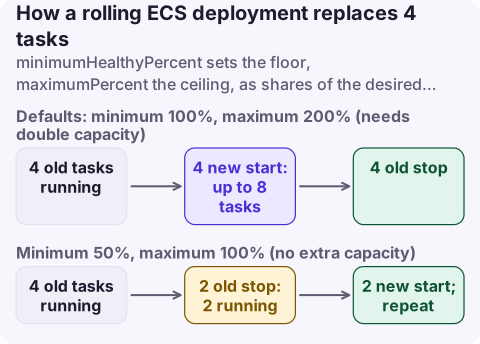
How ECS uses the two numbers
With a desired count of 4:
| minimumHealthyPercent / maximumPercent | Lower bound (round up) | Upper bound (round down) | What a deployment does |
|---|---|---|---|
| 100 / 200 (default) | 4 | 8 | Starts 4 new tasks, then stops 4 old ones as new ones become healthy |
| 100 / 150 | 4 | 6 | Replaces 2 at a time: start 2, drain 2, repeat |
| 50 / 100 | 2 | 4 | Stops 2 old tasks first, then starts 2 new; no extra capacity needed |
| 75 / 125 | 3 | 5 | One extra and one fewer at a time |
| 0 / 100 | 0 | 4 | Stops everything, then starts new tasks: downtime |
A task only counts towards the minimum once it is healthy: when it passes the target group health check (and container health checks, if any). Without any health checks, ECS waits 40 seconds after RUNNING before counting it. These settings also govern replacement of unhealthy tasks and container instance draining, not only deployments.
Recommended values
| Service | minimumHealthyPercent | maximumPercent | Why |
|---|---|---|---|
| User-facing, Fargate | 100 | 200 | Fastest safe deploy; Fargate capacity is on demand |
| User-facing, large count (50+ tasks) | 100 | 125 to 150 | Avoid launching hundreds of tasks at once and hitting launch-rate or vCPU quotas |
| EC2 cluster with little spare capacity | 100 | 110 to 150 | Needs room for only a batch of new tasks |
| Workers / queue consumers | 50 | 100 to 200 | Brief capacity dip is acceptable |
| Single task that must not run twice | 0 | 100 | Accepts downtime to avoid overlap |
| Daemon services | 0 (CLI/API default) | 100 | Fixed by the daemon scheduler's model |
Two traps with small counts: with 1 task and 100/100, ECS can't stop the old task and can't start a new one, so the deployment never progresses. With 2 tasks and 50/100, you serve from a single task during deploys.
Change it
aws ecs update-service --cluster prod --service orders-api \
  --deployment-configuration "maximumPercent=150,minimumHealthyPercent=100,deploymentCircuitBreaker={enable=true,rollback=true}"

aws ecs describe-services --cluster prod --services orders-api \
  --query 'services[0].deploymentConfiguration'
Console: service, Update, Deployment options: Min running tasks % and Max running tasks %. CloudFormation: DeploymentConfiguration with MinimumHealthyPercent and MaximumPercent on AWS::ECS::Service. Terraform: deployment_minimum_healthy_percent and deployment_maximum_percent on aws_ecs_service.
For blue/green (CodeDeploy) and external controllers these values aren't used on Fargate, and on EC2 they only apply to instance draining.
Symptoms of getting it wrong
- Deployment stuck, no new tasks starting: maximumPercent leaves no room (for example 100 with minimum 100), or the cluster lacks capacity for the extra tasks; check service events for
unable to place a task. - Errors or latency spikes during every deploy: minimum below 100 on a service without spare capacity, or deregistration delay and shutdown handling are wrong.
- Deploys take a long time: small batches (low maximumPercent) combined with long health check and draining times.
- Two copies of a singleton running at once: maximumPercent above 100 for a task that must be unique; use 0/100.
Questions
What is the default minimum healthy percent in ECS?
100% for replica services. Daemon services default to 0% through the CLI, SDKs and API, and 50% in the console.
What does maximumPercent 200 mean in ECS?
During a deployment ECS can run up to twice the desired count, so it can start a full set of new tasks before stopping the old ones.
How do I deploy an ECS service with only one task without downtime?
Use minimumHealthyPercent 100 and maximumPercent 200, so ECS starts the new task and waits for it to be healthy before stopping the old one.
A deploy that drops capacity at peak can look like an outage to users. CloudConsole, a phone app for AWS, is being built to show ECS deployment progress and running-task alarms on your phone.
About the app → · Download on the App Store