 CloudConsole
AWS ECS force new deployment
aws ecs update-service --cluster my-cluster --service my-service --force-new-deployment starts a new deployment using the service's current settings, replacing every task without changing the task definition. Use it to pick up a new image behind the same tag, rotated secrets or a new platform version. The rollout follows the service's deployment configuration, and services using CodeDeploy blue/green need a new CodeDeploy deployment instead.
When it is the right tool
| Situation | Force new deployment? |
|---|---|
Pushed a new image to the same tag (:latest, :prod) | Yes: new tasks resolve the tag again |
| Rotated a secret in Secrets Manager or changed a Parameter Store value used by the task | Yes: values are injected when a task starts |
| Want tasks on a newer Fargate platform version or fresh container instances | Yes |
| Registered a new task definition revision | No need: --task-definition family:revision already starts a deployment |
| Tasks crash on start | No: fix the cause first, or the new deployment fails the same way |
The command, and variants
# Plain: same task definition, all tasks replaced
aws ecs update-service --cluster prod --service orders-api --force-new-deployment

# New revision and forced deployment in one call (force is redundant but harmless)
aws ecs update-service --cluster prod --service orders-api \
  --task-definition orders-api:44 --force-new-deployment

# Turn on ECS Exec and roll tasks so it takes effect
aws ecs update-service --cluster prod --service orders-api \
  --enable-execute-command --force-new-deployment
In the console the same thing is the Force new deployment option when you update the service; see restarting an ECS service for the click-through.
Watch the rollout
aws ecs describe-services --cluster prod --services orders-api \
  --query 'services[0].deployments[].{id:id,status:status,rollout:rolloutState,desired:desiredCount,running:runningCount,failed:failedTasks,td:taskDefinition}' \
  --output table

aws ecs describe-services --cluster prod --services orders-api \
  --query 'services[0].events[:5].[createdAt,message]' --output text

aws ecs wait services-stable --cluster prod --services orders-api
You'll see a PRIMARY deployment (new) and an ACTIVE one (old) until the old tasks drain. rolloutState becomes COMPLETED or, with the deployment circuit breaker enabled, FAILED and rolled back.
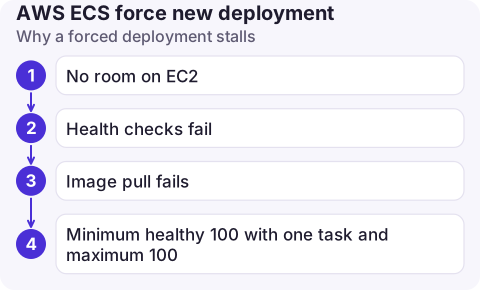
Why a forced deployment stalls
- No room on EC2: with maximum percent at 200, ECS needs capacity for a second set of tasks. Without it, look for unable to place a task in the events.
- Health checks fail: new tasks start but the target group never marks them healthy; see ELB health check failures.
- Image pull fails after the tag moved to an image that no longer exists or isn't accessible: CannotPullContainerError.
- Minimum healthy 100 with one task and maximum 100: ECS can neither start an extra task nor stop the old one. Raise maximum percent.
Limits and gotchas
- Blue/green via CodeDeploy: for services with the
CODE_DEPLOYdeployment controller,update-servicecan only change a few settings such as desired count; roll tasks by creating a CodeDeploy deployment. - Consistency across tasks: ECS resolves a mutable tag to an image digest when the deployment starts, so all tasks in one deployment run the same image even if the tag moves mid-rollout.
- Desired count 0: a forced deployment on a scaled-to-zero service completes instantly and changes nothing.
- Prefer immutable tags (commit SHA) and new revisions for releases; keep forced deployments for refreshes, not for shipping code.
Questions
Does force new deployment cause downtime?
Not if the service has spare tasks or its maximum percent lets new tasks start before old ones stop, and health checks pass. A single task with minimum healthy percent 0 will have a short gap.
How do I force a new deployment with the AWS CLI?
aws ecs update-service --cluster my-cluster --service my-service --force-new-deployment.
Does force new deployment pull the latest image?
It starts new tasks, which resolve the image reference again. With a mutable tag that means the image the tag points to now; with a digest or immutable tag nothing changes.

Watching a rollout finish is something you might do from anywhere. CloudConsole, a phone app for AWS, is built to show ECS deployments and service events on your phone, with guardrails around production changes.
About the app → · Download on the App Store