 CloudConsole
ECS health check grace period
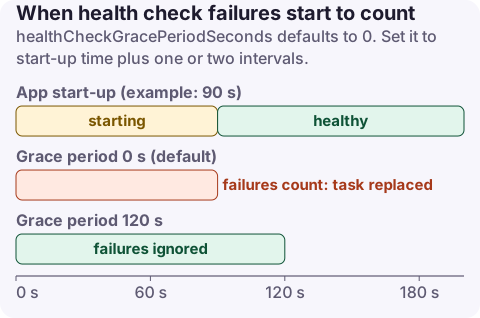
The health check grace period (healthCheckGracePeriodSeconds) is how long the ECS service scheduler ignores failing Elastic Load Balancing, VPC Lattice and container health checks after a task starts. It defaults to 0, so a slow-starting app can be killed and replaced in a loop before it ever becomes healthy. Set it to roughly your worst-case start-up time plus one or two health check intervals, typically 60 to 180 seconds for JVM or large apps; it doesn't trigger a new deployment when changed.
What it does and doesn't cover
During the grace period the scheduler won't stop a task because the target group or the container healthCheck reports it unhealthy. After it ends, normal rules apply: the task is replaced once the target group marks it unhealthy or the container health check fails its retries.
What it doesn't do:
- It doesn't delay the load balancer's own checks or routing. The target group still checks the task and only routes traffic once it passes.
- It doesn't help a container that crashes or exits; that's a different failure (essential container exited).
- If the service uses no health checks at all, the setting is unused.
The maximum is 2,147,483,647 seconds, but very long values hide genuinely broken tasks for that long.
Choosing a value
Measure how long a task takes from RUNNING to answering its health endpoint (application logs, or time from task start to the target becoming healthy in describe-target-health), then:
grace period = worst-case start-up + (healthy threshold x health check interval)
| App | Typical start-up | Suggested grace period |
|---|---|---|
| Go, Node.js, small Python service | 2 to 15 s | 30 to 60 s |
| Spring Boot / JVM | 30 to 90 s | 120 to 180 s |
| App that warms caches or runs migrations at start | Minutes | Fix the start-up first; then up to 300 s |
Container health checks have their own startPeriod (0 to 300 seconds) in the task definition; failures during that period don't count against retries. Use both: startPeriod for the container check and the service grace period for load balancer checks.
Change it
CLI (applies to new tasks without a new deployment):
aws ecs update-service --cluster prod --service orders-api --health-check-grace-period-seconds 120

aws ecs describe-services --cluster prod --services orders-api \
  --query 'services[0].{grace:healthCheckGracePeriodSeconds,events:events[:5].message}'
Console: ECS, cluster, service, Update, then Health check grace period in the load balancing section.
CloudFormation: HealthCheckGracePeriodSeconds on AWS::ECS::Service. Terraform: health_check_grace_period_seconds on aws_ecs_service.
Symptoms of getting it wrong
| Symptom | Likely setting |
|---|---|
| Service events repeat "(task ...) failed ELB health checks" and tasks restart every minute or two after a deploy | Grace period 0 or shorter than start-up |
| Deployment circuit breaker rolls back a release that works fine locally | Same: tasks killed before ready |
| A broken release stays "running" for many minutes before being replaced | Grace period much longer than needed |
| Tasks are healthy but get no traffic for a while | Target group healthy threshold x interval, not the grace period |
When tasks loop, check the stopped task's reason: Task failed ELB health checks in (target-group ...) points to this setting or the health check settings; see ECS failed ELB health checks.
Questions
What is the default ECS health check grace period?
0 seconds. Without a value, ECS acts on failed load balancer and container health checks as soon as a task starts.
Does changing the health check grace period redeploy the service?
No. Updating healthCheckGracePeriodSeconds doesn't start a new deployment; it applies to tasks launched afterwards.
How do I set the ECS health check grace period in Terraform?
Use health_check_grace_period_seconds on the aws_ecs_service resource.
Start-up kill loops typically show up as a deploy that never finishes. CloudConsole, a phone app for AWS, is being built to show ECS service events and alarms on your phone so you can spot the loop early.
About the app → · Download on the App Store