 CloudConsole
EKS managed node group update settings
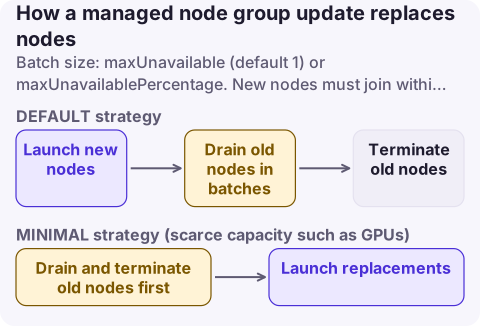
When a managed node group's AMI, Kubernetes version or launch template changes, EKS replaces nodes in batches controlled by updateConfig: maxUnavailable (a count, default 1, up to 100) or maxUnavailablePercentage. The DEFAULT update strategy launches new nodes before draining old ones; MINIMAL terminates old nodes first, which suits scarce or expensive capacity such as GPUs. Each new node must join within 15 minutes and each old node's pods must drain within 15 minutes, or the update fails unless you force it.
The settings
| Setting | Values | Default |
|---|---|---|
maxUnavailable | 1 to 100 nodes | 1 |
maxUnavailablePercentage | 1 to 100% (up to 100 nodes at once) | - (use instead of the count) |
updateStrategy | DEFAULT or MINIMAL | DEFAULT |
Force update (--force on version updates) | Evict pods even if a PodDisruptionBudget blocks it | Off |
How an update runs:
- Setup: a new launch template version with the target AMI.
- Scale up (DEFAULT): the Auto Scaling group's desired and maximum size grow by the larger of twice the number of AZs or maxUnavailable, so new nodes launch first in the same AZs.
- Upgrade: for up to maxUnavailable nodes at a time, cordon, drain pods (honouring PDBs), wait 60 seconds after evictions, terminate.
- Scale down: return the group to its original size.
With MINIMAL, EKS cordons all nodes at the start and terminates old nodes before replacements launch, so capacity never exceeds the configured size, but available capacity dips during the update.
Recommended values
| Node group | Setting | Reason |
|---|---|---|
| Small groups (under 10 nodes) | maxUnavailable 1 | Safe, still quick |
| Medium groups | maxUnavailablePercentage 10 to 25 | Faster without large capacity drops |
| Large groups (100+) | maxUnavailablePercentage 10, but no more than 100 nodes at a time | Updates finish in reasonable time |
| GPU or capacity-constrained | MINIMAL, maxUnavailable 1 | Avoid needing spare scarce instances |
| Stateful workloads with strict PDBs | maxUnavailable 1, check PDBs allow one eviction | Avoid PodEvictionFailure |
Change it
aws eks update-nodegroup-config --cluster-name prod --nodegroup-name general \
  --update-config maxUnavailablePercentage=20

aws eks describe-nodegroup --cluster-name prod --nodegroup-name general \
  --query 'nodegroup.{update:updateConfig,scaling:scalingConfig,status:status,release:releaseVersion}'

# Roll to the latest AMI for the cluster version, forcing past blocking PDBs only if you accept the impact
aws eks update-nodegroup-version --cluster-name prod --nodegroup-name general
aws eks wait nodegroup-active --cluster-name prod --nodegroup-name general
CloudFormation: UpdateConfig (MaxUnavailable, MaxUnavailablePercentage, UpdateStrategy) and ForceUpdateEnabled on AWS::EKS::Nodegroup. Terraform: update_config { max_unavailable, max_unavailable_percentage, update_strategy } and force_update_version on aws_eks_node_group.
Other node group settings worth setting deliberately
- Instance types: list several of similar size so updates and scale-outs survive insufficient capacity in one AZ.
- Capacity type:
ON_DEMANDorSPOT; Spot groups should be diversified across many types. - Disk size: 20 GiB by default (50 for Windows) when not using a launch template; image-heavy nodes need more.
- Scaling config: min, max and desired; the update temporarily raises max and desired, so leave EC2 vCPU quota headroom.
- Node auto repair (
nodeRepairConfig) replaces nodes that report unhealthy conditions.
Failure modes
| Error | Cause | Fix |
|---|---|---|
NodeCreationFailure | Capacity, vCPU quota, bad user data, node not Ready within 15 minutes | Check the ASG activity and node bootstrap logs |
PodEvictionFailure | PDB allows no disruption, or pods tolerate every taint and keep rescheduling | Relax the PDB, fix tolerations, or update with force |
| Update very slow | maxUnavailable 1 on a large group, long pod termination | Raise the percentage; shorten termination grace periods |
Questions
What is maxUnavailable in an EKS managed node group?
The maximum number of nodes EKS takes out of service at once during an update. It defaults to 1 and can be up to 100, or you can set a percentage instead.
What is the difference between the DEFAULT and MINIMAL update strategy?
DEFAULT launches new nodes before terminating old ones, keeping capacity. MINIMAL terminates old nodes first, so capacity never grows beyond the configured size but dips during the update.
Why does my EKS node group update fail with PodEvictionFailure?
Pods couldn't be evicted within 15 minutes, usually because a PodDisruptionBudget allows no disruptions. Fix the PDB or retry the update with force.
Node group updates that stall usually do it hours in, on a PodDisruptionBudget nobody remembered. CloudConsole, a phone app for AWS, is being built to show EKS node and cluster alarms on your phone.
About the app → · Download on the App Store