 CloudConsole
Target tracking scaling policies (EC2 Auto Scaling)
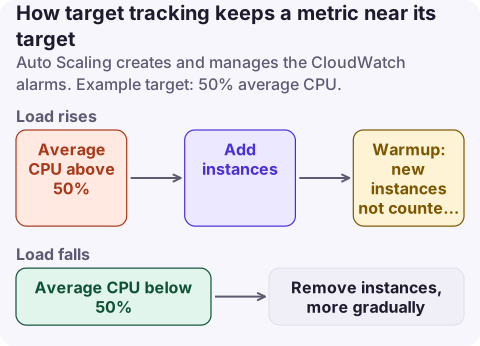
A target tracking policy keeps one metric close to a target value by adding or removing instances, and Auto Scaling creates and manages the CloudWatch alarms for you. Pick a metric that rises with load (average CPU, ALB requests per target, or a custom per-instance metric), set a target that leaves headroom for spikes and launch time (often 40 to 60 percent CPU), and set an instance warmup equal to how long a new instance takes to start contributing. It scales out quickly and scales in gradually.
The settings
| Setting | What it does | Typical value |
|---|---|---|
| Metric | Predefined: ASGAverageCPUUtilization, ASGAverageCPUUtilizationHighResolution, ASGAverageNetworkIn, ASGAverageNetworkOut, ALBRequestCountPerTarget; or a custom metric | CPU for compute-bound, requests per target for web |
| Target value | Level to hold the metric at | 40 to 60% CPU; measured requests per instance at your latency goal |
| Instance warmup | Seconds before a new instance's metrics count | Boot + app start time, e.g. 120 to 300 s |
| Disable scale-in | Policy only adds capacity | false, unless something else removes instances |
If you don't set an instance warmup on the policy, it uses the group's default instance warmup, or the default cooldown if that isn't set either. Setting DefaultInstanceWarmup on the group is the cleaner option because every policy then shares it.
Choosing the metric and target
- The metric must change in proportion to the number of instances: when you double capacity, per-instance CPU or requests per target should roughly halve. Queue length on its own doesn't; backlog per instance (metric math) does.
- Use one-minute data: enable detailed monitoring for EC2 metrics, which otherwise arrive every five minutes and make scaling sluggish. High-resolution CPU is available for faster reaction.
- Leave headroom: the target should be low enough that the group survives a spike for the time it takes to launch and warm new instances. If boot takes 4 minutes and traffic can double in 2, target lower.
- Several policies on different metrics are allowed: the group scales out if any wants to and scales in only if all agree.
Create it
aws autoscaling put-scaling-policy --auto-scaling-group-name web-asg \
  --policy-name cpu50 --policy-type TargetTrackingScaling --estimated-instance-warmup 180 \
  --target-tracking-configuration '{"PredefinedMetricSpecification":{"PredefinedMetricType":"ASGAverageCPUUtilization"},"TargetValue":50.0}'

# Requests per target (resource label = ALB and target group suffixes)
aws autoscaling put-scaling-policy --auto-scaling-group-name web-asg \
  --policy-name rpt1000 --policy-type TargetTrackingScaling \
  --target-tracking-configuration '{"PredefinedMetricSpecification":{"PredefinedMetricType":"ALBRequestCountPerTarget","ResourceLabel":"app/web/50dc6c495c0c9188/targetgroup/web/73e2d6bc24d8a067"},"TargetValue":1000.0}'

aws autoscaling update-auto-scaling-group --auto-scaling-group-name web-asg --default-instance-warmup 180
CloudFormation: AWS::AutoScaling::ScalingPolicy with PolicyType: TargetTrackingScaling, EstimatedInstanceWarmup and TargetTrackingConfiguration (PredefinedMetricSpecification, TargetValue, DisableScaleIn). Terraform: aws_autoscaling_policy with policy_type = "TargetTrackingScaling", estimated_instance_warmup and a target_tracking_configuration block (predefined_metric_specification { predefined_metric_type, resource_label }, target_value, disable_scale_in).
ECS services and other scalable targets use Application Auto Scaling target tracking instead, with the same ideas and ScaleInCooldown / ScaleOutCooldown settings.
Symptoms and fixes
| Symptom | Cause | Fix |
|---|---|---|
| Group oscillates up and down | Warmup too short, or metric noisy | Raise warmup; smooth with a better metric |
| Slow to react to spikes | Five-minute metrics, high target, long boot | Detailed monitoring, lower target, warm pools or faster AMIs |
| Never scales in | Another policy disagrees, scale-in disabled, or min size reached | Check all policies and MinSize |
| Stuck: no scaling at all | Metric missing, alarms in INSUFFICIENT_DATA | Fix the metric source; use FILL() in metric math for sparse metrics |
| Scaling blocked by launch errors | vCPU quota or capacity | Check the group's activity history; see EC2 vCPU limit |
Don't edit or delete the CloudWatch alarms the policy creates (named with TargetTracking-); Auto Scaling manages them and may replace them.
Questions
What is a good target value for CPU target tracking?
Often 40 to 60 percent average CPU. Lower targets leave more headroom for spikes and slow instance start-up; higher targets save money but risk latency.
What is the difference between target tracking and step scaling?
Target tracking keeps a metric near a value and manages its own alarms. Step scaling adds or removes fixed amounts at thresholds you define, which gives more control but needs more tuning.
What does instance warmup do in target tracking?
Until a new instance's warmup expires, its metrics don't count towards the group's average, which stops the policy from adding more instances before the new ones are actually serving.
Scaling problems are usually noticed when latency climbs and the group hasn't grown. CloudConsole, a phone app for AWS, is being built to show scaling activity and capacity alarms on your phone.
About the app → · Download on the App Store