 CloudConsole
EC2 vCPU limits (On-Demand and Spot instance quotas)
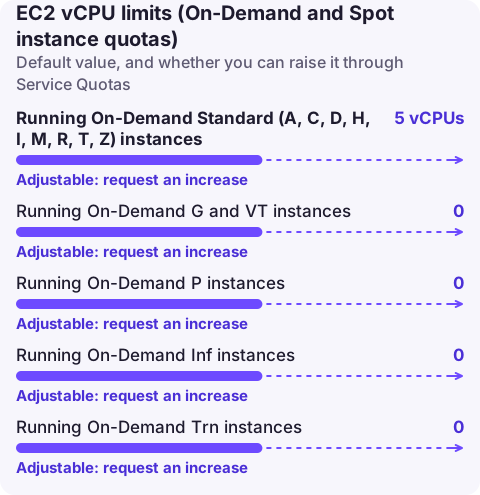
EC2 limits running instances by vCPUs, not instance count: each Region has a vCPU quota per instance family group, such as "Running On-Demand Standard (A, C, D, H, I, M, R, T, Z) instances" (quota code L-1216C47A). Brand-new accounts can start as low as 5 vCPUs for Standard and 0 for GPU and other specialised families, and AWS raises them automatically with usage. Running instances and Capacity Reservations count; stopped instances don't. Request more in Service Quotas.
How the quota works
There is one quota per instance family group per Region for On-Demand, and a matching set for Spot requests. The value is the total vCPUs you can have running at once in that group, whatever mix of sizes you choose: a 256-vCPU Standard quota allows 32 m5.2xlarge (8 vCPUs each) or 16 c5.4xlarge (16 each).
| Quota (On-Demand) | Default on a new account | Adjustable |
|---|---|---|
| Running On-Demand Standard (A, C, D, H, I, M, R, T, Z) instances | 5 vCPUs | Yes |
| Running On-Demand G and VT instances | 0 | Yes |
| Running On-Demand P instances | 0 | Yes |
| Running On-Demand Inf instances | 0 | Yes |
| Running On-Demand Trn instances | 0 | Yes |
| Running On-Demand X instances | 0 | Yes |
| Running On-Demand High Memory instances | 0 | Yes |
| Running On-Demand F, DL and HPC instances | 0 | Yes |
The Spot equivalents are named "All Standard (A, C, D, H, I, M, R, T, Z) Spot Instance Requests" and so on. Established accounts usually show much higher values than these defaults, because EC2 raises quotas automatically with use.
What counts: instances in the running state and unused Capacity Reservations. Pending, stopping, stopped and hibernated instances do not.
Check usage against the quota
# The Standard On-Demand quota in this Region
aws service-quotas get-service-quota --service-code ec2 --quota-code L-1216C47A \
  --query 'Quota.{name:QuotaName,value:Value}'

# All EC2 instance quotas with their codes
aws service-quotas list-service-quotas --service-code ec2 \
  --query "Quotas[?contains(QuotaName,'On-Demand')].[QuotaName,QuotaCode,Value]" --output table

# vCPUs currently running (sum of default vCPUs per running instance)
aws ec2 describe-instances --filters Name=instance-state-name,Values=running \
  --query 'Reservations[].Instances[].[InstanceType,CpuOptions.CoreCount,CpuOptions.ThreadsPerCore]' --output text
Usage is also published to CloudWatch as ResourceCount in the AWS/Usage namespace with dimensions Service=EC2, Type=Resource, Resource=vCPU and Class=Standard/OnDemand. The Service Quotas console shows that graph on the quota page and can create an alarm at a percentage of the quota.
What hitting it looks like
RunInstances, Auto Scaling and launch templates fail with:
VcpuLimitExceeded: You have requested more vCPU capacity than your current vCPU limit of 32 allows
for the instance bucket that the specified instance type belongs to.
Auto Scaling records the same text in the group's activity history and keeps retrying. This is different from InsufficientInstanceCapacity, which means AWS has no capacity of that type in the Availability Zone right now; see that page. The VcpuLimitExceeded fix has a step-by-step recovery.
Raise it
aws service-quotas request-service-quota-increase --service-code ec2 \
  --quota-code L-1216C47A --desired-value 256

aws service-quotas list-requested-service-quota-change-history --service-code ec2 \
  --query 'RequestedQuotas[].{quota:QuotaName,want:DesiredValue,status:Status}' --output table
Request per Region and per family group: a raise for Standard does nothing for G instances. For GPU families from zero, explain the workload in the case; those are reviewed manually. Find the codes for the other groups with the listing command above rather than guessing.
Planning tips
- Size the request for your peak plus a deployment's worth of headroom: rolling deployments and instance refreshes briefly run old and new instances together.
- Large Auto Scaling groups and EKS node groups that use several instance types still draw from one family-group quota.
- Use Spot quotas separately; a Spot fleet does not consume On-Demand vCPUs.
Questions
What is the default EC2 vCPU limit?
It varies by account. Brand-new accounts can start at 5 vCPUs for Standard On-Demand instances and 0 for most accelerated families, and AWS raises them automatically as you use EC2.
Do stopped instances count towards the EC2 vCPU limit?
No. Only running instances (and Capacity Reservations) count. Stopped, stopping, pending and hibernated instances don't.
Is the EC2 vCPU limit per Region?
Yes. Each Region has its own set of vCPU quotas, and you request increases separately in each.
vCPU limits usually bite when an Auto Scaling group tries to scale out under load. CloudConsole, a phone app for AWS, is being built to show capacity alarms and scaling activity on your phone so a stuck scale-out is visible quickly.
About the app → · Download on the App Store