 CloudConsole
AWS data transfer cost between Availability Zones
Yes, AWS charges for data that crosses Availability Zones in the same Region: the EC2 pricing page lists $0.01 per GB in each direction at the time of writing, so a GB sent from one AZ to another is billed twice. It appears as Region-DataTransfer-Regional-Bytes, for example USE2-DataTransfer-Regional-Bytes. Traffic within one AZ over private IPs is free.
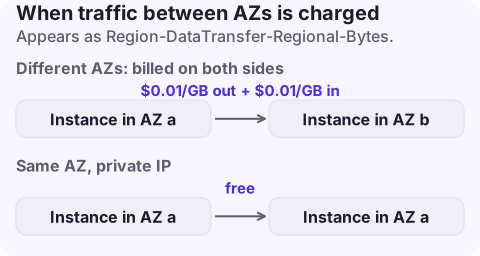
What is charged and what is free
| Traffic | Charged? |
|---|---|
| EC2, RDS, ElastiCache, ENIs talking across AZs | Yes, per GB in each direction |
| Same AZ, private IP addresses | Free |
| To a public or Elastic IPv4 address in the same Region | Yes, per GB in each direction, even within one AZ |
| EC2 to Application or Classic Load Balancer in the same VPC over private IPs | Free |
| RDS Multi-AZ replication between primary and standby | Free |
| EC2 directly to S3, DynamoDB, SQS, SNS, ECR and others in the same Region | Free, unless a NAT gateway or endpoint processing is in the path |
Because both sides are metered, the CUR shows two DataTransfer-Regional-Bytes line items for each resource pair. Some services price in-Region traffic differently, so check the service's own pricing page.
Find the chatty pair
- Cost Explorer: usage type group EC2: Data Transfer - Inter AZ, group by Usage type or linked account, daily.
- Turn on VPC flow logs with a custom format that includes
az-id,srcaddr,dstaddrandbytes, then sum bytes where source and destination are in different zones. - Usual suspects: Kubernetes services spreading calls across nodes in every zone, Kafka or Elasticsearch replication, a database read replica in a different AZ from its readers, and one NAT gateway serving private subnets in other zones.
aws ce get-cost-and-usage --region us-east-1 \
  --time-period Start=2026-10-15,End=2026-11-15 \
  --granularity DAILY --metrics UnblendedCost UsageQuantity \
  --filter '{"Dimensions":{"Key":"USAGE_TYPE_GROUP","Values":["EC2: Data Transfer - Inter AZ"]}}' \
  --query 'ResultsByTime[].[TimePeriod.Start,Total.UnblendedCost.Amount,Total.UsageQuantity.Amount]' \
  --output text
Safe ways to reduce it
- Route to the local zone first. Kubernetes topology-aware routing, zone-aware client libraries, and Kafka follower fetching keep most reads in-zone while you still run in several AZs.
- Use private IPs internally. Talking to a sibling service through its public or Elastic IP turns free same-AZ traffic into billed regional transfer.
- NAT gateway per AZ, with each private route table pointing at its own zone's gateway.
- Place read replicas and caches next to their heaviest readers.
- Compress replication and service-to-service payloads where the software supports it.
What not to do
- Do not move production into a single AZ to save transfer. The resilience you lose is worth more than the bill for most workloads.
- Do not count only one direction when estimating. A 1 TB nightly sync across zones is billed on the way out and on the way in.
- Do not forget that NAT gateway processing is charged on top when cross-AZ traffic also passes through NAT.
Questions
Does AWS charge for data transfer between availability zones?
Yes. The EC2 pricing page lists a per-GB charge in each direction for traffic crossing AZs in the same Region.
What is DataTransfer-Regional-Bytes?
The usage type for data transfer within a Region, mainly between Availability Zones and to public or Elastic IPs, billed per GB.
Is traffic between an ALB and its targets charged?
Data between EC2 instances and an Application or Classic Load Balancer in the same VPC over private IPs is listed as free.
Cross-AZ transfer grows with every new service and replica. CloudConsole, a phone app for AWS, shows spend by usage type, including DataTransfer-Regional-Bytes with an explanation of what it covers, so you notice the trend between releases.
About the app → · Download on the App Store