 CloudConsole
What is DataTransfer-Out-Bytes?
DataTransfer-Out-Bytes is the usage type for data sent from an AWS Region to the internet, written with a Region prefix such as EUW2-DataTransfer-Out-Bytes. It is charged per GB in tiers that aggregate across services, after a 100 GB per month allowance that is shared across all services and Regions. Inbound data from the internet is not charged.
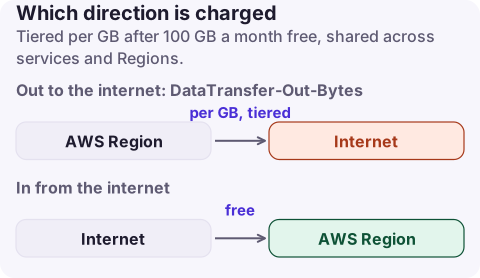
How the charge works
- Direction: only traffic leaving AWS for the internet. The matching
DataTransfer-In-Bytesline has no charge. - Free allowance: the EC2 pricing page lists 100 GB of data transfer out to the internet free each month, aggregated across services and Regions (China and GovCloud excluded). It is one allowance for the account, not per Region.
- Tiers: the per-GB rate drops as monthly volume grows, and the tiers count your combined egress from EC2, S3, RDS, CloudWatch Logs and other listed services.
- Prefix:
APN1-DataTransfer-Out-Bytesis Tokyo; no prefix means us-east-1.
CloudFront uses the same suffix with edge-location prefixes such as EU- or AP-. Tell them apart by service (product code AmazonCloudFront), not by the usage type name alone.
Find what is sending the data
- Cost Explorer: group by Service, filter Usage type to the egress lines (search "DataTransfer-Out"). This tells you whether it is EC2, S3, CloudFront or something else.
- For EC2-side egress, use the usage type group EC2: Data Transfer - Internet (Out) and then resource-level data or flow logs to find the instance or NAT gateway.
- For S3, check which bucket: S3 Storage Lens or server access logs show bytes downloaded per bucket and requester.
# Which services have internet egress this month?
aws ce get-dimension-values --region us-east-1 \
  --time-period Start=2026-11-01,End=2026-11-17 \
  --dimension USAGE_TYPE --search-string DataTransfer-Out-Bytes

aws ce get-cost-and-usage --region us-east-1 \
  --time-period Start=2026-11-01,End=2026-11-17 \
  --granularity MONTHLY --metrics UnblendedCost UsageQuantity \
  --filter '{"Dimensions":{"Key":"USAGE_TYPE","Values":["EUW2-DataTransfer-Out-Bytes","DataTransfer-Out-Bytes"]}}' \
  --group-by Type=DIMENSION,Key=SERVICE
UsageQuantity is in GB here. Divide cost by GB to see your effective rate after the free allowance and tiers.
Ways to reduce it (largest effect first)
- Serve public content through CloudFront. Origin fetches from S3 or a load balancer to CloudFront are not billed as internet egress, and CloudFront caching cuts repeat downloads. CloudFront then bills its own data transfer, so compare rates for your traffic.
- Compress responses (gzip or brotli) and stop sending what nobody reads: verbose API payloads, unpaginated exports, debug assets.
- Find accidental egress: backups or log shippers pushing to another cloud, clients downloading the same large object repeatedly, a public bucket being scraped.
- Use private addresses between your own resources. One instance calling another through its public or Elastic IP in the same Region is billed as regional transfer in each direction rather than internet egress; private IPs in the same AZ cost nothing.
What not to do
- Do not block egress blindly with security groups or NACLs to stop a bill; you will break patching, licence checks and webhooks. Find the flow first.
- Do not assume moving a download to S3 presigned URLs is free. S3 internet egress is still
DataTransfer-Out-Bytes, just under S3. - If you are leaving AWS entirely, ask AWS Support about free data transfer out for migrations before paying egress on a bulk export; the EC2 pricing page describes eligibility.
Questions
Is data transfer into AWS free?
Yes. Data transferred in from the internet is not charged; the DataTransfer-In-Bytes line shows volume at no cost.
What is "data transfer out beyond the global free tier"?
It is internet egress above the 100 GB per month allowance, which is shared across all services and Regions in the account.
Why does S3 show DataTransfer-Out-Bytes?
Objects downloaded from a bucket to the internet are billed as S3 internet egress in the bucket Region.
Egress spikes tend to start on a weekend when nobody is looking. CloudConsole, a phone app for AWS, shows spend by service and usage type and explains lines like DataTransfer-Out-Bytes, so you can see which service is sending data from your phone.
About the app → · Download on the App Store