 CloudConsole
What is "EC2 - Other" on my AWS bill?
EC2 - Other is a Cost Explorer service grouping for charges that belong to Amazon EC2 but are not instance hours: EBS volumes and snapshots, NAT gateway hours and bytes, data transfer, idle Elastic IPs and similar. To see what is inside it, filter Cost Explorer to Service = EC2 - Other and group by Usage type.
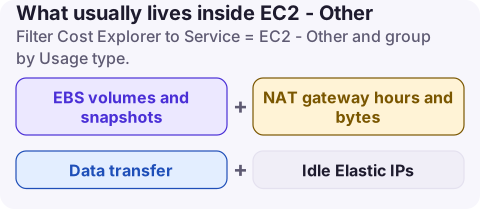
What usually lives inside EC2 - Other
| Usage type pattern | What it is | Typical cause of growth |
|---|---|---|
EBS:VolumeUsage.gp3, .gp2, .io2 | EBS volume storage, GB-month | Volumes left after instances were terminated |
EBS:SnapshotUsage | Standard tier snapshot storage | Backup policies with no expiry |
EBS:VolumeP-IOPS.*, EBS:VolumeP-Throughput.gp3 | Provisioned performance | IOPS or throughput set above what the workload uses |
NatGateway-Hours, NatGateway-Bytes | NAT gateways | Private subnets pulling data through NAT |
DataTransfer-Regional-Bytes | Traffic between AZs in a Region | Chatty services spread across zones |
DataTransfer-Out-Bytes | Internet egress | Downloads, APIs, backups leaving AWS |
Each appears with a Region prefix such as EUC1-. Public IPv4 address charges now appear under Amazon VPC as PublicIPv4:InUseAddress and PublicIPv4:IdleAddress, so look there too if you are hunting for address costs.
Break it down in two minutes
- Cost Explorer, last 3 months, Monthly, Group by Usage type, Filter Service = EC2 - Other.
- Switch to Daily for the line that grew, to find the day it started.
- Use the Usage type group filter for a cleaner view: groups such as EC2: EBS - Snapshots, EC2: NAT Gateway - Data Processed and EC2: Data Transfer - Inter AZ collect the per-Region usage types for you.
aws ce get-cost-and-usage --region us-east-1 \
  --time-period Start=2026-10-01,End=2026-11-01 \
  --granularity MONTHLY --metrics UnblendedCost \
  --filter '{"Dimensions":{"Key":"SERVICE","Values":["EC2 - Other"]}}' \
  --group-by Type=DIMENSION,Key=USAGE_TYPE \
  --query 'ResultsByTime[0].Groups[].[Keys[0],Metrics.UnblendedCost.Amount]' \
  --output text | sort -k2 -gr | head -15
For per-resource detail (which volume, which NAT gateway) enable resource-level data in Cost Explorer settings, which covers the last 14 days, or query your cost and usage export.
Fixes by line item
- Volumes: list unattached ones and snapshot-then-delete what nobody claims; see unused EBS volumes. Migrate gp2 to gp3 (gp2 vs gp3).
- Snapshots: add expiry to backup policies and archive long-term ones; see EBS snapshot cost.
- NAT: gateway endpoints for S3 and DynamoDB; see NAT Gateway cost.
- Cross-AZ transfer: keep chatty pairs in one zone where resilience allows; see cross-AZ data transfer.
When EC2 - Other jumps overnight
A step change on one day usually has an event behind it: a new NAT gateway or VPC, a snapshot policy running for the first time, a large volume restored for an investigation, or a migration copying data across AZs. Note the date in Cost Explorer, then search CloudTrail Event history for CreateNatGateway, CreateVolume, CreateSnapshot or CopySnapshot around it.
Common misreadings
- Looking only at "EC2 - Instances" and concluding EC2 is cheap. Storage and networking can exceed instance spend.
- Stopping instances to save money and being surprised EC2 - Other did not move. Attached volumes keep billing while the instance is stopped.
- Assuming the line is one Region. Group by Region as well; a forgotten Region with old snapshots is common.
Questions
What does EC2-Other mean in AWS billing?
It is the Cost Explorer grouping for EC2-related charges other than instance running hours, such as EBS, snapshots, NAT gateways and data transfer.
Why is EC2-Other higher than my EC2 instances?
Usually large or forgotten EBS volumes and snapshots, or NAT gateway and data transfer charges from busy private subnets.
Does EC2-Other include Elastic IPs?
Cost Explorer has EC2 usage type groups for Elastic IP addresses, but public IPv4 address charges are billed as PublicIPv4 usage types under Amazon VPC. Check both services.
EC2 - Other is the line people never expand until the bill arrives. CloudConsole, a phone app for AWS, breaks spend down by service and usage type and explains each usage type, so the volumes and NAT bytes inside it are visible from your phone.
About the app → · Download on the App Store