 CloudConsole
Does S3 versioning cost more?
Versioning itself is free, but every version of every object is stored and billed at its storage class rate. Overwrites and deletes in a versioned bucket do not remove data: overwrites keep the old version as noncurrent, and deletes add a delete marker while the data stays. Without a lifecycle rule to expire noncurrent versions, a versioned bucket only grows.
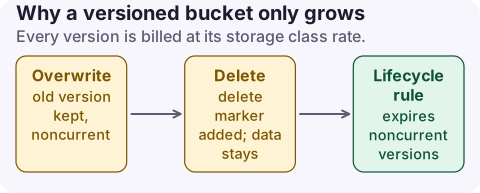
How versions add up
- Upload
report.csvthree times and you are billed for three objects. - Deleting an object without a version ID adds a delete marker; the previous versions remain and still bill.
- Once enabled, versioning can only be suspended, not removed. Suspending stops new versions but keeps every existing one.
- Replication and Object Lock require versioning, so buckets with those features need lifecycle rules even more.
All of this lands in the normal storage usage types, such as TimedStorage-ByteHrs; there is no separate "versioning" line, which is why it goes unnoticed.
Rewrites are the usual culprit. A status file updated every minute, or a nightly 1 GB export written to the same key, creates a new version each time: the export alone leaves around 30 GB of noncurrent data a month in a versioned bucket unless a rule expires it.
Measure noncurrent data
S3 Storage Lens reports current and noncurrent version bytes per bucket, which is the cheapest way to see the scale across an account. For a single prefix you can list versions directly, but on large buckets that is a lot of billed LIST requests.
# Count and size noncurrent versions under one prefix
aws s3api list-object-versions --bucket my-bucket --prefix exports/ \
  --query 'Versions[?IsLatest==`false`].[Key,VersionId,Size,LastModified]' \
  --output text | awk '{n++; s+=$3} END {print n " noncurrent versions, " s/1024/1024/1024 " GiB"}'

# Delete markers with nothing behind them
aws s3api list-object-versions --bucket my-bucket --prefix exports/ \
  --query 'DeleteMarkers[?IsLatest==`true`].[Key,VersionId]' --output text | head
Cap it with lifecycle rules
This rule keeps the three most recent noncurrent versions for 30 days after they become noncurrent, then expires them, and cleans up delete markers that no longer hide any version:
{
  "Rules": [{
    "ID": "expire-old-versions",
    "Status": "Enabled",
    "Filter": {},
    "NoncurrentVersionExpiration": {"NoncurrentDays": 30, "NewerNoncurrentVersions": 3},
    "Expiration": {"ExpiredObjectDeleteMarker": true},
    "AbortIncompleteMultipartUpload": {"DaysAfterInitiation": 7}
  }]
}
Apply with aws s3api put-bucket-lifecycle-configuration (it replaces the existing configuration). Lifecycle expiration runs asynchronously, so the storage drop shows over the following days. You can also transition noncurrent versions to a colder class first if you must keep them longer.
Before you expire anything
- Agree the retention with whoever relies on versions for recovery from accidental deletes or ransomware. Versions are often the only undo.
- Check Object Lock or legal holds; locked versions cannot be expired until the retention ends.
- If you are emptying the bucket entirely, follow deleting a versioned bucket rather than deleting versions by hand.
What not to do: suspend versioning thinking it frees space. It only stops new versions; the existing ones keep billing until a lifecycle rule or an explicit versioned delete removes them.
Questions
Does S3 versioning cost money?
Enabling it is free, but every stored version is billed as normal storage, so costs rise with overwrites and deletes.
Does deleting an object in a versioned bucket save space?
No. A plain delete adds a delete marker and keeps the data as a noncurrent version until it is expired or deleted by version ID.
Can I turn off versioning to stop the cost?
You can only suspend it. Existing versions remain and keep billing until you expire them.
Versioned buckets grow a bit every day, which a monthly glance misses. CloudConsole, a phone app for AWS, shows S3 spend by usage type with an explanation of each storage line, so steady growth is visible on your phone.
About the app → · Download on the App Store