 CloudConsole
S3 storage classes and cost
Colder S3 storage classes cost less per GB-month but add minimum storage durations, a 128 KB minimum billable size in the IA classes, per-GB retrieval fees and per-object transition requests. They save money for large objects that are kept for months and read rarely; for small or short-lived objects they can cost more than S3 Standard. Intelligent-Tiering avoids the guesswork for unpredictable access.
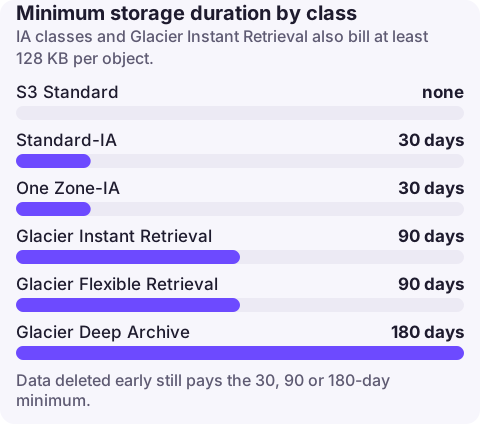
The trade-offs per class
| Class | Minimum duration | Minimum billable size | Retrieval |
|---|---|---|---|
| S3 Standard | None | None | No fee |
| Intelligent-Tiering | None | None (objects under 128 KB are not tiered) | No fee; monitoring fee per object |
| Standard-IA | 30 days | 128 KB | Per-GB fee |
| One Zone-IA | 30 days | 128 KB | Per-GB fee; single AZ |
| Glacier Instant Retrieval | 90 days | 128 KB | Per-GB fee, milliseconds |
| Glacier Flexible Retrieval | 90 days | None, but 40 KB metadata per object | Per-GB fee; restore first, minutes to hours |
| Glacier Deep Archive | 180 days | None, but 40 KB metadata per object | Per-GB fee; restore first, hours |
Deleting, overwriting or transitioning an object before its minimum duration incurs a prorated charge for the remaining days, shown as usage types such as EarlyDelete-SIA, EarlyDelete-GIR, EarlyDelete-ByteHrs (Glacier Flexible Retrieval) and EarlyDelete-GDA.
Where class changes go wrong
- Small objects in IA classes: a 20 KB object in Standard-IA is billed as 128 KB, so the cheaper rate is cancelled out.
- Transition request costs: each object moved by lifecycle is a billed request. For a bucket of hundreds of millions of small objects, the one-off transition can exceed months of savings. S3 skips objects under 128 KB in transitions by default for this reason.
- Data that is read more than expected: retrieval fees on Standard-IA or Glacier Instant Retrieval can exceed the storage saving for analytics data scanned weekly.
- Short-lived data deleted after a week still pays the 30, 90 or 180-day minimum.
Decide with data, then automate
- Run Storage Class Analysis on a bucket or prefix for a few weeks to see how often objects are read by age (it is billed by the number of objects monitored).
- Check average object size:
BucketSizeBytesdivided byNumberOfObjectsfrom theAWS/S3CloudWatch metrics. - Write a lifecycle rule that transitions only the prefixes and ages that analysis supports, and expires what you can delete.
{
  "Rules": [{
    "ID": "logs-to-ia-then-expire",
    "Status": "Enabled",
    "Filter": {"Prefix": "logs/"},
    "Transitions": [{"Days": 30, "StorageClass": "STANDARD_IA"},
                    {"Days": 120, "StorageClass": "GLACIER_IR"}],
    "Expiration": {"Days": 400}
  }]
}
Apply with aws s3api put-bucket-lifecycle-configuration --bucket my-bucket --lifecycle-configuration file://lifecycle.json, which replaces any existing rules on the bucket.
Rules of thumb
- Unknown or changing access, objects mostly over 128 KB: Intelligent-Tiering (cost details).
- Backups and logs kept for compliance, rarely read: Glacier Instant Retrieval if you need immediate reads, Deep Archive if a 12-hour restore is acceptable.
- Re-creatable data you can afford to lose with one AZ: One Zone-IA.
- Anything kept under 30 days: leave it in Standard and expire it.
Questions
Which S3 storage class is cheapest?
Glacier Deep Archive has the lowest storage rate, but it has a 180-day minimum and restores take hours, so it suits only long-term archives.
Do S3 lifecycle transitions cost money?
Yes. Each object transitioned is a billed lifecycle transition request, priced per 1,000 requests by destination class.
What is the S3 Standard-IA minimum object size?
Objects smaller than 128 KB are billed as 128 KB in Standard-IA and One Zone-IA.
After a lifecycle change the bill moves between usage types over weeks. CloudConsole, a phone app for AWS, shows S3 spend by usage type and explains each storage-class line, so you can check the shift is happening as planned.
About the app → · Download on the App Store