 CloudConsole
Aurora I/O-Optimized vs Aurora Standard
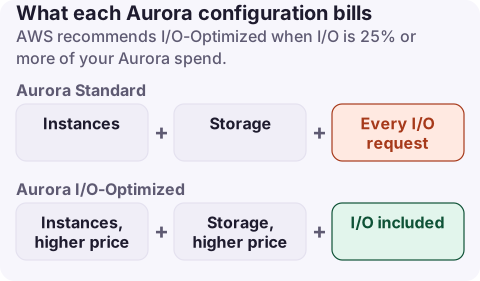
Aurora Standard charges for instances, storage and every I/O request; Aurora I/O-Optimized has no read or write I/O charges but higher instance and storage prices. AWS recommends I/O-Optimized when I/O is 25% or more of your Aurora spend, and says such clusters can save up to 40%. You can switch from Standard to I/O-Optimized once every 30 days and back to Standard at any time.
How to tell which you need
- In Cost Explorer, filter Service = Relational Database Service and group by usage type for the cluster's Region.
- Compare the I/O line (
Aurora:StorageIOUsage, with a Region prefix) with the total of instance, storage and I/O lines for Aurora. - If I/O is 25% or more of that total, I/O-Optimized is likely cheaper. If it is well under, stay on Standard.
aws ce get-cost-and-usage --region us-east-1 \
  --time-period Start=2026-10-01,End=2026-11-01 \
  --granularity MONTHLY --metrics UnblendedCost \
  --filter '{"Dimensions":{"Key":"SERVICE","Values":["Amazon Relational Database Service"]}}' \
  --group-by Type=DIMENSION,Key=USAGE_TYPE \
  --query 'ResultsByTime[0].Groups[?contains(Keys[0], `Aurora`)].[Keys[0],Metrics.UnblendedCost.Amount]' \
  --output table
To see I/O per cluster rather than per account, sum the VolumeReadIOPs and VolumeWriteIOPs CloudWatch metrics for the cluster over a month and multiply by your Region's per-million I/O price.
What changes when you switch
- Read and write I/O charges stop for the whole cluster.
- Instance-hours (or ACU-hours for Serverless v2) and storage are priced higher.
- Reserved Instances apply to both configurations; AWS accounts for the price difference, and suggests buying about 30% more RIs to fully cover I/O-Optimized usage.
- Backup storage, data transfer and Extended Support charges are unaffected.
# Switch a cluster to I/O-Optimized (back to Standard: --storage-type aurora)
aws rds modify-db-cluster --db-cluster-identifier my-aurora-cluster \
  --storage-type aurora-iopt1 --apply-immediately
For clusters on non-NVMe instance classes the switch has no downtime; NVMe-based instances need an engine reboot. Your engine version must support I/O-Optimized.
Because storage is priced higher on I/O-Optimized, clusters with very large volumes and little I/O are the worst candidates; the storage increase can outweigh the I/O saving entirely.
Verify after a month
Aurora:StorageIOUsageshould disappear for that cluster's Region (if it was the only one) and the instance and storage lines should rise.- Compare the month's Aurora total with the previous month at similar traffic.
- If I/O fell for other reasons (a fixed query, a new index), Standard may be cheaper again; you can switch back at any time, but switching forward again waits 30 days.
What not to do
- Do not switch on a single expensive day; use a full month of data, since I/O often follows batch jobs and month-end reporting.
- Do not switch to hide a runaway query. Fix full-table scans and missing indexes first; that lowers cost on either configuration.
- Do not forget dev and test clusters: low-traffic clusters are almost always cheaper on Standard.
Questions
When should I use Aurora I/O-Optimized?
When I/O charges are 25% or more of your total Aurora spend for the cluster; below that, Aurora Standard is usually cheaper.
How often can I switch to Aurora I/O-Optimized?
From Standard to I/O-Optimized once every 30 days; from I/O-Optimized back to Standard at any time.
Do Reserved Instances work with I/O-Optimized?
Yes. RIs apply to both configurations; AWS suggests purchasing about 30% more RIs to fully cover I/O-Optimized usage.
The I/O line is the one that decides this, and it moves with batch jobs. CloudConsole, a phone app for AWS, shows RDS spend by usage type and explains Aurora:StorageIOUsage, so you can track the share of I/O from your phone.
About the app → · Download on the App Store