 CloudConsole
 · Lock Screen
AWS alarms on your Lock Screen and in the Dynamic Island
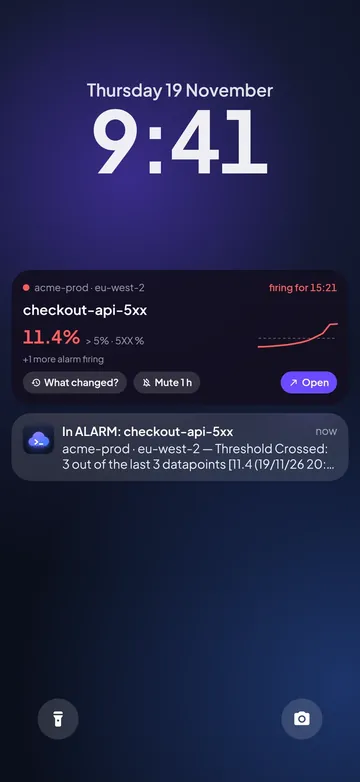
Turn on Live Activities and a firing CloudWatch alarm stays on your iPhone’s Lock Screen and in the Dynamic Island until it’s OK again: the value against the threshold, how long it has been firing, and buttons for Mute 1 h and What changed? From version 1.0.3, and only if you turn it on.
Off until you turn it on
Nothing appears on your Lock Screen unless you ask for it. Turn it on in Account → Live Activities → Firing alarm, or say yes the one time the app offers it after you connect an account. Turn it off and an alarm on the Lock Screen goes away at once.
One alarm, with what you need
When an alarm goes into ALARM, the Live Activity shows its name and account, the value against the threshold and how long it has been firing. What changed? opens the deploys and changes from the hour before; Mute 1 h silences it on this phone without touching AWS; Open goes to the alarm. When it’s OK again it says how long it fired, then goes away after 15 minutes. Alarms you muted don’t start one.
Track a resource
Watching a deploy or a busy instance? On an EC2 instance or Lambda function, tap More → Track on lock screen, pick up to three values and how long: 1 hour, 4 hours or until you stop. For CPU you can ask for an alert above 90% for 10 minutes. A firing alarm takes priority over tracking.
Widgets on the Home Screen and Lock Screen
Version 1.0.3 also brings iPhone widgets: alarms in ALARM, this month’s spend against budget and what needs attention, on the Home Screen and Lock Screen, for all accounts, production only or one account. See the widgets.
On Android
On Android the same Live Activity is an ongoing notification in the “Live status” channel. Android also has a home-screen widget and an AWS alarms Quick Settings tile. The Android widget and tile.


Questions
Can I see CloudWatch alarms on my iPhone Lock Screen?
Yes. Turn on Live Activities in CloudConsole (Account → Live Activities → Firing alarm). A firing alarm then shows on the Lock Screen and in the Dynamic Island with its value, how long it has fired, and What changed? and Mute 1 h buttons.
Is it on by default?
No. It’s opt-in: nothing shows on your Lock Screen until you turn it on, and turning it off removes it straight away.
Does it send my alarms to a server?
No. The app reads CloudWatch directly from your phone, as it does everywhere else. It refreshes while the app is open, and in the background when Alarm alerts are on.
Which iPhones does it work on?
Live Activities need iOS 16.2 or later; the Dynamic Island needs an iPhone that has one. Mute 1 h works right on the Lock Screen from iOS 17; on iOS 16 it opens the app to mute.
Is there something similar on Android?
Yes: an ongoing notification with the same content, plus a home-screen widget and a Quick Settings tile.
Try CloudConsole
On the App Store for iPhone and Google Play for Android. Look around the demo, GitHub and Slack included, before connecting an account.