 CloudConsole
Live Activities: turn on, Mute 1 h, track a resource
Show a firing alarm, or a resource you are watching, on the iPhone Lock Screen and in the Dynamic Island, or as an ongoing notification on Android.
Live Activities are off until you turn them on. Go to Account → Live Activities and turn on Live Activities and then Firing alarm. The app also offers this once, after you connect your first account; Not now leaves it off.
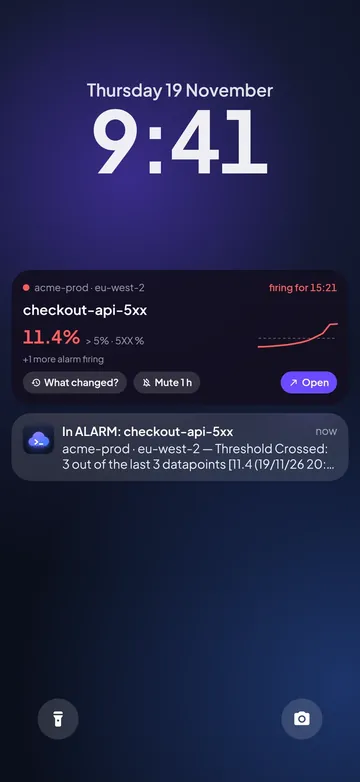
A firing alarm
When an alarm goes into ALARM, the Lock Screen (and the Dynamic Island, on iPhones that have one) shows the alarm, its account and region, the value against the threshold and how long it has been firing. It has three buttons:
- What changed? opens the alarm at its What changed? timeline.
- Mute 1 h stops this alarm from showing or notifying on this phone for an hour. Nothing changes in AWS: the alarm and its actions keep running.
- Open opens the alarm.
Only one Live Activity shows at a time, and a firing alarm takes priority. When the alarm is OK again, it shows how long it fired and goes away after 15 minutes. Alarms you muted don’t start one. Turning Firing alarm off removes it at once.
Track a resource
- Open an EC2 instance or a Lambda function and tap More → Track on lock screen.
- Pick up to three values to show, such as CPU.
- Choose how long: 1 hour, 4 hours or Until I stop. For CPU, you can turn on Alert if CPU > 90% for 10 min.
- Tap Start tracking.
Stop it from the same menu (Stop tracking on lock screen) or in Account → Live Activities. A firing alarm replaces tracking while it fires.
When it updates
Right away while CloudConsole is open, and about every 15 minutes in the background when Alarm alerts are on. iOS doesn’t let an app start a Live Activity from the background, so a new one appears the next time you open the app; updates to one already showing work in the background. Everything is read straight from AWS on your phone.
Try it
Preview on lock screen in Account → Live Activities shows one with demo data for 10 minutes. Nothing is changed in AWS.
Android
On Android the same content is an ongoing notification in the Live status channel. The home-screen widget and Quick Settings tile show alarms too.
Questions
Which iPhones support it?
iOS 16.2 or later. Mute 1 h works on the Lock Screen itself from iOS 17; on iOS 16 it opens the app to mute.
Live Activities are on but nothing shows
Check that Live Activities are allowed for CloudConsole in the iPhone’s Settings, that Firing alarm is on, that the alarm isn’t muted, and open the app once: iOS only lets a Live Activity start while the app is open.
Email [email protected] with what you tried and any message the app showed. Don’t send access keys or secrets. We reply within two working days.