 CloudConsole
How to find S3 bucket size
For one bucket, the quickest accurate figure is the CloudWatch metric BucketSizeBytes (AWS/S3 namespace), reported once a day per storage class; the bucket's Metrics tab in the S3 console graphs it. To rank all buckets, open the S3 Storage Lens default dashboard. aws s3 ls s3://bucket --recursive --summarize works too, but it lists every object, misses old versions and is slow on large buckets.
One bucket from the CLI
# Daily size for the Standard storage class (bytes); run in the bucket's Region
aws cloudwatch get-metric-statistics --region eu-west-2 \
  --namespace AWS/S3 --metric-name BucketSizeBytes \
  --dimensions Name=BucketName,Value=my-bucket Name=StorageType,Value=StandardStorage \
  --start-time 2026-11-13T00:00:00Z --end-time 2026-11-16T00:00:00Z \
  --period 86400 --statistics Average \
  --query 'sort_by(Datapoints,&Timestamp)[-1].Average'

# Object count
aws cloudwatch get-metric-statistics --region eu-west-2 \
  --namespace AWS/S3 --metric-name NumberOfObjects \
  --dimensions Name=BucketName,Value=my-bucket Name=StorageType,Value=AllStorageTypes \
  --start-time 2026-11-13T00:00:00Z --end-time 2026-11-16T00:00:00Z \
  --period 86400 --statistics Average
Each storage class has its own StorageType value (for example StandardIAStorage or GlacierStorage); add them up for the total. aws cloudwatch list-metrics --namespace AWS/S3 --dimensions Name=BucketName,Value=my-bucket shows which ones exist for the bucket.
All buckets: Storage Lens
Open the Amazon S3 console and choose Storage Lens. The default dashboard is created for you and covers every bucket in the account across Regions, with free metrics including total storage and object count per bucket, so you can sort to find the largest. Data refreshes daily, and a new account needs a day or two before it fills in. Advanced (paid) metrics add things like prefix-level detail and activity.
The listing approach, and its limits
aws s3 ls s3://my-bucket --recursive --summarize --human-readable | tail -2
#    Total Objects: 1842234
#       Total Size: 3.4 TiB

# Rough ranking for small accounts (lists every object - slow and costs LIST requests)
for b in $(aws s3api list-buckets --query 'Buckets[].Name' --output text); do
  echo "$b $(aws s3 ls s3://$b --recursive --summarize | awk '/Total Size/{print $3}')"
done | sort -k2 -n| Method | Includes old versions | Speed and cost |
|---|---|---|
| CloudWatch BucketSizeBytes | Yes | Instant, free; one day behind |
| Storage Lens | Yes (and shows noncurrent bytes separately) | Free default dashboard; one day behind |
aws s3 ls --summarize | No: current versions only | Slow on big buckets; billed LIST requests |
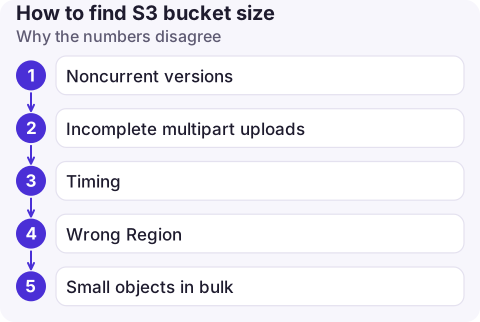
Why the numbers disagree
- Noncurrent versions. A versioned bucket can hold far more data than
s3 lsshows. If CloudWatch is much higher, old versions are the likely reason; a lifecycle rule to expire them fixes it (see versioned buckets). - Incomplete multipart uploads take up billed storage and don't appear in listings. A lifecycle rule with
AbortIncompleteMultipartUploadcleans them up. - Timing. Storage metrics are daily, so today's uploads appear tomorrow.
- Wrong Region. Bucket metrics live in the bucket's Region;
list-bucketsoutput includesBucketRegionto help. - Small objects in bulk. On buckets with millions of tiny objects, request and lifecycle transition charges can matter more than size; compare object counts with total bytes in Storage Lens.
Questions
How do I get the size of an S3 bucket with the AWS CLI?
Query the CloudWatch metric BucketSizeBytes with aws cloudwatch get-metric-statistics, or run aws s3 ls s3://bucket --recursive --summarize for current objects only.
Why is my S3 bill higher than the bucket size suggests?
Old object versions, incomplete multipart uploads, request charges and data transfer all add cost beyond the size of the current objects.
Does the S3 console show bucket size?
Yes. The bucket's Metrics tab shows total size and object count from the daily storage metrics.

Storage costs creep rather than spike. CloudConsole, a phone app for AWS, is built to show cost by service on your phone, so a growing S3 line is noticed early.
About the app → · Download on the App Store