 CloudConsole
Why is my AWS bill so high?
A high AWS bill almost always comes from a small number of line items, so start on the Bills page or in Cost Explorer, group by service and then by usage type, and look for the day costs jumped. The usual causes are resources left running in a Region you forgot, NAT gateway and data transfer charges, unattached storage, CloudWatch Logs ingestion, a free tier that ended, or leaked credentials being used to mine cryptocurrency.
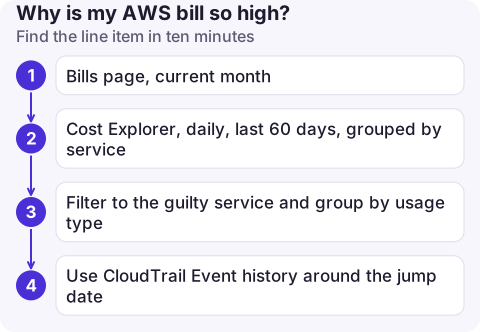
Find the line item in ten minutes
- Bills page, current month: sort services by amount. Expand the top one to see Regions and usage types.
- Cost Explorer, daily, last 60 days, grouped by service: a step change points to an event (a deploy, a new resource); a steady climb points to growth (data, logs, traffic).
- Filter to the guilty service and group by usage type. The usage type name tells you the actual meter, for example NAT gateway bytes, EBS snapshot storage, or data transfer out to the internet.
- Use CloudTrail Event history around the jump date to see what was created; see finding who changed a resource for the technique.
The cost breakdown guide has the CLI versions of these queries.
The usual culprits
| Line item | What is usually behind it |
|---|---|
| EC2 - Other: NAT gateway | A NAT gateway costs per hour and per GB processed. Private workloads pulling images or talking to S3 through it add up fast; S3 and DynamoDB gateway endpoints avoid that traffic. |
| EC2 - Other: EBS | Volumes left behind after instances were terminated, old snapshots, or over-provisioned io1/io2 IOPS. |
| Public IPv4 addresses | Every public IPv4 address is billed hourly, whether in use or not, including those on load balancers and NAT gateways. |
| Data transfer | Traffic out to the internet, between Regions, and between Availability Zones. |
| CloudWatch | Log ingestion from chatty applications, logs kept forever, detailed metrics, many custom metrics. |
| RDS, OpenSearch, SageMaker, EKS | Something created for a test and never deleted; these bill hourly whether used or not. |
| An unexpected Region | Resources created when the console was pointed at a different Region, or instances launched by an attacker. |
| S3 | Versioned buckets keeping every old object version, incomplete multipart uploads, or a hot request pattern. |
Quick checks from the CLI
# Unattached EBS volumes in the current Region
aws ec2 describe-volumes --filters Name=status,Values=available \
  --query 'Volumes[].[VolumeId,Size,VolumeType,CreateTime]' --output table

# Elastic IPs not associated with anything
aws ec2 describe-addresses --query 'Addresses[?AssociationId==null].PublicIp'

# NAT gateways (each one bills hourly)
aws ec2 describe-nat-gateways --query 'NatGateways[].[NatGatewayId,State,VpcId]' --output table

# Log groups without a retention setting
aws logs describe-log-groups --query 'logGroups[?!retentionInDays].[logGroupName,storedBytes]' --output text
Repeat per Region, or use a multi-Region search.
If you don't recognise the resources
Large EC2 instances (often GPU types) in Regions you never use, or new IAM users and access keys you didn't create, suggest leaked credentials. Act immediately: deactivate the exposed access keys, check CloudTrail for what they did, terminate the attacker's resources, and open a case with AWS Support about the charges. The incident response checklist has the order of operations.
Stop it happening again
- A monthly budget with a forecast alert catches drift within days: set up a billing alert.
- Set retention on log groups and lifecycle rules on versioned buckets.
- Tag resources with an owner and activate the tag for cost allocation, so the next spike has a name attached.
- If you only use one or two Regions, an SCP denying the others (in AWS Organizations) prevents surprise resources there.
Questions
Why am I being charged when I have no instances running?
Charges continue for storage and networking that outlive instances: EBS volumes and snapshots, Elastic IPs and public IPv4 addresses, NAT gateways, load balancers, S3 data and RDS databases. Check every Region on the Bills page.
Why did my AWS bill increase after a year?
The 12-month free tier offers for older accounts end a year after sign-up, so usage that was free starts being charged.
Can AWS refund an unexpected bill?
You can open a billing case with AWS Support explaining what happened, especially for compromised credentials. Refunds are at AWS's discretion and not guaranteed.

Bill shock usually builds for days before anyone looks. CloudConsole, a phone app for AWS, is built to show daily cost by service on your phone so a jump is visible early.
About the app → · Download on the App Store