 CloudConsole
IAM policy: push and pull one ECR repository
Allow ecr:GetAuthorizationToken on "*" (it has no resource), and the layer and image actions (BatchCheckLayerAvailability, InitiateLayerUpload, UploadLayerPart, CompleteLayerUpload, PutImage, plus BatchGetImage and GetDownloadUrlForLayer for pulls) on the repository ARN.
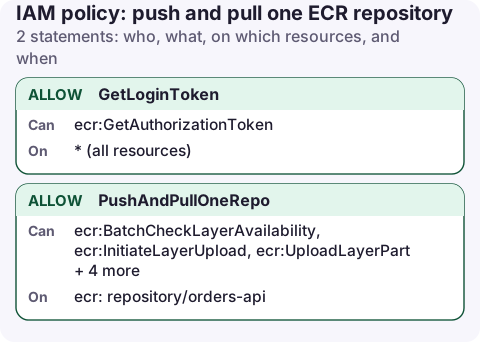
The policy
{
  "Version": "2012-10-17",
  "Statement": [
    {
      "Sid": "GetLoginToken",
      "Effect": "Allow",
      "Action": "ecr:GetAuthorizationToken",
      "Resource": "*"
    },
    {
      "Sid": "PushAndPullOneRepo",
      "Effect": "Allow",
      "Action": [
        "ecr:BatchCheckLayerAvailability",
        "ecr:InitiateLayerUpload",
        "ecr:UploadLayerPart",
        "ecr:CompleteLayerUpload",
        "ecr:PutImage",
        "ecr:BatchGetImage",
        "ecr:GetDownloadUrlForLayer"
      ],
      "Resource": "arn:aws:ecr:eu-west-2:123456789012:repository/orders-api"
    }
  ]
}
What each action does
ecr:GetAuthorizationToken: behindaws ecr get-login-password. The token is account-wide, so the action can't be scoped to a repository. It doesn't grant access to any repository by itself.BatchCheckLayerAvailability: Docker asks which layers already exist so it only uploads new ones.InitiateLayerUpload,UploadLayerPart,CompleteLayerUpload: the layer upload.PutImage: writes the manifest and the tag. This is the step that makes the push visible.BatchGetImage,GetDownloadUrlForLayer: pulling, which multi-stage builds and cache-from need.
Use it in CI
aws ecr get-login-password --region eu-west-2 | docker login \
  --username AWS --password-stdin 123456789012.dkr.ecr.eu-west-2.amazonaws.com

docker push 123456789012.dkr.ecr.eu-west-2.amazonaws.com/orders-api:1.4.2

aws ecr describe-images --repository-name orders-api \
  --query 'imageDetails[].imageTags' --output text
For GitHub Actions, attach the policy to the role in the OIDC trust policy instead of storing keys. Add ecr:DescribeImages on the repository if a later step reads the result.
Variations
- Pull only (ECS, EKS nodes, Lambda container images): keep
GetAuthorizationToken,BatchGetImage,GetDownloadUrlForLayerandBatchCheckLayerAvailability. For ECS this goes on the task execution role. - Cross-account pull: add a repository policy in the image account allowing the other account's role the pull actions; the puller also needs them in IAM.
- Immutable tags: turn on tag immutability so a compromised CI job can't overwrite a released tag, even with
PutImage. - Pull-through cache repositories need extra actions to create the cached repository on first pull; see the ECR docs.
Scan and lifecycle
A CI role with push rights doesn't need permission to configure scanning or lifecycle rules; set those once on the repository with an admin role. Lifecycle policies expire untagged and old images so a busy pipeline doesn't grow storage forever, and basic or enhanced scanning reports vulnerabilities on push.
aws ecr put-lifecycle-policy --repository-name orders-api \
  --lifecycle-policy-text file://keep-last-50.json
Keep push rights to CI only. Developers usually need pull access at most, and production pulls should come from the execution or node role rather than a person's credentials.
Common mistakes
- GetAuthorizationToken scoped to the repository ARN: login fails with AccessDenied even though the repository statements are right.
no basic auth credentialson push means Docker never logged in, or logged in to a different registry or region; see the error page.- Repository encrypted with a customer managed KMS key: pushers and pullers also need the matching KMS permissions.
- Using
AmazonEC2ContainerRegistryFullAccessin CI: it can delete repositories and change their policies.
Questions
What permissions are needed to push to ECR?
ecr:GetAuthorizationToken on "*", and BatchCheckLayerAvailability, InitiateLayerUpload, UploadLayerPart, CompleteLayerUpload and PutImage on the repository.
Why does ecr:GetAuthorizationToken need Resource "*"?
The token authenticates you to the whole registry, not one repository, so the action has no resource ARN. Repository access is still controlled by the other statements.
A push that failed means a deploy that never happened. Checking the latest image tag in the repository from your phone tells you whether the build or the deploy is the stage to look at.
About the app → · Download on the App Store